
If you’ve ever wondered why some keyboards feel like typing on clouds while others feel like pressing buttons on a spaceship console, the answer lies in one critical component: the switch. Mechanical keyboard switches are the heart of your typing experience, determining everything from how your keys feel and sound to how fast you can game or how comfortable your 8-hour workday becomes.
This comprehensive guide will walk you through everything you need to know about keyboard switches, from understanding the basic types to choosing the perfect switch for your needs.
What Are Mechanical Keyboard Switches?
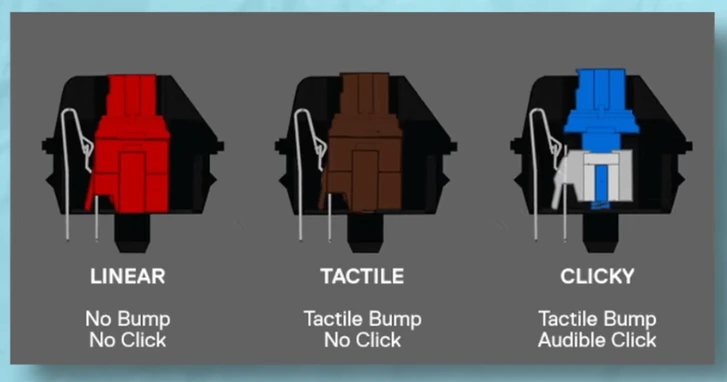
Mechanical keyboard switches are individual key mechanisms that register each keystroke using physical components. Each switch sits under a keycap and uses a spring, stem, and metal contacts to send an input signal when pressed.
Unlike membrane or rubber-dome keyboards, mechanical switches activate at a precise actuation point, meaning the key registers before it is fully pressed. This design delivers better accuracy, tactile feedback, and durability.
Key advantages of mechanical switches:
- Precise actuation point (you know exactly when a key registers)
- Durability (50-100 million keystrokes vs 5 million for membrane)
- Customizable feel and sound
- Consistent performance that doesn’t degrade over time
- Individual key replacement capability
The Three Main Switch Types
Every mechanical switch falls into one of three categories based on how it feels when you press it. Understanding these categories is the foundation of choosing your ideal switch.
Linear Switches
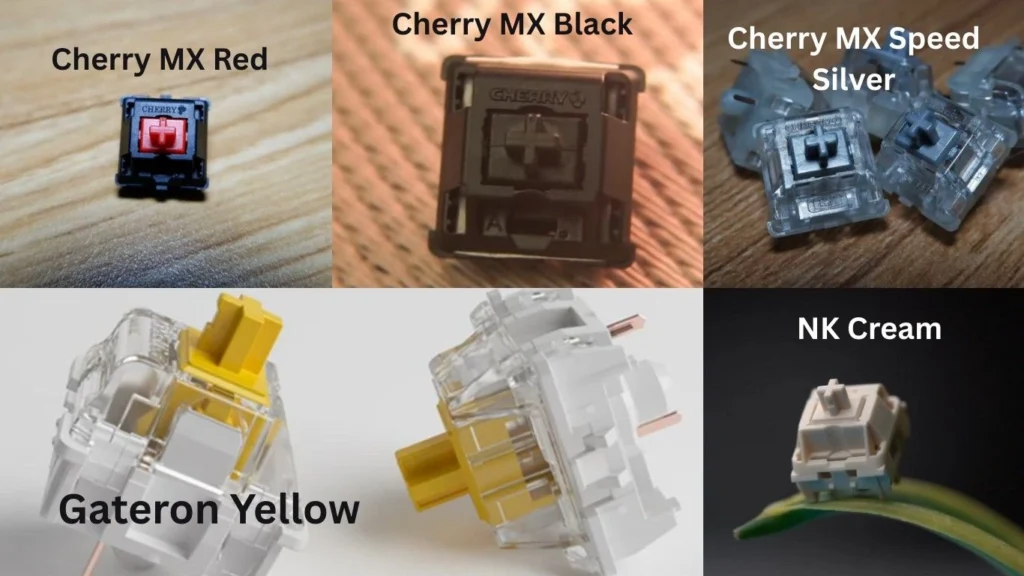
Linear switches provide a smooth, consistent keystroke from top to bottom with no tactile bump or click. Pressing a linear switch feels like sliding a smooth slider up and down with no interruptions.
Characteristics:
- Completely smooth travel with no bump
- Quiet operation (except for bottoming out sound)
- Consistent resistance throughout the keystroke
- Fast actuation with no resistance changes
Best for: Gamers who want rapid-fire keypresses, people who prefer smooth typing, and anyone who doesn’t want tactile feedback.
Popular linear switches: Cherry MX Red, Cherry MX Black, Gateron Yellow, Cherry MX Speed Silver, NK Cream
Tactile Switches
Tactile switches feature a noticeable bump at the actuation point, giving you physical feedback that your keystroke has registered without making an audible click sound. This bump tells your fingers, “the key has been pressed” without disturbing others around you.
Characteristics:
- Distinct bump at actuation point
- Moderate sound (quieter than clicky, louder than linear)
- Physical feedback without audio feedback
- Slightly slower actuation than linear due to bump
Best for: Typists who want feedback, office environments, programmers, all-around versatile use, and people transitioning from membrane keyboards.
Popular tactile switches: Cherry MX Brown, Cherry MX Clear, Zealios, Holy Panda, Glorious Panda, Boba U4T
Clicky Switches
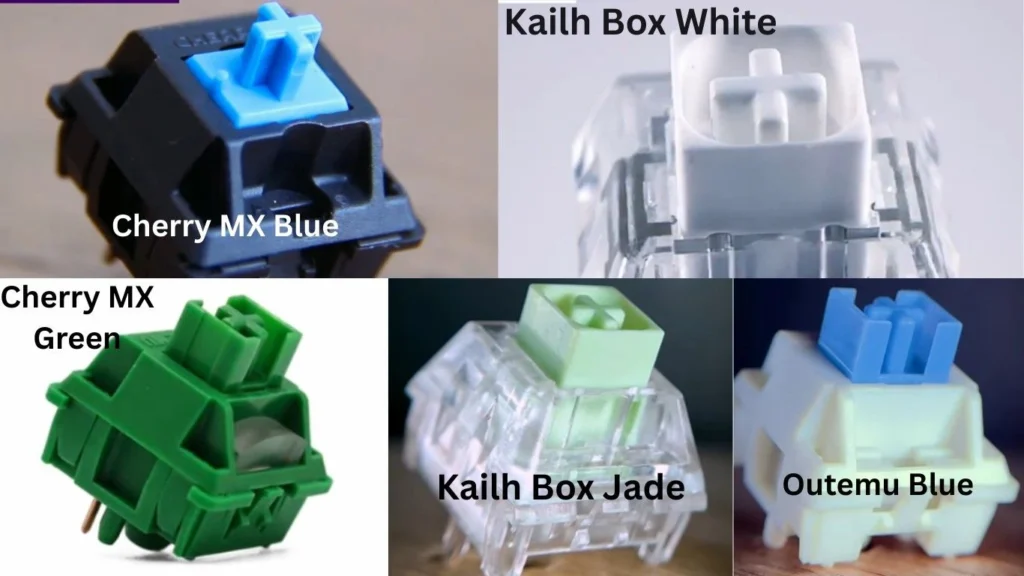
Clicky switches combine a tactile bump with an audible click sound, providing maximum feedback both physically and aurally. These are the switches that give mechanical keyboards their iconic “clickity-clack” reputation.
Characteristics:
- Tactile bump at actuation
- Loud, distinctive click sound
- Maximum feedback (tactile + audio)
- Most satisfying typing experience for click lovers
Best for: Typists who love audible feedback, home office use, people who aren’t concerned about noise, and anyone who wants the classic mechanical keyboard experience.
Popular clicky switches: Cherry MX Blue, Cherry MX Green, Kailh Box White, Kailh Box Jade, Outemu Blue
Mechanical Switch Color Guide
Switch manufacturers use different colors to indicate different switch characteristics. Here’s a comprehensive breakdown of the most common switches by color.
Cherry MX Switches (The Industry Standard)
| Color | Type | Actuation Force | Actuation Distance | Sound Level | Best For |
|---|---|---|---|---|---|
| Red | Linear | 45g | 2.0mm | Quiet | Gaming, light typing |
| Black | Linear | 60g | 2.0mm | Quiet | Heavy-handed typists, gaming |
| Brown | Tactile | 45g | 2.0mm | Moderate | All-purpose, office work |
| Clear | Tactile | 65g | 2.0mm | Moderate | Heavy tactile preference |
| Blue | Clicky | 50g | 2.2mm | Loud | Typing enthusiasts |
| Green | Clicky | 80g | 2.2mm | Very Loud | Heavy clicky typing |
| Speed Silver | Linear | 45g | 1.2mm | Quiet | Competitive gaming |
| Silent Red | Linear | 45g | 1.9mm | Very Quiet | Quiet gaming/typing |
| Silent Black | Linear | 60g | 1.9mm | Very Quiet | Quiet heavy typing |
Gateron Switches (Smooth & Affordable)
Gateron switches are known for being smoother than Cherry MX switches at a lower price point.
| Color | Type | Actuation Force | Feel | vs Cherry MX |
|---|---|---|---|---|
| Red | Linear | 45g | Very smooth | Smoother than MX Red |
| Yellow | Linear | 50g | Smooth, popular | No Cherry equivalent |
| Black | Linear | 60g | Smooth, heavy | Similar to MX Black |
| Brown | Tactile | 55g | Subtle bump | Less tactile than MX Brown |
| Blue | Clicky | 60g | Clicky | Similar to MX Blue |
Kailh Switches (Innovative Designs)
Kailh offers unique switch designs including their popular Box series with dust and water resistance.
| Switch Name | Type | Actuation Force | Special Feature |
|---|---|---|---|
| Box Red | Linear | 50g | Dust/water resistant |
| Box Brown | Tactile | 50g | Dust/water resistant |
| Box White | Clicky | 50g | Crisp click, bar click mechanism |
| Box Jade | Clicky | 60g | Thick click, heavy tactile |
| Speed Silver | Linear | 40g | 1.1mm actuation for gaming |
| Speed Copper | Tactile | 40g | Fast tactile for gaming |
Premium Enthusiast Switches
| Switch Name | Type | Actuation Force | Notable Features |
|---|---|---|---|
| Zealios V2 | Tactile | 62g/65g/67g/78g | Sharp, pronounced tactile bump |
| Tealios V2 | Linear | 67g | Ultra-smooth premium linear |
| Holy Panda | Tactile | 67g | Legendary tactile bump, cult following |
| Glorious Panda | Tactile | 67g | Holy Panda alternative, more accessible |
| NK Cream | Linear | 55g | Self-lubricating POM housing |
| Boba U4T | Tactile | 62g | Deep “thock” sound, strong tactility |
| Alpaca | Linear | 62g | Smooth linear, JWK-manufactured |
Best Switches by Use Case
Choosing the right switch depends heavily on what you’ll be using your keyboard for. Here are the top recommendations for each scenario.
Best Switches for Gaming
Winner: Cherry MX Speed Silver / Kailh Speed Silver
- Ultra-fast 1.2mm actuation point
- Linear for smooth rapid presses
- Light 45g actuation force reduces finger fatigue
Runner-up: Cherry MX Red / Gateron Red
- Standard 2.0mm actuation, still very fast
- Slightly more controlled than Speed switches
- Better for gaming + typing hybrid use
Budget Option: Outemu Red
- Similar feel to Cherry MX Red
- Significantly cheaper
- Good enough for most gamers
Best Switches for Typing
Winner: Holy Panda / Glorious Panda
- Extremely satisfying tactile bump
- “Thocky” sound profile
- Premium typing experience
Runner-up: Cherry MX Brown / Gateron Brown
- Gentle tactile bump, not fatiguing
- Quiet enough for office use
- Great all-around performer
Budget Option: Outemu Brown
- Similar to Cherry MX Brown
- More affordable
- Decent tactility for the price
Best Switches for Programming
Winner: Cherry MX Clear / Zealios 65g
- Strong tactile bump reduces typos
- Heavier spring prevents accidental presses
- Precise actuation for accurate coding
Runner-up: Cherry MX Brown
- Lighter tactile for long coding sessions
- Less finger fatigue during marathon sessions
- Versatile for coding and writing
Best Quiet Switches for Office
Winner: Cherry MX Silent Red / Silent Black
- Dampened sound on actuation and bottom-out
- Smooth linear feel
- Won’t disturb coworkers
Runner-up: Boba U4 Silent Tactile
- Silent tactile option
- Strong bump without the noise
- Best of both worlds for office typists
Budget Option: Gateron Silent Red
- Similar to Cherry MX Silent Red
- More affordable
- Good quiet performance
Best Budget Switches
Winner: Gateron Yellow
- Incredibly smooth for the price
- 50g actuation is versatile
- Often preferred over Cherry MX switches
Runner-up: Outemu switches (any color)
- Most affordable option
- Adequate performance for beginners
- Good for testing if you like mechanical keyboards
Best Premium Switches
Winner: Zealios V2 / Tealios V2
- Factory-lubed for smoothness
- Multiple weight options
- Top-tier build quality and consistency
Runner-up: C³ Equalz X TKC Tangerine
- Ultra-smooth UHMWPE housing
- Unique feel
- Highly regarded in enthusiast community
Understanding Switch Specifications
When comparing switches, you’ll encounter several key specifications. Here’s what they mean and why they matter.
Actuation Force
Measured in grams (g) or centinewtons (cN), actuation force is how much pressure you need to apply for the switch to register a keystroke.
- Light (40-50g): Easy to press, less finger fatigue, faster actuation, but more accidental presses
- Medium (50-60g): Balanced feel, most versatile, good for most users
- Heavy (60-80g+): Requires deliberate presses, reduces typos, can cause fatigue during long sessions
Actuation Point
The distance the key must travel before it registers a keystroke, measured in millimeters (mm).
- Short (1.0-1.5mm): Ultra-fast response, preferred by competitive gamers
- Standard (2.0mm): Balanced, most common, good for all uses
- Long (2.2mm+): More deliberate actuation, found in some clicky switches
Total Travel Distance
The maximum distance a key can travel from rest to fully pressed (bottoming out), typically 3.5-4.0mm for most mechanical switches.
Shorter travel distance means faster actuation but less cushioning. Longer travel provides more key travel feedback.
Pre-travel vs Post-travel
- Pre-travel: Distance from rest to actuation point
- Post-travel: Distance from actuation point to bottom-out
Some typists prefer minimal post-travel to reduce unnecessary key movement, while others like the extra cushioning.
How to Choose Your Perfect Switch
Still not sure which switch is right for you? Follow this decision-making process:
Step 1: Determine Your Primary Use
- Gaming: Start with linear switches (Red, Speed Silver)
- Typing: Start with tactile switches (Brown, Clear, Zealios)
- Both: Tactile switches or light linear switches
- Quiet environment needed: Silent switches (Silent Red, Boba U4)
Step 2: Consider Sound Preferences
- Want maximum feedback: Clicky switches (Blue, Green, Box White)
- Want some feedback, less noise: Tactile switches (Brown, Panda)
- Want minimal noise: Linear or silent switches (Red, Silent Red)
- Don’t care about noise: Any switch type works
Step 3: Assess Your Typing Style
- Heavy-handed typer: Heavier switches (60g+) like Black, Clear, Green
- Light touch: Lighter switches (45-50g) like Red, Brown, Speed Silver
- Not sure: Start with medium weight (50-55g)
Step 4: Set Your Budget
- Budget ($): Outemu or Gateron switches
- Mid-range ($$): Cherry MX or Kailh switches
- Premium ($$$): Zealios, Holy Pandas, NK Creams
Step 5: Get a Switch Tester
The best way to know which switch you’ll love is to try them yourself. Switch testers are small boards with 4-12 different switches that let you test before committing to a full keyboard.
Recommended switch testers:
- GMMK Switch Tester (12 switches)
- Cherry MX Switch Tester (4 switches)
- Glorious PC Gaming Race Switch Tester (7 switches)
- Full custom switch testers from NovelKeys or KBDfans
Testing switches in person is invaluable because descriptions can only go so far. What feels “scratchy” to one person might feel “textured” to another.
Hot-Swappable vs Soldered Keyboards
When choosing a mechanical keyboard, one crucial decision is whether to get hot-swappable sockets or soldered switches.
Hot-Swappable Keyboards
Hot-swap keyboards use special sockets that let you pull out and replace switches without soldering.
Advantages:
- Change switches anytime without tools (except a switch puller)
- Try different switches easily
- Replace broken switches instantly
- Customize individual keys with different switches
Disadvantages:
- Slightly less stable connection (though negligible for most users)
- Sockets can wear out after hundreds of swaps
- Slightly more expensive than soldered boards
Best for: Beginners, enthusiasts who like to experiment, anyone unsure about switch preference
Soldered Keyboards
Traditional mechanical keyboards have switches permanently soldered to the PCB.
Advantages:
- Maximum connection stability
- Often less expensive
- More durable long-term connection
- No socket failure risk
Disadvantages:
- Changing switches requires desoldering (advanced skill)
- You’re locked into your switch choice
- Harder to repair if switches fail
Best for: Users confident in their switch choice, those seeking maximum value, experienced builders
Advanced Switch Modifications
Once you’re comfortable with mechanical keyboards, you can modify switches to improve their feel and sound.
Lubing Switches
Applying lubricant to switch components reduces friction and eliminates scratchiness.
Benefits:
- Smoother keystrokes
- Reduced spring ping sound
- More consistent feel across all switches
- Deeper, more pleasant sound profile
Drawbacks:
- Time-consuming (5+ hours for full keyboard)
- Requires disassembly of every switch
- Can ruin switches if over-lubed
Recommended lubes: Krytox 205g0 (linear/tactile), Krytox 105 (springs), Tribosys 3204 (tactile)
Filming Switches
Switch films are thin plastic sheets inserted between switch housings to reduce wobble.
Benefits:
- Reduces housing wobble
- Tighter, more consistent sound
- Minimal effort compared to lubing
Best for: Switches with loose tolerances, improving stock switch sound
Spring Swapping
Replacing the stock spring with a different weight or type.
Benefits:
- Customize actuation force precisely
- Try progressive or slow springs for different feel
- Fix spring ping issues
Popular options: TX Springs, SPRiT Springs, Durock Springs
Franken switches
Mixing components from different switches to create custom combinations.
Popular combinations:
- Holy Panda (Halo stem + Invyr Panda housing)
- Creamsicle (Cream stem + Tangerine housing)
- Boba Pandas (Boba housing + Halo/Panda stem)
|
What do the different keyboard switches mean?
▼
Different keyboard switches describe how a key feels and sounds when pressed. The main differences include actuation force, feedback type (linear, tactile, or clicky), and noise level, which affect typing comfort and performance.
|
|
What is R1, R2, R3, R4 in a keyboard?
▼
R1, R2, R3, and R4 refer to keyboard row profiles. They indicate the height and angle of keycaps from the top row (R1) to the bottom row (R4), helping create a comfortable and ergonomic typing experience.
|
|
What are the 4 types of keyboard switches?
▼
The four main types of keyboard switches are linear, tactile, clicky, optical, and low-profile switches. Each type offers a different balance of smoothness, feedback, speed, and sound.
|
|
How many switches do I need for a 75% keyboard?
▼
A 75% keyboard typically requires around 82 to 84 switches, depending on the layout and whether extra keys or split keys are included.
|
Conclusion
Choosing the right keyboard switch depends on your priorities—gaming speed, typing feel, noise level, and environment. Linear switches are smooth and fast for gaming, tactile switches offer noticeable feedback with less noise, and clicky switches provide strong feedback and sound for typing enthusiasts.
Test switches if possible, focus on your main use case, and experiment with hot-swappable keyboards. There’s no single “best” switch—only the one that feels right for you.