
Laptop Keyboard Replacement Cost (2026) – Quick Price Guide
Average Cost of Laptop Keyboard Replacement
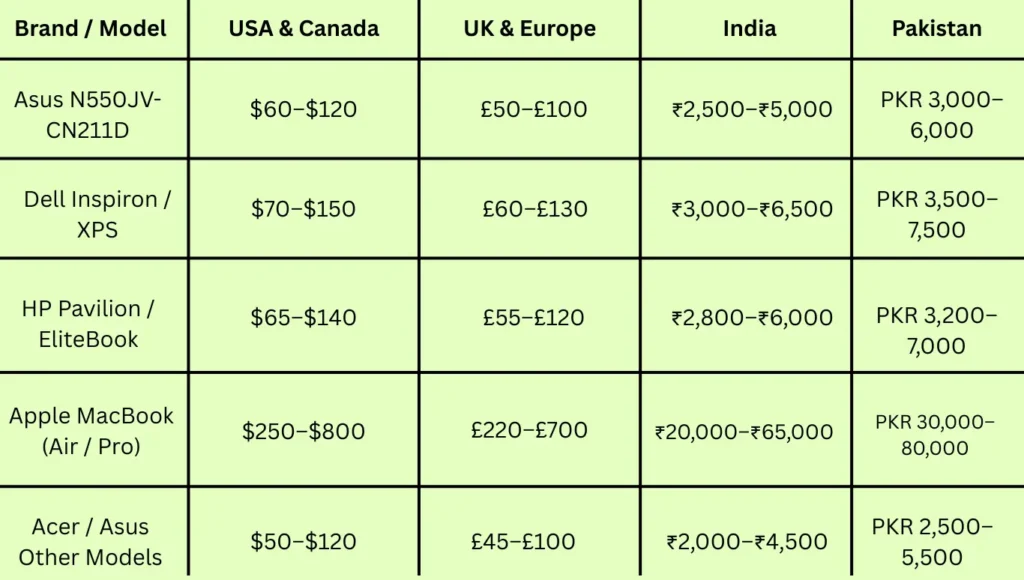
On average, replacing a laptop keyboard costs between $100 and $250 for most Windows laptops. However, prices vary based on the brand, model, and type of damage.
- Budget brands (Dell, HP, Lenovo, Acer, ASUS) usually cost $70–$150.
- Premium laptops (Razer, MSI, Alienware, Surface) can cost $150–$350.
- MacBooks are the most expensive, ranging from $250–$800, because Apple replaces the entire top case assembly that includes the trackpad and battery.
💡 Pro tip: Always check your warranty before paying for repairs. In many cases, following a guide on resetting a Logitech K850 keyboard can resolve common issues without extra cost. Many laptops also come with 1–3 years of limited coverage that includes keyboard malfunctions.
Cost by Laptop Brand
Different brands have unique repair structures, which directly impact the total price.
Budget Laptops
Models from Dell, HP, Lenovo, Acer, and ASUS are easier to service because their parts are widely available.
- Dell: $80–$180
- HP: $80–$150
- Lenovo: $80–$150
- Acer: $70–$120
- ASUS: $75–$130
Premium and Gaming Laptops
High-end laptops come with backlit or mechanical keyboards, RGB lighting, and special key mechanisms, which increase replacement cost.
- Razer / MSI / Alienware: $150–$400
- Microsoft Surface: $200–$350
- Dell XPS: $180–$280
Apple MacBooks
Apple keyboards are expensive to replace due to design integration.
- MacBook Air: $250–$450
- MacBook Pro 13”: $300–$600
- MacBook Pro 16”: $400–$800
If you have AppleCare+, your total cost might be as low as $125. Without it, expect premium pricing.
Factors Affecting Laptop Keyboard Replacement Cost
Several factors influence the overall cost of replacement or repair:
- Brand and Model:
Premium laptops or gaming models use advanced keyboard systems that are more costly to replace. - Warranty Coverage:
If your device is still under manufacturer warranty, you might only pay for labor — or nothing at all. - Type of Keyboard:
Backlit and mechanical keyboards have higher repair costs because of additional wiring and illumination systems. - Water or Liquid Damage:
Spilled coffee or water can add $50–$400 to the repair cost due to possible motherboard or circuit issues. - Location and Labor:
In large cities, prices are usually 20–30% higher due to service charges. Smaller towns might offer cheaper options but with limited availability.
DIY Fixes vs Professional Repair
Not every keyboard issue needs a technician. Some minor issues can be fixed at home.
Safe DIY Fixes
- Clean sticky keys using compressed air or isopropyl alcohol on a cotton swab.
- Reattach loose keycaps if the clips are intact.
- Update or reinstall keyboard drivers through your system settings.
- Try using an external USB keyboard as a temporary solution.
Risky Repairs to Avoid
- Avoid removing the entire keyboard unless you know how to handle ribbon cables — one wrong move can damage your motherboard.
- Never use glue, a hairdryer, or “rice drying” methods for spills; they cause more harm than good.
- Water-damaged laptops should be unplugged immediately and left to dry for at least 24–48 hours before testing again.
If your issue persists, it’s best to visit a trusted repair shop or an authorized service center to prevent permanent damage.
When to Replace Instead of Repair
Sometimes, repairing your keyboard might not be the best investment. The 25% rule helps make this decision easier:
| Laptop Value | Max Reasonable Repair Cost | Recommendation |
|---|---|---|
| $500 | $125 | Repair |
| $1,000 | $250 | Repair |
| $2,000 | $500 | Repair |
If your laptop is older than 5 years or the repair cost exceeds 25% of its value, it may be more practical to buy a new one.
Tips to Save Money on Keyboard Repair
- Check warranty status before any repair — sometimes, keyboard issues are covered.
- Compare quotes from at least three repair shops.
- Choose OEM or high-quality aftermarket parts for better durability.
- Ask about labor and warranty policies before handing over your laptop.
- For small fixes, try safe DIY cleaning methods first.
Environmental Benefit of Repairing
Replacing your keyboard instead of the entire laptop helps reduce electronic waste and promotes sustainability. Many local technicians even recycle damaged parts, keeping e-waste out of landfills.
FAQs
1. How much does it cost to replace a laptop keyboard?
It typically costs $100–$250 for Windows laptops and $250–$800 for MacBooks. Prices depend on brand, damage, and warranty coverage.
2. Is it worth fixing a laptop keyboard?
Yes, especially if your laptop is less than 5 years old and the repair cost is under 25% of its total value.
3. Can I fix my laptop keyboard myself?
Minor issues like sticky or unresponsive keys can be cleaned or adjusted at home. However, internal replacements are best handled by professionals.
4. How long does keyboard replacement take?
Most repairs are done same day or within 48 hours, depending on parts availability.
5. Does water damage always require replacement?
Not always — if the spill is minor and addressed quickly, cleaning and minor repairs may save the keyboard.
Final Thoughts
Laptop keyboard replacement doesn’t have to be expensive or stressful. Whether it’s a single stuck key or full water damage, professional repair is almost always cheaper than buying a new laptop. With the right technician and quality parts, your device can work like new again — often within a few hours.