
Need the diameter symbol? Copy it instantly below:
What Is the Diameter Symbol?
The diameter symbol (⌀) is a standardized technical symbol used to indicate the diameter of a circular or cylindrical feature. It shows that the measurement represents the full distance across a circle through its center, rather than its radius.
For example, ⌀25 mm means the diameter of the circular feature is 25 millimeters. The symbol is commonly used in engineering drawings, CAD designs, manufacturing specifications, and technical documentation.
Want to learn more? Explore all keyboard symbols and their meanings to master every special character.
Where Is the Diameter Symbol Used?
The ⌀ symbol commonly appears in:
- Mechanical engineering — shaft diameters, bores, and pipe dimensions
- CAD and technical drawings — circular dimensions and geometric features
- Manufacturing and machining — holes, shafts, drills, and CNC specifications
- Architecture — circular and cylindrical structural features
- Mathematics and geometry — identifying the diameter of circles
- Technical documentation — clearly communicating circular measurements
Its standardized use helps engineers, designers, and manufacturers identify circular dimensions quickly and accurately.
Need another useful math symbol? Learn how to type the [Not Equal Sign (≠)] on your keyboard.
Why the Diameter Symbol Matters in Engineering & Design
The diameter symbol (⌀) makes technical dimensions clear by showing that a measurement refers to the full diameter of a circular feature.
It helps:
- Avoid measurement confusion between diameter and radius
- Improve drawing clarity in engineering and CAD designs
- Communicate dimensions consistently across technical documents
- Support manufacturing accuracy for holes, shafts, pipes, and other circular features
- Reduce measurement errors between design and production teams
The symbol is commonly used in engineering drawings, CAD, manufacturing, and technical documentation where precise dimensional communication is important.
Diameter Symbol Unicode, HTML, Alt Code & LaTeX
The diameter symbol ⌀ has several useful codes and input methods for digital documents, websites, and technical applications.
| Format | Diameter Symbol / Code |
|---|---|
| Symbol | ⌀ |
| Unicode | U+2300 |
| HTML Decimal | ⌀ |
| HTML Hex | ⌀ |
| LaTeX | \diameter* |
Quick Reference
- Copy and paste: ⌀
- Unicode: U+2300
- HTML:
⌀ - HTML hexadecimal:
⌀
Note: LaTeX support for the diameter symbol can depend on the package or environment being used, so don’t assume \diameter works in every LaTeX setup.
Diameter Symbol vs Ø vs ∅ (Key Differences Explained)
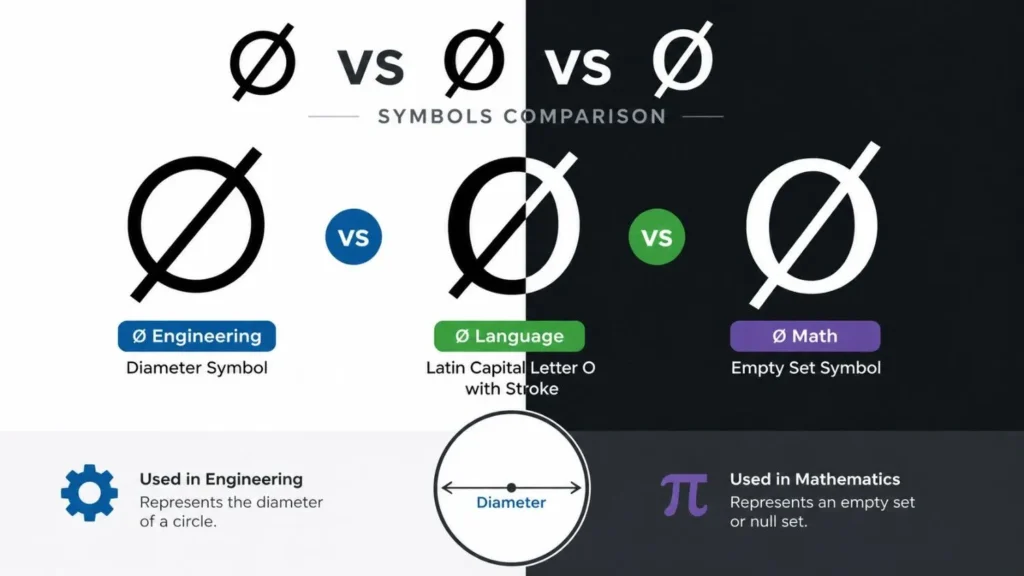
Engineering Diameter Symbol vs Letter Ø
Although ⌀ and Ø appear visually similar, they belong to entirely separate domains with no functional overlap.
- ⌀ (Diameter Symbol) serves as a dimensional indicator in engineering drawings, CAD environments, blueprints, and machining specifications — denoting the measured diameter of circular features like holes, shafts, and pipes. It is purely a geometric notation, not an alphabetic character.
- Ø (Latin O with stroke) belongs to the Danish and Norwegian writing systems, functioning as a vowel in spoken and written language — appearing in personal names, vocabulary, and everyday text, never in dimensional contexts.
Core distinction:
| Symbol | Category | Purpose |
|---|---|---|
| ⌀ | Geometric notation | Circular dimension measurement |
| Ø | Alphabetic character | Linguistic use in Scandinavian languages |
Substituting Ø for ⌀ in technical documentation risks misinterpretation, rendering inconsistencies, and non-conformance with ISO/ANSI engineering standards.
⌀ vs ∅ — Diameter Symbol vs Empty Set
Another frequent mix-up involves the Diameter Symbol and the mathematical Empty Set notation.
- ⌀ (Diameter Symbol) quantifies physical circular dimensions in mechanical drafting, manufacturing, and machining workflows.
- ∅ (Empty Set) is an abstract concept from set theory, representing a collection containing zero elements — used exclusively in mathematical reasoning.
Core distinction:
| Symbol | Field | Represents |
|---|---|---|
| ⌀ | Engineering & design | Measurable circular dimension |
| ∅ | Mathematics | A set with no members |
Inserting ∅ where ⌀ is required in technical drawings — particularly in CNC machining or fabrication contexts — introduces serious dimensional ambiguity where precision is critical.
Common Errors to Avoid
Even seasoned professionals occasionally misuse these symbols due to their near-identical appearance. Frequent mistakes include:
- Substituting Ø for ⌀ in engineering drawings, resulting in non-standard notation
- Copy-pasting incorrect symbols from online sources or mismatched font sets, causing rendering inconsistencies
- Conflating ∅ with the diameter symbol in design or mathematical contexts, producing conceptual errors
- Overlooking Unicode and font compatibility, leading to symbols displaying incorrectly across CAD platforms or documents
- Neglecting ISO/ANSI drafting conventions, undermining the professional integrity of technical specifications
Best practice: Always insert the correct Unicode diameter character (⌀) when annotating circular dimensions. Verify symbol compatibility within your chosen software, font environment, and documentation format to maintain dimensional accuracy and technical compliance.
How to Type Diameter Symbol (⌀) on Keyboard
Since ⌀ doesn’t appear on standard keyboards, inserting it requires platform-specific methods. Whether you’re working in engineering documentation, CAD annotations, technical drafting, or mathematical notation, the approaches below cover every major operating system and application.
Test your typing speed instantly:
Practice typing symbols using this typing tool.Windows — Alt Code Method
The Alt code technique is one of the quickest input methods for special and technical symbols on Windows.
Steps:
- Hold the Alt key
- Type 8960 on the numeric keypad
- Release Alt → ⌀ appears
Note: A dedicated numeric keypad is required. Laptop users without one should use the Unicode, Emoji Picker, or Character Map alternatives listed below.
Windows — Unicode Input Method
Ideal for word processors, technical editors, and applications supporting Unicode entry — including Microsoft Word.
Steps:
- Type 2300
- Press Alt + X
- The sequence converts instantly to ⌀
Unicode reference: Name — Diameter Sign | Code point — U+2300
Windows — Emoji & Symbol Picker
Windows includes a built-in panel for accessing special characters and symbols without memorizing codes.
Steps:
- Press Windows + . (period)
- Navigate to the symbols section or use the search field
- Locate and select the diameter symbol
Availability depends on your Windows version and installed fonts.
Windows — Character Map Utility
Character Map offers a reliable, visual method for locating and copying technical symbols.
Steps:
- Open Character Map (search via Start menu)
- Search for “Diameter Sign”
- Select ⌀, click Copy, then paste into your document
Mac — Character Viewer
macOS provides a searchable symbol browser accessible through a simple keyboard shortcut.
Steps:
- Press Control + Command + Space
- Search for “Diameter Sign”
- Click the symbol to insert ⌀ at your cursor position
Microsoft Office (Word, Excel, PowerPoint)
Office applications support several insertion methods for the diameter symbol and other geometric notations.
Steps:
- Go to Insert → Symbol
- Search for “diameter” in the symbol browser
- Double-click ⌀ to place it in your document
Alternatively, the Alt code (8960) or Unicode conversion (2300 + Alt+X) work directly within most Office applications.
Google Workspace (Docs & Sheets)
Google’s productivity suite includes a dedicated special characters panel for inserting technical and mathematical symbols.
Steps:
- Click Insert → Special Characters
- Search for “diameter” or draw the symbol shape in the input box
- Click ⌀ to insert it at the current cursor position
This method works consistently across Google Docs and Google Sheets without requiring any keyboard codes or additional tools.
Common Applications of the Diameter Symbol (⌀) in Engineering and Mathematics
The ⌀ symbol serves as a universal dimensional indicator across engineering, manufacturing, mathematics, and digital design — conveying the width of circular features with consistency and technical precision. Correct application of this notation prevents ambiguity in drawings, dimensional callouts, and professional specifications.
Proper Usage Guidelines
When annotating circular dimensions, the diameter symbol must always precede the numerical value, followed immediately by the appropriate unit of measurement.
Correct format examples:
These incorrect forms can lead to misinterpretation in technical drawings and engineering specifications.
Engineering & Technical Drawing Applications
The ⌀ symbol is a foundational element in technical communication, appearing across engineering blueprints, CAD documentation, mechanical component specifications, and CNC machining instructions. Its presence eliminates dimensional ambiguity, ensuring that circular measurements are interpreted consistently across design and production teams.
Typical applications include:
- Bearing specification: ⌀50 mm
- Tolerance-controlled hole: ⌀10 ± 0.1 mm
- Threaded feature: ⌀M8×1.25
Manufacturing & Industrial Use
Across manufacturing workflows, the diameter symbol appears in pipe and tubing specifications, structural material callouts, industrial equipment datasheets, quality control records, and assembly documentation — wherever circular cross-sections must be precisely defined.
Common examples:
- PVC pipe: ⌀100 mm
- Steel rod stock: ⌀12 mm
- Welding wire: ⌀0.8 mm
Mathematics & Academic Contexts
In geometry and mathematics education, ⌀ supports formula writing, geometric proofs, scientific publications, and instructional materials. It provides a concise, universally understood notation for expressing circular measurements in both theoretical and applied problems.
Representative uses:
- Circle diameter: ⌀5 units
- Area derivation: Area = π(⌀/2)²
- Algebraic relation: ⌀r = 2x
Digital Design & UI Specifications
In screen-based design environments, ⌀ defines circular element dimensions within design system documentation, UI component specs, icon grids, and infographic layouts — ensuring pixel-accurate circular dimensions are communicated clearly between designers and developers.
Practical examples:
Interactive button: ⌀40 px
Profile avatar: ⌀56 px
Brand logo container: ⌀100 px
Learn the fastest way to type the @ symbol on any keyboard.
FAQs About Diameter Symbol (⌀)
What is the ø symbol?
The symbols Ø and ⌀ (diameter sign) are used in mathematics, engineering, and technical drawings to represent the diameter of a circle. In some contexts, Ø may also denote an average value, while a slashed zero is a typographic variation of the number 0.
What is the Diameter Formula?
To calculate the diameter of a circle from its area, use this formula:
ø = 2 × √(A / π)
Where A is the area and π (pi) is a mathematical constant. This formula is commonly used in geometry and engineering calculations.
How to type Ø on a keyboard?
On most systems, you can type Ø / ø using keyboard shortcuts:
- Windows: Hold
Altand type0216(Ø) or0248(ø) - Mac: Press
Option + Shift + O(Ø) orOption + O(ø)
How to use ⌀ (diameter symbol)?
To insert the ⌀ diameter symbol on Windows:
- Hold the
Altkey - Type
8960on the numeric keypad - Release the key to display ⌀
It is widely used in CAD drawings, measurements, and technical documentation.
Does ∅ mean diameter?
No, ∅ (empty set symbol) does not mean diameter. The correct diameter symbol is ⌀. While they look similar, ∅ is used in set theory, whereas ⌀ is used in engineering and geometry.