
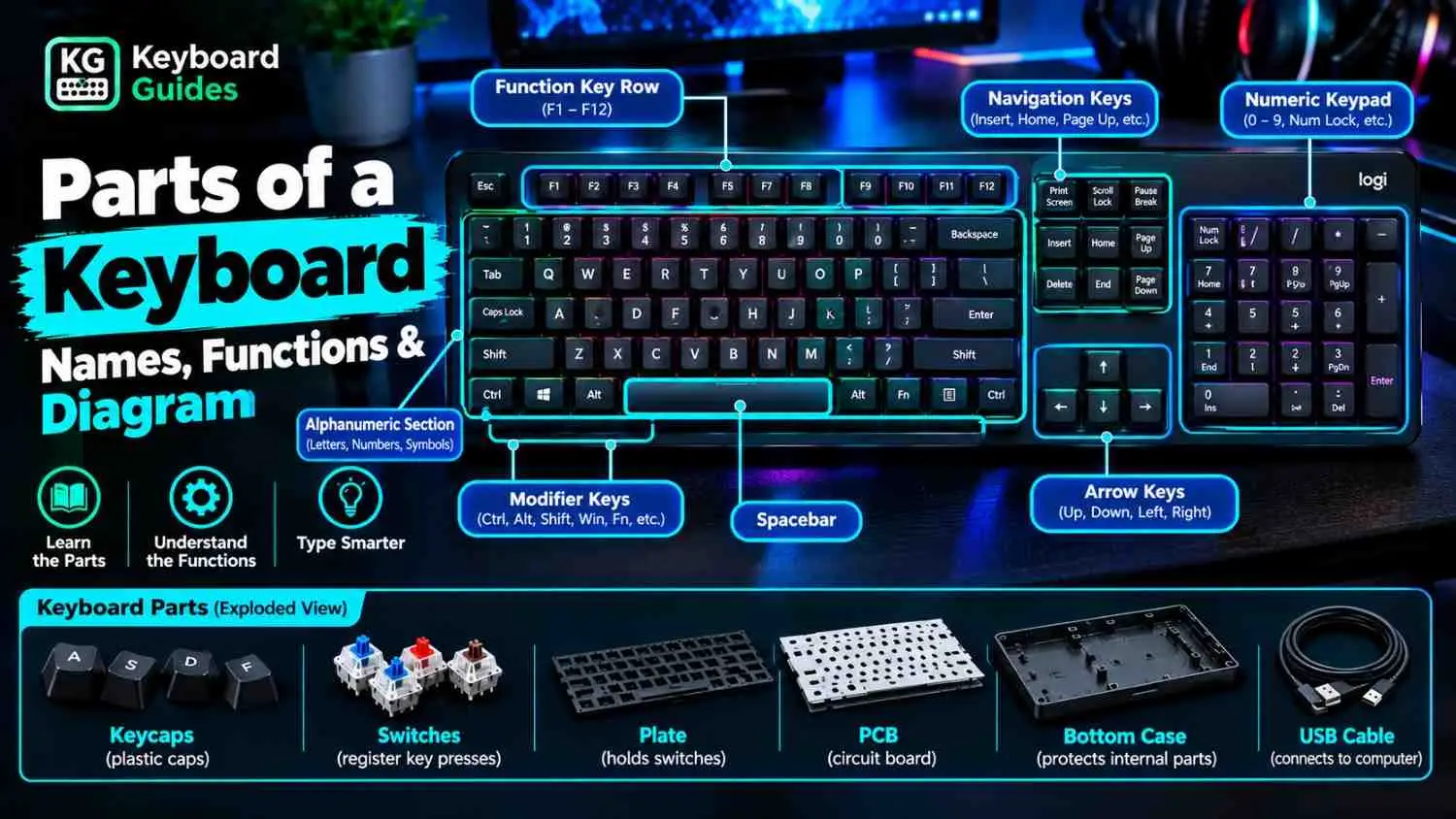
A computer keyboard has several parts that work together to help you enter text, control your computer, and navigate applications. These include visible key sections, such as letter keys and arrow keys, as well as internal components that register each keypress. If you’re new to keyboards, start with our guide explaining what is a keyboard and how it works.
Understanding the parts of a keyboard makes it easier to identify keys, learn their functions, and understand how different keyboard designs work. This guide explains the main keyboard sections, their names and functions, and the components found inside many desktop and laptop keyboards.
What Are the Parts of a Keyboard?
Keyboard parts fall into two categories:
- key sections, used for typing and navigation.
- internal components, which detect keypresses.
A full-size keyboard usually includes alphanumeric keys, function keys, modifier keys, navigation keys, arrow keys, and a numeric keypad. Smaller models may combine or omit some sections. Learn more about keyboard size explained and different types of keyboard.
Keyboards also support tasks such as gaming, shortcuts, and data entry. Explore the common uses of keyboard to learn more.
Parts of a Keyboard With a Labeled Diagram
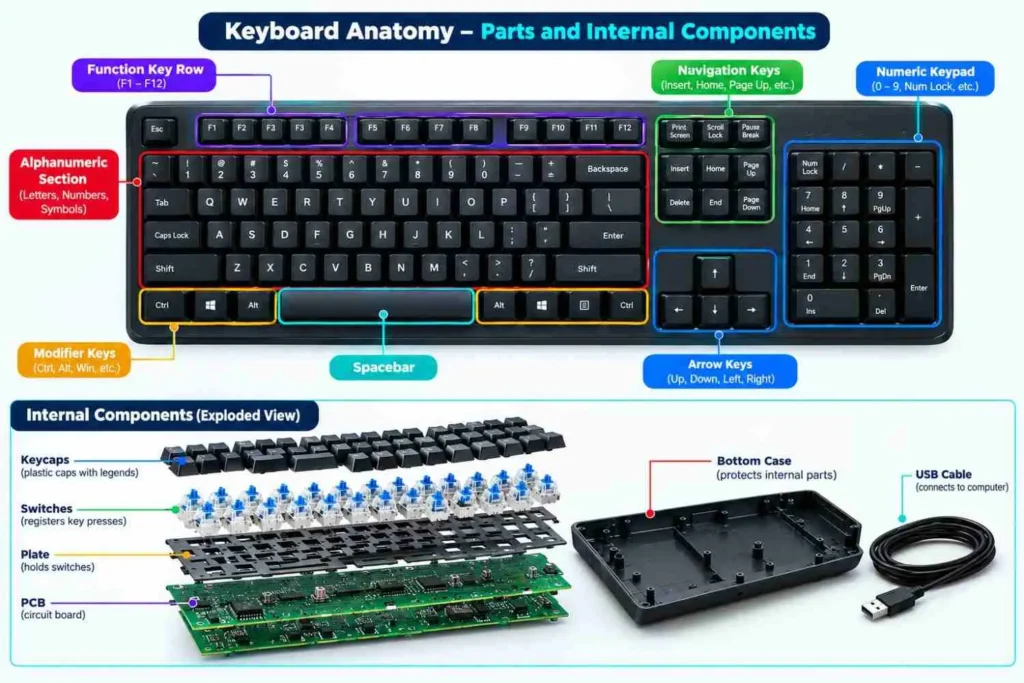
The diagram should show a full-size keyboard from above, with labels pointing to these main sections:
| Label | Keyboard part | Main function |
|---|---|---|
| A | Function keys | Perform application or system commands |
| B | Alphanumeric section | Enter letters, numbers, and punctuation |
| C | Modifier keys | Change the effect of other keypresses |
| D | Navigation keys | Move through text, pages, and documents |
| E | Arrow keys | Move the cursor or selection |
| F | Numeric keypad | Enter numbers and perform calculations |
| G | Special-purpose keys | Control actions such as printing, screenshots, or system functions |
A second inset can show the internal layers of a typical mechanical keyboard, including the keycap, switch, optional plate, printed circuit board (PCB), and case. These parts are not arranged identically in every keyboard, so the diagram should be labeled as an example of a common design.
Main Parts of a Computer Keyboard
1. Alphanumeric Key Section
The alphanumeric section is the main typing area of a keyboard. It contains the alphabet keys, number-row keys, and punctuation marks.
These keys are used to type words, enter numbers, write messages, and input text into documents, search boxes, and other applications.
2. Function Key Row
The function-key row usually contains F1 through F12. Their actions depend on the operating system, application, and keyboard model.
Common examples include:
- F1 may open Help in some applications.
- F2 often renames a selected file in Windows File Explorer.
- F5 commonly refreshes a webpage in many browsers.
- F11 may toggle full-screen mode in some applications.
On laptops, function keys may also control brightness, volume, wireless features, or other hardware settings. You may need to press the Fn key to access either their standard or secondary functions.
3. Navigation Key Section
Navigation keys help you move through documents, webpages, and text without relying entirely on a mouse.
Common navigation keys include:
- Home: Moves to the beginning of a line or another context-dependent starting point.
- End: Moves to the end of a line or another context-dependent endpoint.
- Page Up: Moves upward by a page or screen area.
- Page Down: Moves downward by a page or screen area.
- Insert: Toggles between insert and overwrite modes in applications that support it.
- Delete: Deletes selected content or the character ahead of the cursor, depending on the context.
The exact behavior of some navigation keys varies by application and operating system.
4. Arrow Key Cluster
The four arrow keys move the cursor or selection up, down, left, and right. They are useful when editing text, navigating menus, moving through spreadsheets, and controlling games.
In many applications, holding an arrow key moves the cursor or selection repeatedly. The action depends on the active program.
5. Numeric Keypad
A full-size keyboard often includes a numeric keypad on the right side. It contains number keys, arithmetic operators, and other keys used for calculations and data entry.
The numeric keypad is particularly useful for spreadsheets, accounting, and entering large amounts of numerical data.
The Num Lock key commonly switches the keypad between number-entry mode and alternative navigation functions on traditional layouts. Its behavior may differ on compact keyboards and laptops.
6. Control and Modifier Keys
Modifier keys change how other keys behave when pressed together. They are commonly used for keyboard shortcuts.
Important modifier and control keys include:
- Ctrl (Control): Used for shortcuts such as Ctrl+C to copy on Windows.
- Alt: Used for application commands and other shortcuts.
- Shift: Types uppercase letters and accesses alternate symbols.
- Windows key: Opens the Start menu and supports Windows shortcuts.
- Command (⌘): The primary shortcut modifier on Mac keyboards.
- Fn: Accesses secondary functions on many laptops and compact keyboards.
The available modifier keys and their behavior depend on the keyboard layout and operating system.
7. Special-Purpose Keys
Some keys perform specific actions that do not fit neatly into the other sections.
Examples include:
- Esc: Cancels or exits certain operations.
- Enter: Confirms a command or creates a new line in many text fields.
- Tab: Moves between fields or inserts indentation in supported applications.
- Caps Lock: Toggles uppercase letter entry.
- Backspace: Deletes the character before the cursor in many text fields.
- Print Screen: Captures the screen or opens a screenshot function, depending on the system.
- Spacebar: Inserts a space between words and other text.
Not every keyboard has all these keys. Their placement and behavior can also vary by model.
Physical Components Inside a Keyboard
The keys you see are supported by physical components that help register keypresses. Their construction varies between mechanical, membrane, scissor-switch, and other keyboard designs.
1. Keycaps
Keycaps are the removable covers that sit on top of the key mechanisms. Their surfaces display letters, numbers, symbols, or other legends.
Keycaps differ in material, shape, thickness, and printing method. Common materials include ABS and PBT plastic. The choice can affect texture, durability, appearance, and typing feel.
Not all keyboards have user-removable keycaps. Some laptop keyboards use small, delicate key mechanisms that can be damaged if removed incorrectly.
2. Keyboard Switches or Membrane Mechanisms
The mechanism beneath a key detects when the key is pressed.
In a mechanical keyboard, each key generally has an individual mechanical switch. Pressing the key moves the switch mechanism and changes an electrical contact state.
Many membrane keyboards use a flexible membrane circuit and conductive contacts. Pressing a key brings the relevant contacts together so the keyboard can register the input.
Many laptop keyboards use scissor-switch mechanisms combined with a low-profile key structure, although designs vary.
Read our guide to keyboard switches explained to learn more about different switch designs and their characteristics.
3. Keyboard Frame and Housing
The case or housing holds and protects the keyboard’s internal assembly. It helps keep the keys and supporting components aligned.
Some keyboards also use a plate to support or position the switches. Other designs may not have a separate plate.
Mechanical keyboards can use different mounting methods, which affect how the assembly flexes and how typing feels. A detailed explanation of mounting styles is not necessary to identify the main keyboard parts.
4. Printed Circuit Board (PCB)
A printed circuit board, or PCB, is used in many keyboards to connect the key mechanisms to the keyboard’s electronic controller.
The controller scans the keyboard’s key matrix or uses another input-detection arrangement to identify which key has been pressed. The keyboard then sends the corresponding input to the connected computer.
Depending on the design, a PCB may also support features such as RGB lighting or hot-swap sockets. USB ports, wireless radios, batteries, and other electronics may be located on the main PCB or on separate boards.
Learn more about how does a keyboard work to understand the process behind each keypress.
What is a hot-swappable keyboard?
A hot-swappable keyboard allows compatible switches to be removed and replaced without desoldering them from the PCB. A switch puller is often used to remove the switches safely. Compatibility depends on the keyboard’s sockets and the replacement switches.
5. Stabilizers
Stabilizers support longer keys, such as the spacebar, Shift, Enter, and Backspace on many keyboards. They help keep these keys level when pressed away from the center.
The design and number of stabilizers depend on the keyboard. Not every keyboard uses the same stabilizer arrangement.
6. Connection Cable or Wireless Components
Keyboards connect to computers through wired or wireless connections.
- USB cable: Carries keyboard input to the computer and may also provide power.
- Bluetooth: Allows compatible keyboards to connect wirelessly to supported devices.
- 2.4 GHz wireless: Often uses a small USB receiver to establish a wireless connection.
- Battery or rechargeable cell: Powers many wireless keyboards.
Some keyboards support more than one connection method. Wireless hardware and batteries may be built into the main assembly or placed in separate compartments.
7. Gaskets and Other Optional Components
Some mechanical keyboards use gaskets or other cushioning materials between parts of the assembly. These components can change the keyboard’s flexibility, vibration, sound, and typing feel.
Gaskets are not generally intended to make a keyboard waterproof or to serve as its primary dust protection. Their role depends on the specific design.
Not every keyboard contains gaskets, a separate mounting plate, hot-swap sockets, or RGB lighting. These are optional design features rather than universal keyboard parts.
Parts of a Laptop Keyboard vs. a Desktop Keyboard
Laptop and desktop keyboards perform the same basic job, but their physical construction often differs.
| Feature | Laptop keyboard | Desktop keyboard |
|---|---|---|
| Key size | Usually low-profile | Varies by model |
| Key mechanism | Often scissor-switch or another compact mechanism | May use mechanical switches, membrane mechanisms, or other designs |
| Numeric keypad | Present on some models | Common on full-size models; absent on many compact models |
| Key replacement | Often more difficult and model-specific | May be easier, especially on keyboards with removable keycaps |
| Internal space | Usually tightly integrated into the laptop | Often has a separate case and more room for components |
| Connection | Built into the laptop | Commonly connects through USB or wirelessly |
These are general differences, not fixed rules. Some desktop keyboards are slim and compact, while some laptops include a numeric keypad.
If you need to identify individual laptop keys or learn their functions, see our guide to Laptop Keyboard Keys: Names, Functions & Replacement.
Do All Keyboards Have the Same Parts?
No. Keyboard parts depend on the keyboard’s size, purpose, and construction.
A full-size desktop keyboard commonly has a numeric keypad, function keys, navigation keys, and arrow keys. A tenkeyless keyboard omits the separate numeric keypad, while smaller layouts may combine navigation functions with other keys.
Internal construction also varies. Mechanical keyboards use individual switches, many membrane keyboards use membrane circuits, and laptop keyboards often use compact mechanisms. Some keyboards include wireless components, RGB lighting, hot-swap sockets, or other optional features.
The best way to identify a keyboard’s parts is to consider both its visible key sections and the mechanisms used inside it.
Frequently Asked Questions
What Are the Main Parts of a Keyboard?
The main visible parts of a standard full-size keyboard are the alphanumeric section, function keys, modifier keys, navigation keys, arrow keys, and numeric keypad. Internal components may include keycaps, switches or membrane mechanisms, a PCB, a case, and other supporting parts.
What Are the Five Main Parts of a Keyboard?
There is no single official five-part classification. For a simple overview, you can group a keyboard into the alphanumeric section, function keys, control and modifier keys, navigation and arrow keys, and numeric keypad. Smaller keyboards may not have every group.
What Are the Parts Inside a Computer Keyboard?
Depending on its design, a keyboard may contain key mechanisms, a PCB or membrane circuit, a controller, a case, and supporting components. Mechanical keyboards commonly have individual switches and may also include a plate and stabilizers.
What Is the Difference Between Keyboard Parts and Keyboard Keys?
Keyboard keys are the individual buttons you press, such as A, Enter, or Spacebar. Keyboard parts include the key sections and the internal components that support the keys and register each press.
Does Every Keyboard Have a Numeric Keypad?
No. Full-size keyboards commonly include a separate numeric keypad, but tenkeyless, compact, and many laptop keyboards do not. Some compact keyboards provide number-entry functions through other keys or a secondary layer.
What Does a Keyboard PCB Do?
The PCB connects the keyboard’s input mechanisms to its electronic controller in many keyboard designs. The controller identifies keypresses and sends the corresponding input to the computer. Some keyboards use a membrane circuit or another arrangement instead of a conventional mechanical-keyboard PCB.
What Is the Difference Between a Mechanical and a Membrane Keyboard?
A mechanical keyboard generally uses an individual mechanical switch for each key. A membrane keyboard typically detects keypresses through contacts in a flexible membrane circuit. The designs can differ in typing feel, sound, construction, and maintenance.
Conclusion
A computer keyboard consists of visible key sections and the physical components that register keypresses. Understanding the alphanumeric keys, function row, modifier keys, navigation controls, and numeric keypad helps you recognize the purpose of each section.
Internal parts vary by design, but may include keycaps, switches or membrane mechanisms, a PCB, a case, and stabilizers. Knowing these differences makes it easier to understand how keyboards work and how their construction affects everyday use.