Keyboard Switches Explained: Types, Differences & How to Choose
Mechanical keyboard switches are the core components that determine how a mechanical keyboard feels, sounds, and performs. Every key contains an individual switch that controls the keystroke, actuation, and tactile feedback, creating a more precise, durable, and customizable typing experience than a traditional membrane keyboard.
The three primary mechanical keyboard switch types are linear, tactile, and clicky switches. Each offers a unique combination of smoothness, feedback, sound, actuation force, and travel distance, making certain switches better suited for gaming, typing, programming, or office work. Newer technologies such as optical and Hall Effect switches also provide advanced features for users seeking faster response times and greater customization.
Whether you’re buying your first mechanical keyboard or upgrading a custom keyboard, choosing the right switch can significantly improve comfort, accuracy, and overall performance. In this guide, you’ll learn how mechanical keyboard switches work, compare different switch types and technologies, understand key switch specifications, and discover how to choose the best keyboard switch for your needs.
Not sure how different switches feel? Try our Keyboard Switch Actuation Tester to compare actuation points, travel distance, and switch responsiveness before choosing your next keyboard.
What Are Mechanical Keyboard Switches?
Mechanical keyboard switches are individual electro-mechanical switches installed beneath each keycap. Each switch contains a housing, stem, spring, and metal contact leaves that work together to register every keystroke. Unlike membrane keyboards, every switch operates independently, delivering greater precision, durability, and a more consistent typing experience.
How a Mechanical Keyboard Switch Works
When you press a key, the stem moves inside the switch housing, compressing the spring until the metal contact leaves complete an electrical circuit. This is called the actuation point, where the keystroke is registered. Depending on the switch type, you may also feel a tactile bump or hear an audible click before the spring resets the switch for the next keypress.
Mechanical Switches vs Membrane Keyboards
Unlike membrane keyboards, which use a single rubber dome membrane, mechanical keyboards have an individual switch beneath every key for greater consistency and responsiveness. Most mechanical switches are rated for 50–100 million keystrokes, compared to 5–10 million for membrane keyboards, making them a better choice for gaming, typing, and long-term durability.
Tip: Keep your switches performing like new by following our complete guide on cleaning a mechanical keyboard.
Why Keyboard Switches Matter
The mechanical keyboard switch you choose directly affects your typing feel, gaming performance, and overall comfort. Factors such as actuation force, travel distance, tactile feedback, and sound profile determine how each keystroke feels and responds. Choosing the right switch can improve typing speed, accuracy, and reduce finger fatigue, while the wrong one may lead to discomfort and inconsistent performance.
Types of Keyboard Switches
Mechanical keyboards generally use three primary switch types—Linear, Tactile, and Clicky—but modern keyboards also include Optical, Hall Effect, Analog, Silent, and Low-Profile switches. Here’s what each type offers.
Linear Switches
Linear switches provide a smooth keystroke from top to bottom with no tactile bump and no audible click. Because there is no physical resistance during travel, they are widely preferred by gamers who value fast, consistent key presses.
Popular examples include Cherry MX Red (45g), Gateron Yellow (35g), and Akko Cream Yellow (35–40g). Their light actuation force makes rapid inputs effortless, although some users miss the typing feedback provided by other switch types.
Best for: Gaming, fast typing, smooth keystrokes
Popular examples: Cherry MX Red, Gateron Yellow, Akko Cream Yellow
Test your typing speed and keystrokes per second with our Keyboard Counter tool.
Tactile Switches
Tactile switches feature a noticeable bump at the actuation point, providing physical feedback when a key registers. This added feedback helps many users type more accurately and comfortably during long sessions without producing the loud click associated with clicky switches.
Cherry MX Brown (55g) is the most common tactile switch, while enthusiast favorites such as the Gazzew Boba U4T offer a stronger and more pronounced tactile bump.
Best for: Typing, programming, office work
Popular examples: Cherry MX Brown, Gateron Brown, Gazzew Boba U4T
Clicky Switches
Clicky switches combine tactile feedback with a distinct audible click. The click mechanism creates a typewriter-like sound that many keyboard enthusiasts and dedicated typists find highly satisfying.
Well-known examples include Cherry MX Blue (60g) and Kailh Box White. While clicky switches provide the most noticeable feedback, their higher noise levels make them less suitable for shared workspaces and quiet environments.
Best for: Typing enthusiasts, solo workspaces, mechanical keyboard fans
Popular examples: Cherry MX Blue, Kailh Box White.
Optical Switches
Optical switches register keystrokes using an infrared light beam instead of traditional metal contact leaves, reducing physical wear and improving response speed. Their contactless design offers excellent durability and consistent performance, making them increasingly popular among competitive gamers.
Popular examples include Razer Optical Switches, Bloody LK Optical Switches, and Gateron Optical Switches. Since they require compatible keyboards, they are generally not interchangeable with standard MX-style mechanical switches.
Best for: Competitive gaming, fast response, long-term durability
Popular examples: Razer Optical, Gateron Optical, Bloody LK Optical
Hall Effect Switches
Hall Effect switches use magnetic sensors to detect key presses without physical electrical contact, allowing highly accurate input and virtually eliminating switch wear. They also support advanced features like Rapid Trigger, adjustable actuation points, and dynamic key travel customization.
Popular examples include Gateron Magnetic Jade, SteelSeries OmniPoint, and Keychron Double-Rail Magnetic Switches. These switches are ideal for users seeking premium performance and extensive customization.
Best for: Esports, advanced gaming, customizable actuation
Popular examples: Gateron Magnetic Jade, SteelSeries OmniPoint, Keychron Double-Rail Magnetic
Analog Switches
Analog switches measure how far a key is pressed rather than simply detecting an on/off input. This enables pressure-sensitive controls similar to a game controller, allowing gradual movement, variable acceleration, and multiple actions assigned to a single key.
Popular implementations include Wooting Lekker Switches, SteelSeries OmniPoint, and other Hall Effect analog switches. While less common than standard mechanical switches, they offer unmatched control in supported games.
Best for: Racing games, flight simulators, analog movement
Popular examples: Wooting Lekker, SteelSeries OmniPoint
Low-Profile Switches
Low-profile switches have a shorter stem and reduced travel distance than standard mechanical switches, resulting in a slimmer keyboard and faster key presses. They provide a typing experience similar to laptop keyboards while retaining the feel and reliability of mechanical switches.
Popular examples include Cherry MX Low Profile, Kailh Choc, and Gateron Low Profile Switches. They are commonly used in compact, portable, and ultra-thin mechanical keyboards.
Best for: Compact keyboards, portability, fast typing
Popular examples: Cherry MX Low Profile, Kailh Choc, Gateron Low Profile
Silent Switches
Silent switches are designed with integrated rubber dampeners or noise-reduction pads that minimize sound during both the downstroke and return stroke. Available in linear and tactile variants, they provide a quieter typing experience without sacrificing the benefits of mechanical switches.
Popular examples include Cherry MX Silent Red, Gateron Silent Brown, and Durock Silent Dolphin. They are an excellent choice for offices, shared workspaces, and late-night use.
Best for: Offices, shared spaces, quiet environments
Popular examples: Cherry MX Silent Red, Gateron Silent Brown, Durock Silent Dolphin
Specialty Switches
Specialty switches are designed for specific performance characteristics beyond standard linear, tactile, and clicky switches. This category includes speed switches, heavy switches, box switches, dustproof switches, and enthusiast-focused designs that prioritize faster actuation, increased durability, or a unique typing feel.
Popular examples include Cherry MX Speed Silver, Kailh Box White, and Cherry MX Black. These switches are best suited for enthusiasts who want a keyboard tailored to their exact preferences.
Best for: Enthusiasts, specialized gaming, custom keyboard builds
Popular examples: Cherry MX Speed Silver, Kailh Box White, Cherry MX Black
Check every key for accuracy and responsiveness using our free Keyboard Tester.
Linear vs Tactile vs Clicky — Key Differences
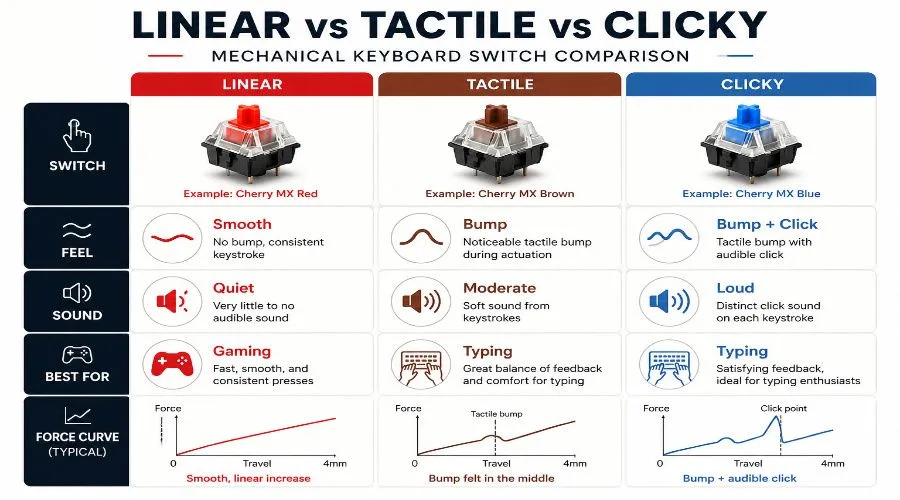
Choosing between linear, tactile, and clicky switches comes down to three key factors: typing feel, noise level, and intended use. While all three switch types perform the same basic function, they deliver a very different typing experience.
Typing Feel Comparison
Linear switches provide a smooth, uninterrupted keystroke with no tactile bump, while tactile switches offer noticeable feedback at the actuation point without producing a click. Clicky switches combine tactile feedback with a distinct audible click, making every keypress more pronounced. Since typing feel is subjective, testing different switch types is the best way to find your preference.
Sound Level Comparison
Linear switches are the quietest option, making them ideal for offices and shared workspaces. Tactile switches generate moderate noise from the tactile bump, whereas clicky switches produce a loud, satisfying click with every keystroke and are best suited for users who enjoy audible feedback.
Gaming Performance Comparison
For gaming, linear switches are the most popular choice because their smooth travel supports rapid key presses and quick double-tapping. Tactile switches provide a balanced experience for gaming and typing, while clicky switches are generally less favored in competitive games due to their extra feedback and louder sound.
Beginner-Friendly Comparison
If you’re new to mechanical keyboards, tactile switches are often the easiest place to start because they provide clear feedback without excessive noise. However, the best switch ultimately depends on your typing style, gaming habits, and personal preference.
Quick Comparison Table
The table below summarizes the key differences between linear, tactile, and clicky switches to help you choose the right option at a glance.
| Feature | Linear | Tactile | Clicky | Silent |
|---|---|---|---|---|
| Tactile Bump | None | Yes | Yes | None or Mild |
| Audible Click | No | No | Yes | No |
| Best For | Gaming | Typing | Enthusiasts | Office |
| Noise Level | Low | Medium | High | Very Low |
| Typing Feel | Smooth | Bumpy | Bumpy + Click | Smooth / Soft |
| Example | Cherry MX Red | Cherry MX Brown | Cherry MX Blue | Gateron Silent Red |
Understanding Keyboard Switch Anatomy
Every mechanical keyboard switch consists of several components that work together to determine typing feel, sound profile, switch smoothness, and durability. Understanding switch anatomy also makes it easier to compare switch designs, interpret specifications, and perform modifications such as lubing and filming.
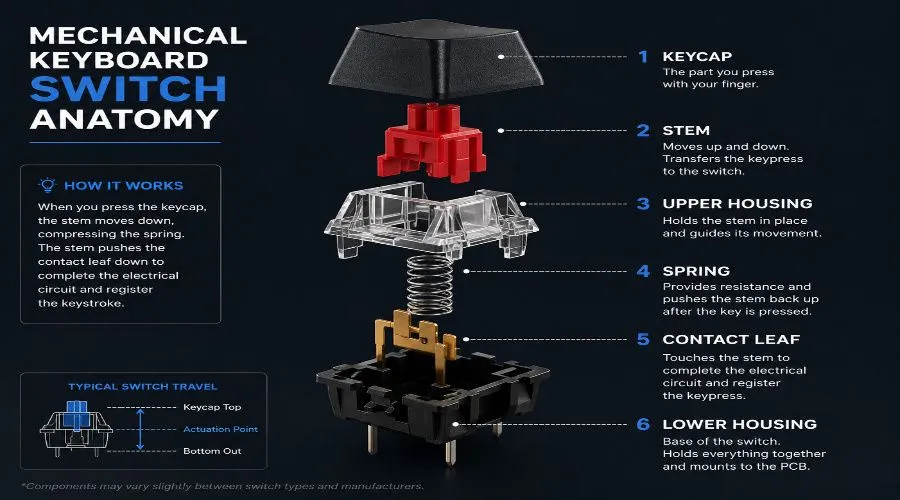
Upper Housing
The upper housing is the top shell of the switch that guides stem movement and helps reduce switch wobble. Materials like polycarbonate and nylon influence both typing feel and sound.
Role: Guides stem travel and improves stability.
Lower Housing
The lower housing forms the base of the switch and holds the spring and metal contact leaves. Its material significantly affects keyboard acoustics, with nylon typically producing a deeper sound than polycarbonate.
Role: Supports internal components and shapes the sound profile.
Stem
The stem is the moving component that connects to the keycap and determines the switch’s feel. Most stems are made from POM (Polyoxymethylene) and are designed as linear, tactile, or clicky depending on their shape.
- Straight stem = Linear
- Tactile leg = Tactile
- Click jacket or click bar = Clicky
Role: Defines switch feel and key travel.
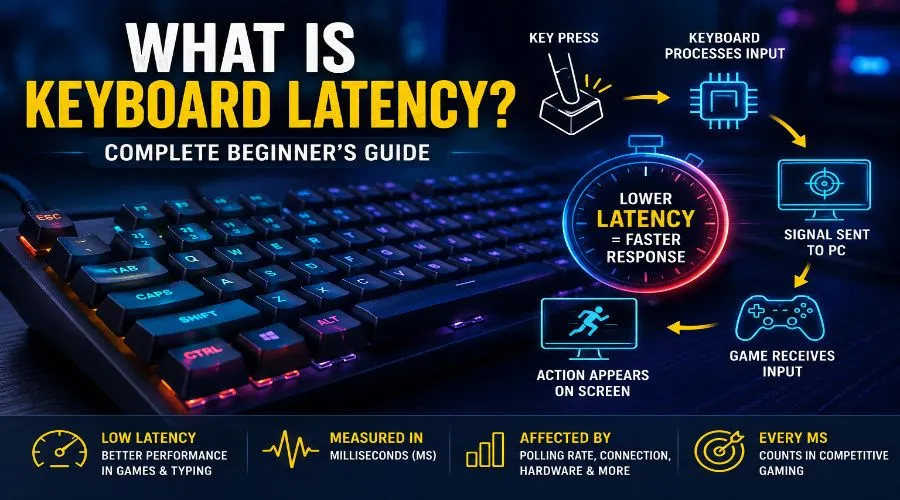
Want to understand how switch design affects responsiveness? Read our guide on keyboard latency and input delay.
Spring
The spring controls both the actuation force and bottom-out force of a switch. Lighter springs (35–45g) are commonly preferred for gaming, while heavier springs (60–80g) provide more resistance for typing.
Role: Determines keypress resistance and return force.
Metal Contact Leaves
Metal contact leaves register each keystroke by completing the electrical circuit when the switch actuates. Their quality affects switch consistency, responsiveness, and long-term durability.
Role: Registers key inputs.
Test every key and verify proper switch registration using our free Keyboard Tester.
LED Slot and Light Diffuser
Many modern switches include an LED slot that allows PCB-mounted LEDs to illuminate the switch and keycaps. Clear or frosted housings provide better light diffusion for brighter and more even RGB effects.
Role: Improves RGB visibility and lighting.
Key Takeaway
Although every mechanical keyboard switch shares the same core components, differences in housing materials, stem design, spring weight, and metal contact leaves are what create distinct typing feel, sound, and performance across different switch brands and models.
Keyboard Switch Specifications Explained
Every mechanical keyboard switch is defined by a set of technical specifications that determine how it feels, sounds, and performs. Understanding these numbers makes it easier to compare switches from brands like Cherry MX, Gateron, Kailh, Akko, and TTC without relying solely on subjective reviews.
Quick Specification Reference
| Specification | What It Measures | Why It Matters |
|---|---|---|
| Actuation Force | Required pressure | Typing comfort |
| Actuation Point | Registration depth | Gaming speed |
| Travel Distance | Total key movement | Typing feel |
| Bottom-Out Force | Full press resistance | Fatigue & control |
| Reset Point | Re-registration point | Double-tapping |
| Debounce Time | Input delay prevention | Accuracy |
Actuation Force
Actuation force (also called operating force) is the amount of pressure required to actuate a switch, typically measured in grams-force (gf) or grams (g).
- 35–45g: Light, ideal for gaming and fast typing
- 45–60g: Balanced for typing, gaming, and everyday use
- 60g+: Heavy, reduces accidental keypresses and suits deliberate typists
Choosing the right actuation force improves comfort, control, and typing endurance during long sessions.
Actuation Point (Operating Point)
The actuation point (or operating point) is the distance a key travels before registering a keystroke, typically between 1.2mm and 2.0mm. A shorter actuation point enables faster input, while modern Hall Effect and magnetic switches offer adjustable actuation points for a more personalized typing and gaming experience.
Total Travel Distance
Travel distance is the total distance a key moves from its resting position until it bottoms out. Standard mechanical switches typically offer 3.5–4.0mm of travel, while low-profile switches range from 2.5–3.0mm, providing a shorter and faster keystroke.
- Standard mechanical switches: 3.5–4.0mm
- Low-profile switches: 2.5–3.0mm
Longer travel generally feels deeper and more deliberate, while shorter travel provides a quicker, more responsive feel.
Pre-Travel and Post-Travel
Pre-travel is the distance a key moves before reaching the actuation point, while post-travel is the remaining movement until the key bottoms out. Together, these measurements influence switch responsiveness, typing feel, and overall key travel. On tactile switches, the tactile bump usually occurs near the end of the pre-travel stage.
Bottom-Out Force
Bottom-out force is the pressure required to fully press a key until it reaches the end of its travel. Because it is always higher than actuation force, it plays an important role in typing comfort, especially for users who naturally bottom out while typing.
Reset Point
The reset point is the position where a switch becomes ready to register another keystroke after being released. A reset point close to the actuation point allows faster repeated key presses, which is why Hall Effect switches with Rapid Trigger technology are popular among competitive gamers.
Debounce Time
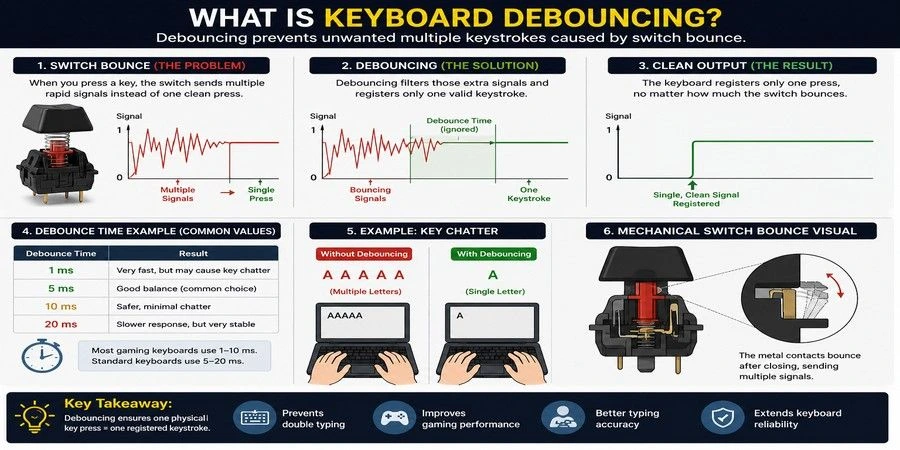
Debounce time is a short delay built into a keyboard’s firmware that prevents unintended double inputs caused by switch contact bouncing. Most keyboards use debounce settings between 5–25 ms, while some gaming keyboards reduce this delay to improve responsiveness and lower input latency
Curious how debounce settings affect gaming and typing performance? Read our complete guide to keyboard debouncing to learn how it impacts input latency, double key presses, and keystroke accuracy.
Popular Switch Specification Comparison
| Switch | Type | Actuation Force | Actuation Point | Travel Distance |
|---|---|---|---|---|
| Cherry MX Red | Linear | 45g | 2.0mm | 4.0mm |
| Cherry MX Brown | Tactile | 55g | 2.0mm | 4.0mm |
| Cherry MX Blue | Clicky | 60g | 2.2mm | 4.0mm |
| Gateron Yellow | Linear | 35g | 2.0mm | 4.0mm |
| Gateron Milky Yellow | Linear | 35g | 2.0mm | 4.0mm |
| Kailh Box White | Clicky | 45g | 1.8mm | 3.6mm |
| Gazzew Boba U4T | Tactile | 62g | 2.0mm | 4.0mm |
| Akko Cream Yellow | Linear | 35–40g | 2.0mm | 4.0mm |
Keyboard Switch Compatibility
Before buying replacement switches, make sure they are compatible with your keyboard. Compatibility depends on the switch mount, PCB design, pin configuration, and whether your keyboard supports hot-swappable switches.
MX-Compatible Switches
Most modern mechanical keyboards use MX-compatible switches, which feature the standard Cherry MX-style cross stem. This design is supported by popular brands like Cherry MX, Gateron, Kailh, Akko, and TTC, and works with most aftermarket keycap sets.
Key benefits
- Broad keycap compatibility
- Wide range of switch options
- Easy customization and upgrades
3-Pin vs 5-Pin Switches
Mechanical switches are available in 3-pin and 5-pin versions. Both use the same electrical contacts, but 5-pin switches include two extra plastic support legs for improved stability on the PCB.
- 3-pin: Compatible with most pre-built keyboards
- 5-pin: Better stability and preferred for custom keyboards
Tip: Many hot-swap keyboards support both, while some 3-pin PCBs require trimming the extra legs from a 5-pin switch.
Hot-Swap Compatibility
A hot-swappable keyboard lets you replace switches without soldering, making it easy to test different switch types or upgrade your typing experience. Non-hot-swappable keyboards require soldering to install or replace switches.
Before purchasing new switches, check:
- Hot-swap support
- 3-pin or 5-pin compatibility
- MX-compatible stem support for your keycaps
Mechanical Keyboard Switch Technologies
While most users focus on switch types like linear, tactile, and clicky, the underlying switch technology also plays a major role in performance, durability, and responsiveness. Understanding these technologies can help you choose the right keyboard for gaming, typing, or custom keyboard builds.
Quick Technology Comparison
| Technology | Registration Method | Adjustable Actuation | Rapid Trigger Support | Best For |
|---|---|---|---|---|
| Traditional Mechanical | Metal contact leaves | No | No | General use |
| Optical | Infrared light sensor | Limited | Some models | Gaming |
| Hall Effect (Magnetic) | Magnetic sensor | Yes | Yes | Competitive gaming |
| Analog | Continuous depth sensing | Yes | Yes | Advanced gaming |
Traditional Mechanical Switches
Traditional mechanical switches use metal contact leaves to register keypresses. Popularized by Cherry MX, this design has powered mechanical keyboards for decades and remains the most widely used switch technology today.
Advantages
- Proven reliability
- Affordable pricing
- Huge switch selection
- Compatible with most keyboards
Best for: Gaming, typing, office work, and custom keyboards
Optical Switches
Optical switches use an infrared light beam instead of physical metal contacts. When a key is pressed, the stem interrupts the light beam, instantly registering the keystroke.
Because there is no metal contact bounce, optical switches can offer faster response times and reduced debounce delays.
Advantages
- Fast input registration
- Reduced debounce delay
- Longer lifespan
- Popular in gaming keyboards
Best for: Fast-paced gaming and esports
Hall Effect (Magnetic) Switches
Hall Effect switches use magnetic sensors to detect key movement rather than relying on physical contact. This allows users to customize the actuation point and precisely control how sensitive each key feels.
When combined with Rapid Trigger technology, Hall Effect switches provide some of the fastest and most customizable input available today.
Advantages
- Adjustable actuation points
- Rapid Trigger support
- Exceptional durability
- Highly customizable
Best for: Competitive gaming and enthusiasts
Analog Switches
Analog switches can detect how far a key is pressed instead of simply registering an on/off input. This allows keyboard keys to behave similarly to controller triggers or joysticks.
For example, lightly pressing a key can make a character walk, while fully pressing it can make them run.
Advantages
- Variable input control
- Controller-like functionality
- Advanced gaming features
Best for: Racing games, simulation games, and advanced users
Rapid Trigger Technology
Rapid Trigger is a modern gaming feature that dynamically adjusts activation and reset points based on key movement. Instead of waiting for a key to return to a fixed reset point, the switch resets immediately when the key begins moving upward.
This dramatically improves repeated inputs and is one of the main reasons Hall Effect keyboards have become so popular among competitive FPS players.
Best for: FPS games, rhythm games, and esports
Key Takeaway
For most users, traditional mechanical switches remain the best balance of price, feel, and reliability. However, gamers seeking the lowest possible input delay often prefer Hall Effect switches with Rapid Trigger technology, while optical switches offer a strong middle ground between traditional and magnetic switch designs.
Learn the difference between North Facing and South Facing switches for better RGB lighting and keycap compatibility.
Popular Mechanical Keyboard Switch Brands
The mechanical keyboard market includes dozens of switch manufacturers, but a handful of brands consistently stand out for quality, innovation, and community reputation. Understanding each brand’s strengths can help you narrow down your options before comparing individual switch models.
Quick Brand Comparison
| Brand | Best Known For | Popular Among |
|---|---|---|
| Cherry MX | Industry standard | Mainstream users |
| Gateron | Smooth linear switches | Gamers & enthusiasts |
| Kailh | Innovative designs | Enthusiasts |
| Akko | Budget value | Beginners |
| Outemu | Affordable pricing | Budget buyers |
| TTC | Silent & specialty switches | Office users |
| Gazzew | Premium tactile switches | Enthusiasts |
Keyboard Switch Colors Explained
Keyboard switch colors are commonly used to identify a switch’s characteristics, such as typing feel, actuation, and sound level. While there is no universal color standard across all manufacturers, many brands use similar color conventions. Understanding these color differences can help you choose the right switch for gaming, typing, programming, or everyday use.
| Color | Typical Type | Typical Feel | Common Use |
|---|---|---|---|
| Red | Linear | Smooth | Gaming |
| Brown | Tactile | Mild bump | Typing & office |
| Blue | Clicky | Bump + click | Typing enthusiasts |
| Black | Linear | Smooth, heavier | Heavy typists |
| Silver | Linear | Fast, short travel | Competitive gaming |
| Green | Clicky | Heavy click | Dedicated typists |
| Yellow | Linear | Light and smooth | Gaming & fast typing |
Best Keyboard Switches for Different Use Cases
| Use Case | Recommended Switch Type | Example Switches |
|---|---|---|
| Gaming | Linear | Cherry MX Red, Gateron Yellow |
| Competitive FPS | Hall Effect / Speed | Cherry MX Speed Silver |
| Typing | Tactile | Cherry MX Brown, Boba U4T |
| Programming | Tactile | Cherry MX Brown, Gateron Brown |
| Office Work | Silent | Gateron Silent Red |
| Content Creation | Silent Tactile | TTC Silent Bluish White V2 |
| Beginners | Light Tactile | Cherry MX Brown |
Gaming
Linear switches provide smooth and fast key presses, making them the preferred choice for most gamers.
Typing & Programming
Tactile switches offer physical feedback that can improve typing accuracy and comfort during long sessions.
Find the best keyboard layouts for programming to improve coding comfort, speed, and productivity.
Office Work & Content Creation
Silent switches reduce noise while maintaining the benefits of mechanical keyboards.
Beginners
A light tactile switch such as Cherry MX Brown is usually the safest starting point.
Silent, Low-Profile, and Specialty Switches
While linear, tactile, and clicky switches dominate the market, several specialty switch categories are designed for specific use cases such as quiet typing, compact keyboards, and competitive gaming.
| Switch Type | Key Feature | Best For |
|---|---|---|
| Silent Linear | Reduced typing noise | Office work, shared spaces |
| Silent Tactile | Quiet tactile feedback | Typing and productivity |
| Low-Profile | Shorter travel distance | Laptop users, compact setups |
| Speed Switch | Short actuation point | Competitive gaming |
| Lightweight Switch | Lower actuation force | Fast typing and gaming |
| Heavy Switch | Higher actuation force | Deliberate typing and control |
Hot-Swappable vs Soldered Keyboards
If you plan to experiment with different switches, it’s important to understand the difference between hot-swappable and soldered keyboards. The choice affects how easily you can replace switches and customize your typing experience.
| Feature | Hot-Swappable | Soldered |
|---|---|---|
| Switch Replacement | Easy | Requires soldering |
| Beginner Friendly | Yes | No |
| Customization | High | Limited |
| Tools Required | None | Soldering equipment |
| Best For | Beginners & enthusiasts | Permanent builds |
Hot-Swappable Keyboards
Hot-swappable keyboards use PCB sockets that allow switches to be removed and replaced without soldering. This makes it easy to test different switch types and customize your keyboard over time.
Soldered Keyboards
Soldered keyboards attach switches directly to the PCB. While changing switches is possible, it requires desoldering equipment and significantly more effort.
Which Option Should You Choose?
For most users, a hot-swappable keyboard is the better choice because it offers flexibility and makes switch experimentation simple. Soldered keyboards are best suited for users building a long-term setup who do not plan to change switches frequently.
Customizing and Modifying Keyboard Switches
One of the biggest advantages of mechanical keyboards is the ability to customize switch feel and sound. Enthusiasts often modify switches to improve smoothness, reduce noise, or create a more personalized typing experience.
| Modification | Purpose | Difficulty |
|---|---|---|
| Lubing | Improves smoothness and sound | Easy |
| Filming | Reduces housing wobble and rattle | Easy |
| Spring Swapping | Changes switch weight | Moderate |
| Stem Swapping | Alters switch feel | Advanced |
| Frankenswitches | Combines parts from multiple switches | Advanced |
Common Switch Modifications
- Lubing: Adds lubricant to internal switch parts for smoother keypresses and improved acoustics.
- Filming: Inserts a thin film between switch housings to reduce wobble and tighten tolerances.
- Spring Swapping: Replaces the stock spring to change actuation force and typing resistance.
- Stem Swapping: Uses a different stem to alter switch feel or tactile characteristics.
- Frankenswitches: Combines components from multiple switches to create a unique custom switch.
Factory-Lubed vs Hand-Lubed Switches
Many modern switches come factory-lubed, offering improved smoothness out of the box. However, hand-lubed switches are often preferred by enthusiasts because they allow more precise control over feel and sound.
Key Takeaway: Most users will be satisfied with quality factory-lubed switches, while enthusiasts may enjoy experimenting with switch modifications to fine-tune their typing experience.
How to Choose the Right Keyboard Switch
Choosing the right keyboard switch comes down to your primary use case, noise preferences, typing style, and budget. Use the framework below to narrow down your options.
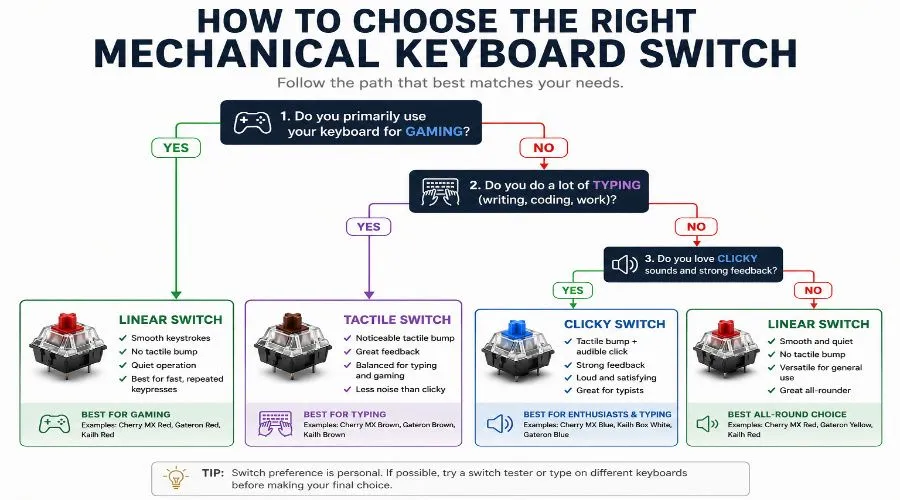
Choose Based on Your Primary Activity
Your intended use should be the biggest factor in your decision.
- Gaming: Linear or speed switches
- Typing & Programming: Tactile switches
- Office Work: Silent switches
- Enthusiast Typing: Clicky or premium tactile switches
Consider Noise Levels
Noise can have a major impact on your experience.
- Quietest: Silent linear and silent tactile switches
- Moderate: Standard linear and tactile switches
- Loudest: Clicky switches
If you share a workspace or record audio, avoid clicky switches.
Evaluate Your Typing Style
Switch weight affects comfort and control.
- Light touch: 35–45g switches
- Average typists: 45–60g switches
- Heavy typists: 60g+ switches
The right actuation force can reduce fatigue during long sessions.
Decide Between Speed and Feedback
If you value fast inputs, choose a linear or speed switch. If you prefer physical confirmation that a key has registered, choose a tactile or clicky switch.
Set a Realistic Budget
Budget switches from brands like Akko and Gateron offer excellent value, while enthusiast switches often cost significantly more. Most beginners can find an excellent switch without spending premium prices.
Test Before You Buy
Whenever possible, use a switch tester before purchasing a keyboard. Testing different switch types in person is the fastest way to discover your preferred typing feel.
Tip: Use our Keyboard Counter tool to compare your typing speed and accuracy across different switch types.
Common Mistakes When Choosing Keyboard Switches
Choosing the wrong switch can lead to unnecessary frustration, wasted money, and a typing experience that doesn’t match your expectations. Avoid these common mistakes before buying your next mechanical keyboard.
Choosing Only by Color
Switch colors are not standardized across brands. A red, brown, or blue switch can feel different depending on the manufacturer, so always check the switch specifications rather than relying on color alone.
Ignoring Actuation Force
Actuation force has a major impact on comfort and typing feel. Switches that are too heavy can cause fatigue, while switches that are too light may result in accidental keypresses.
Buying Loud Switches for Shared Spaces
Clicky switches can be enjoyable to type on, but they are often too loud for offices, classrooms, and shared rooms. Consider silent or tactile switches if noise is a concern.
Following Trends Without Testing
Popular switches may not suit your personal preferences. Whenever possible, try a switch tester before purchasing a full keyboard or set of switches.
Overlooking Hot-Swap Compatibility
A hot-swappable keyboard makes it easy to experiment with different switches in the future. For beginners, this flexibility is often worth the small additional cost.
Key Takeaway
The best keyboard switch is not necessarily the most popular one—it’s the switch that matches your typing style, environment, and daily use case.
Keyboard Switch Lifespan and Durability
One of the biggest advantages of mechanical keyboards is switch durability. Unlike membrane keyboards, most mechanical switches are designed to last for tens of millions of keypresses without losing responsiveness.
Typical Switch Lifespan
| Switch Brand / Technology | Rated Lifespan |
|---|---|
| Cherry MX | Up to 100 million keystrokes |
| Gateron | 60–80 million keystrokes |
| Kailh | 60–80 million keystrokes |
| Akko | 50–80 million keystrokes |
| Hall Effect Switches | Extremely high due to contactless design |
For most users, even a 50-million-keystroke switch can last many years of daily use.
For most users, switch feel, sound, and typing comfort are far more important factors than lifespan, since even entry-level mechanical switches are designed to last for years of regular use.
Frequently Asked Questions
Which keyboard switch is best for gaming?
Linear switches are generally the best choice for gaming because they provide smooth key travel and fast repeated inputs. Popular options include Cherry MX Red and Gateron Yellow, while Hall Effect switches are preferred by competitive gamers seeking maximum responsiveness.
Are linear switches better than tactile switches?
Neither is universally better. Linear switches are typically preferred for gaming, while tactile switches are often favored for typing because they provide physical feedback when a key registers.
What is the quietest mechanical keyboard switch?
Silent linear and silent tactile switches are the quietest options. Popular examples include Cherry MX Silent Red, Gateron Silent Red, and Gazzew Boba U4, all of which use internal dampening to reduce typing noise.
What switch should beginners choose?
Most beginners should start with a tactile switch such as Cherry MX Brown or Gateron Brown. These switches provide feedback without excessive noise and offer a balanced experience for both typing and gaming.
How long do mechanical keyboard switches last?
Most mechanical keyboard switches are rated for 50 to 100 million keystrokes. For everyday users, even entry-level switches can last many years of regular typing and gaming.
RELATED ARTICLES