
North Facing vs South Facing Switches: What Is the Real Difference?
What Are North Facing Switches?
North facing switches refer to the orientation of keyboard switches on a PCB, where the LED sits at the top of the switch housing — closest to the keycap legends. This positioning became a standard in gaming keyboards and many budget-friendly mechanical keyboards, as it places the light source directly beneath the translucent legends, producing brighter, more vibrant illumination through the keycap.
Keyboard Switches Explained“Not sure how switches work? Start here before going any further.”
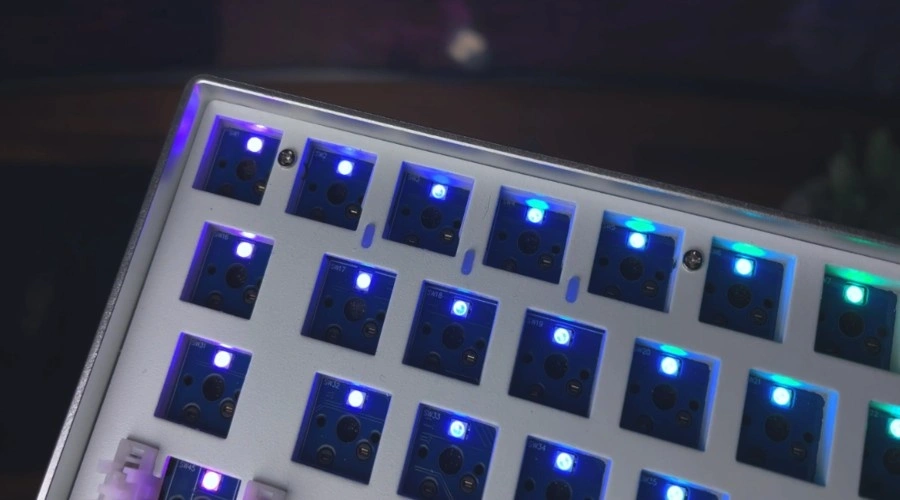
How North Facing Switches Work
In a north facing setup, the LED faces the top of the keyboard, shining directly through the keycap legends to deliver vivid and consistent RGB lighting. The trade-off is keycap compatibility — north facing sockets can cause interference with Cherry profile keycaps, though the orientation remains popular in gaming keyboards where strong backlighting takes priority over keycap flexibility.
Learn how a keyboard works behind every key press.
Pros of North Facing Switches
Keycap Compatibility
North-facing mechanical keyboard switches are generally more compatible with a wider range of keycaps, giving you more options to customize your keyboard according to your style and preference.
Smooth Keystrokes
The LED placement at the top means there is less interference with certain keycap profiles, especially those with thicker walls, leading to a smoother typing experience.
Enhanced RGB Effects
One clear advantage of north facing keyboard switches is the improved lighting, as the LED positioned at the top of the switch shines directly through the legends on your keycaps, keeping them visible in low-light conditions, which is something gamers and enthusiasts who love customizable RGB effects and backlighting truly enjoy.
Reduced Key Wobble
Since the stem is centered, north facing keyboard switches have less wobbling when you type, giving you a more stable typing experience.
Reduced Shadowing
With the LED at the top, there is less shadowing caused by keycaps, making the lighting more uniform and consistent, which enhances the overall aesthetic of your keyboard.
Cons of North Facing Switches
Inconsistent Lighting
The LED placement in north-facing switches can produce uneven and inconsistent lighting across certain keycap sets, which becomes a clear drawback for those chasing a clean, uniform look. If you are aiming for smooth backlighting across your entire keyboard, this is something worth considering before committing to a build.
Potential for Keycap Contact
The LED placement can cause direct interference with the bottom of a keycap, particularly when using a taller profile keycap that sits lower on the switch. This affects your overall typing feel and can introduce contact issues that make the experience feel inconsistent and slightly off.
Stem Visibility
The stem of north facing switches can become visible when viewing the keyboard from certain angles, which is a minor but noticeable concern. For those who prefer a sleeker look, this small detail can affect the overall appeal of an otherwise well-built keyboard.
What Are South Facing Switches?
South facing switches place the LED at the bottom of the switch, facing directly toward the PCB rather than the user. This positioning eliminates the keycap interference found in north facing switches, offering cleaner keycap compatibility with Cherry profile keycaps and more uniform lighting across all legends. Growing demand has pushed manufacturers to adopt south facing switches widely, making them a favorite among custom keyboard builders who value a polished and clean keyboard setup.
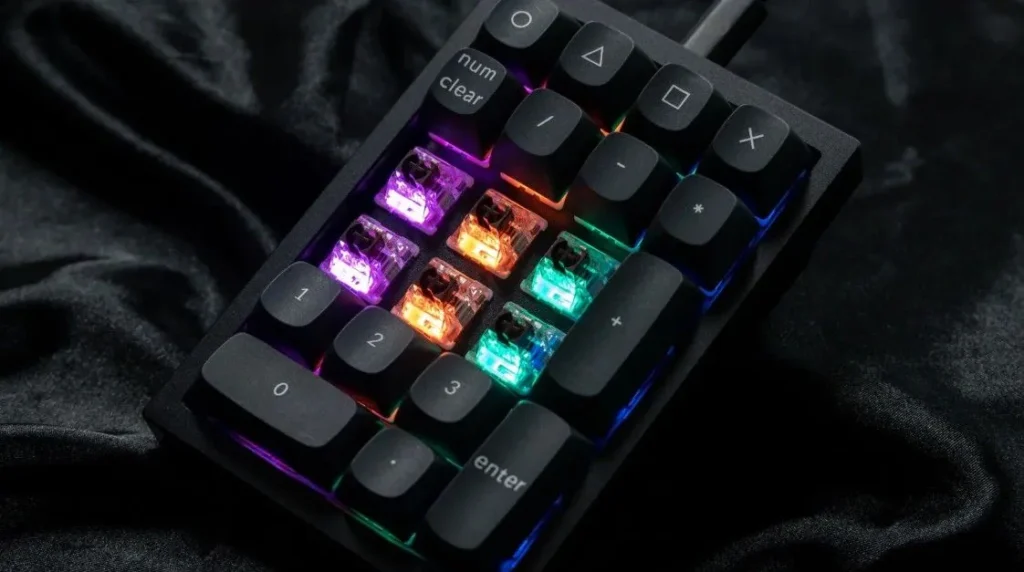
How South Facing Switches Work
South-facing switches work by positioning the LED at the bottom of the switch, so when seated in the PCB, the LED hole faces toward the user, allowing light to travel upward and illuminate the keycap legends indirectly for a clean, uniform, and evenly lit keyboard setup.
Pros of South Facing Switches
Better Lighting Coverage
When the LED sits at the bottom of the switch, everything changes — the consistent lighting and uniform lighting across all keys feels like a completely different keyboard setup. The RGB backlighting becomes genuinely visually stunning, something you notice immediately the first time you see it in a dim room.
Stability
From personal experience, south facing switches deliver a noticeably better stability compared to most keyboard switches I’ve tested. Different keycap profiles sit more naturally because the LED at the bottom eliminates any interference between the keycap and switch, giving you that solid typing feel that just clicks right.
Minimal Light Bleeding
The LED positioned at the bottom almost entirely eliminates light bleeding around the edges of the keycaps, producing a far cleaner and more subtle lighting effect that looks intentional rather than accidental.
Potential for Quieter Typing
South facing switches consistently produce quieter keystrokes than north facing switches, which matters more than people expect — especially in shared environments or quiet environments where every sound gets noticed.
Reduced Glare
With the LED tucked at the bottom of the switch, south facing switches produce significantly less glare, making the keyboard far more comfortable in a brightly lit room while still delivering a subdued lighting effect that looks refined.
Uniform Keycap Design
South facing keyboard switches naturally support a more uniform keycap design because the stem stays flush, giving the keyboard a genuinely cleaner appearance that stands out in any build.
Less Visible Stem
Since the stem faces downwards, it stays hidden from most angles, preserving that sleek and minimalist look that serious keyboard builders always chase.
Cons of South Facing Switches
Dimmer Lighting
Unlike north-facing switches where RGB LEDs sit directly under the keycap legends making them look bright and vibrant, south facing keyboard switches push the LED to the bottom, which noticeably reduces RGB glow and overall illumination — the dimmer lighting is the first thing I noticed when switching between the two switch orientations.
Increased Shadowing
The LED placement at the bottom of south-facing switches creates unavoidable shadowing beneath the keycaps, dragging down the visual appeal of your entire keyboard build with uneven lighting that disrupts an otherwise clean keyboard RGB setup and lighting configuration.
Keycap Compatibility
South facing switches genuinely struggle with keycap compatibility — thicker-walled keycaps, custom keycap sets, and keycap profiles with unconventional designs all restrict your keycap customization and customization options, which frustrated me more than once during a keyboard assembly.
Potential Interference
The LED sitting at the keycap bottom can create interference with certain keycap profiles during switch mounting, particularly in a tight keyboard structure where switch sockets and PCB orientation leave little room, affecting the overall keyboard design and lighting performance.
Increased Key Wobble
Because the stem sits off-center in south facing switches, key wobbling becomes noticeable during heavy use — this directly impacts typing stability in ways that north facing switches simply don’t produce, something most keyboard enthusiasts and keyboard designers openly flag as a concern.
Explore the advantages and disadvantages of computer keyboards.
North Facing vs South Facing Switches (Key Differences)
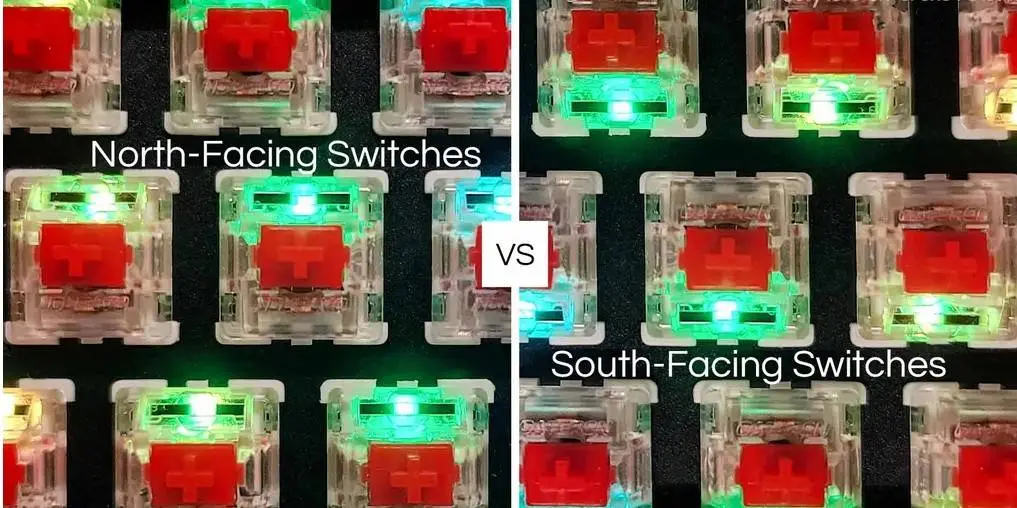
RGB Brightness Comparison
North facing switches deliver noticeably stronger RGB brightness because the LED shines directly through the legends, creating vivid and consistent lighting effects across every key. South facing switches, by contrast, struggle with uneven lighting since the stem partially blocks the light path, causing shadows that reduce overall RGB illumination — something any keyboard enthusiast who has compared both orientations will immediately notice.
Keycap Compatibility (Important)
Keycap compatibility is where the real divide between these two switch orientations shows up most practically. North facing switches cause interference with Cherry profile keycaps, preventing proper bottoming-out and affecting typing consistency. South facing switches solve that keycap interference issue but introduce their own limits with thicker-walled keycaps and certain custom keycap sets, so your keycap profile choice directly determines which switch orientation works best for your keyboard build.
Typing Feel and Sound
The typing feel and keystroke sound between north and south facing switches are subtly different but worth understanding. South facing switches tend to produce slightly quieter keystrokes and a more solid typing feel due to reduced keycap interference, while north facing switches can feel slightly different depending on the keycap material and switch type used — factors that compound across different keyboard builds and personal typing experience preferences.
Cherry Profile Interference
What Is Cherry Profile Keycap Interference?
Cherry profile keycap interference happens when Cherry profile keycaps physically hit the switch housing during bottoming-out, stopping the keycap from pressing down fully. This keycap contact disrupts typing feel, hurts typing accuracy, and creates an inconsistent keystroke sound that most keyboard enthusiasts immediately notice.
Why It Happens in North Facing Switches
In north facing switches, the LED sits at the top of the switch housing, raising the front wall just enough to clash with the bottom edge of Cherry profile keycaps. This switch orientation makes proper bottoming-out impossible, directly damaging typing consistency and tactile sound — which is why many keyboard brands have moved away from north-facing switch sockets on their PCBs.
How South Facing Fixes This Issue
South facing switches fix Cherry profile keycap interference by flipping the switch orientation so the LED moves to the bottom of the switch housing, clearing the path completely. This shift in PCB orientation restores proper bottoming-out, improves typing feel, and brings back the tactile sound and typing consistency that keyboard enthusiasts building custom mechanical keyboards depend on.
Switch Actuation Tester “Stop guessing — test your switches before your build regrets it.”
Which Is Better for Your Use Case?
Gaming: RGB and Performance
For gaming setups, north facing switches are the obvious pick — the RGB LEDs shine directly through the keycap legends, producing bright and vibrant RGB lighting that makes any gaming keyboard look visually striking. Latency and raw performance remain identical between both switch orientations, so the real win for gaming is purely the RGB visibility and that bold, stylish keyboard aesthetic that gaming brands have always leaned into.
Keyboard Tester Your fingers know best — test every key and measure your keyboard performance instantly.
Typing and Daily Use: Comfort and Compatibility
For typing experience and daily use, south facing switches are what most keyboard enthusiasts and experts genuinely recommend. They offer clean keycap compatibility with Cherry profile keycaps and dye-sublimated PBT keycaps without any interference, delivering a more solid typing feel, better sound preference, and a more comfortable long-term usage experience that holds up across extended sessions.
Best Keyboard Layout for Programming “Your switch choice matters — but so does the layout you are typing on all day.”
North Facing vs South Facing Switches – Which Should You Choose?
Best Choice for Beginners
North facing switches are the easiest starting point for anyone new to the keyboard hobby. Most budget-friendly mechanical keyboards and gaming keyboards already come with north facing switch sockets by default. As long as you avoid Cherry profile keycaps, you won’t run into any real issues early on.
Best Choice for Enthusiasts
Keyboard enthusiasts building custom mechanical keyboards almost always prefer south facing switches. Clean keycap compatibility, zero Cherry profile keycap interference, better tactile sound, and improved typing consistency make them the community standard on quality PCBs.
The Honest Verdict
If RGB shine and a stylish keyboard matter most, go north facing. If you care about keycap compatibility, a quieter keystroke sound, and a smoother typing experience that works with any keycap profile including Cherry-style keycaps, south facing switches are the smarter long-term choice — and for most custom keyboard builders, that trade-off is an easy one to make.
TKL Keyboard Layout “Building a TKL? Switch orientation will affect your build more than you think.”
FAQs About North vs South Facing Switches
Is North Facing or South Facing Better?
North facing switches deliver superior RGB visibility and vibrant lighting directly through keycap legends, making them ideal for gaming setups. South facing switches win on keycap compatibility, typing feel, and overall build satisfaction, making them the smarter choice for keyboard enthusiasts and custom keyboard builders.
Why is South Facing RGB Better?
South facing switches produce softer and more uniform lighting distribution across all keys, reducing light bleeding and minimizing shadowing. While slightly less bright than north facing switches, the cleaner and more refined lighting effect is something many enthusiasts genuinely prefer for a polished keyboard aesthetic.
Do North Facing Switches Affect Typing?
North facing switches can affect typing feel when paired with Cherry profile keycaps, preventing proper bottoming-out and creating inconsistent keystroke sound. If you use non-Cherry profile keycaps, the typing experience remains completely normal and unaffected.
Can You Fix North Facing Interference?
Yes — switching to SA, DSA, or XDA profile keycaps is the simplest fix for north facing interference issues. Alternatively, replacing the PCB with a south facing compatible one fully eliminates Cherry profile keycap interference and restores proper typing consistency.
Which Switch Orientation Do Most Keyboard Builders Prefer?
Most custom keyboard builders and designers prefer south facing switches for their versatility, Cherry profile keycap compatibility, and consistent typing experience. North facing switches remain popular strictly among RGB-focused users and gamers who prioritize lighting intensity over typing performance.