
When choosing a keyboard, most people focus on size or switches, but the keyboard layout standard also plays a big role in your typing experience. The two most common standards are ANSI and ISO, and while they may look similar at first glance, small design differences can significantly affect comfort, typing speed, and compatibility. Understanding these differences helps you pick the right layout for gaming, programming, or everyday use.
What is ANSI Keyboard Layout?
The ANSI keyboard layout is based on American standards and is the most widely used keyboard format globally. It is commonly found in the United States and many other regions because most software, operating systems, and keyboard manufacturers are designed around this layout. ANSI keyboards typically have around 104 keys and follow a clean, simple structure that makes them easy to use for both beginners and professionals.
You can also explore the US keyboard layout to see how ANSI is used in real setups.
ANSI Full Form and Meaning
ANSI stands for American National Standards Institute, an organization that oversees standards development in the United States. In keyboards, ANSI refers to a layout standard that defines the physical arrangement of keys, including size, spacing, and positioning.
Key Features of ANSI Layout
The ANSI layout is known for its wide rectangular Enter key, long left Shift key, and the absence of an extra key near the Shift. This creates a more spacious and balanced layout that many users find comfortable, especially for gaming and fast typing.
Where ANSI Layout is Commonly Used
ANSI keyboards are mainly used in the United States and are also popular worldwide due to their compatibility with software and keycap sets. Most gaming keyboards and custom mechanical keyboards are designed using the ANSI standard.
What is ISO Keyboard Layout?
The ISO keyboard layout follows a European standard and is commonly used in countries like the UK, Germany, and France. At first glance, it looks almost identical to ANSI, but once you start typing on it, the differences become very noticeable—especially around the Enter and Shift keys. I remember the first time I switched to an ISO board; my muscle memory kept missing the Enter key for a few hours until I adjusted.
ISO Full Form and Meaning
ISO stands for International Organization for Standardization, which defines global standards across different industries. In keyboards, ISO refers to a layout that slightly modifies key placement to support more language variations and regional typing needs.
Key Features of ISO Layout
The ISO layout is easy to recognize because of its tall, L-shaped Enter key and shorter left Shift key. It also includes an extra key next to Shift, which is often used for additional characters in different languages. While this design helps multilingual users, it can feel a bit cramped if you’re used to ANSI.
Where ISO Layout is Commonly Used
ISO keyboards are widely used in Europe, especially in the UK and other countries where additional symbols and language support are required. Many regional layouts, such as UK QWERTY, German QWERTZ, and French AZERTY, are built on the ISO structure.
Regional Layout Variants (UK, German, French, etc.)
One thing I’ve noticed is that ISO isn’t just a layout—it’s more like a base structure that adapts to different languages. For example, the UK layout adds the £ symbol, German keyboards rearrange some letters, and French keyboards even switch to AZERTY. So while the physical shape stays similar, the typing experience can vary quite a bit.
ANSI vs ISO Standards (What They Actually Mean)
A lot of people think ANSI and ISO are just keyboard styles, but they actually come from official standards bodies—ANSI (American National Standards Institute) and ISO (International Organization for Standardization). These organizations don’t just define keyboards; they create rules for consistency across industries.
In keyboards, these standards mainly control key size, placement, and spacing, ensuring manufacturers follow a consistent design. From what I’ve seen, this is why most keyboards feel familiar even when switching brands—the layout standard keeps everything predictable.
ANSI vs ISO Keyboard Layout (Quick Comparison Table)
| Feature | ANSI Layout | ISO Layout |
|---|---|---|
| Enter Key | Wide horizontal | L-shaped (vertical) |
| Left Shift | Long | Shorter |
| Extra Key | No | Yes (next to left Shift) |
| Total Keys | ~104 | ~105 |
| Usage | USA, Global | Europe, UK |
| Keycap Compatibility | High | Limited |
Key Differences Between ANSI and ISO Keyboards
Enter Key Shape
The most obvious difference is the Enter key. ANSI uses a simple horizontal key, while ISO uses a taller, L-shaped design. Personally, I find ANSI easier for fast typing because the Enter key is wider and easier to hit without looking.
Left Shift Key Size
ANSI has a longer left Shift key, which makes it more comfortable for typing shortcuts or capital letters. ISO reduces its size to make space for an extra key, which can sometimes lead to accidental presses if you’re not used to it.
Extra Key in ISO Layout
ISO includes an additional key next to the left Shift. This is useful for typing extra characters in different languages, but for someone who types mostly in English, it often feels unnecessary.
Key Count Difference
ANSI keyboards usually have around 104 keys, while ISO layouts add one extra key, making it around 105. It’s a small difference, but it changes the overall feel of the layout.
Typing Experience Differences
From real use, the difference isn’t just visual—it’s muscle memory. ANSI feels more open and consistent, while ISO feels slightly tighter. If you switch between them often, you’ll notice small typing errors at first, especially with Shift and Enter.
ANSI vs ISO Layout (Visual Comparison)
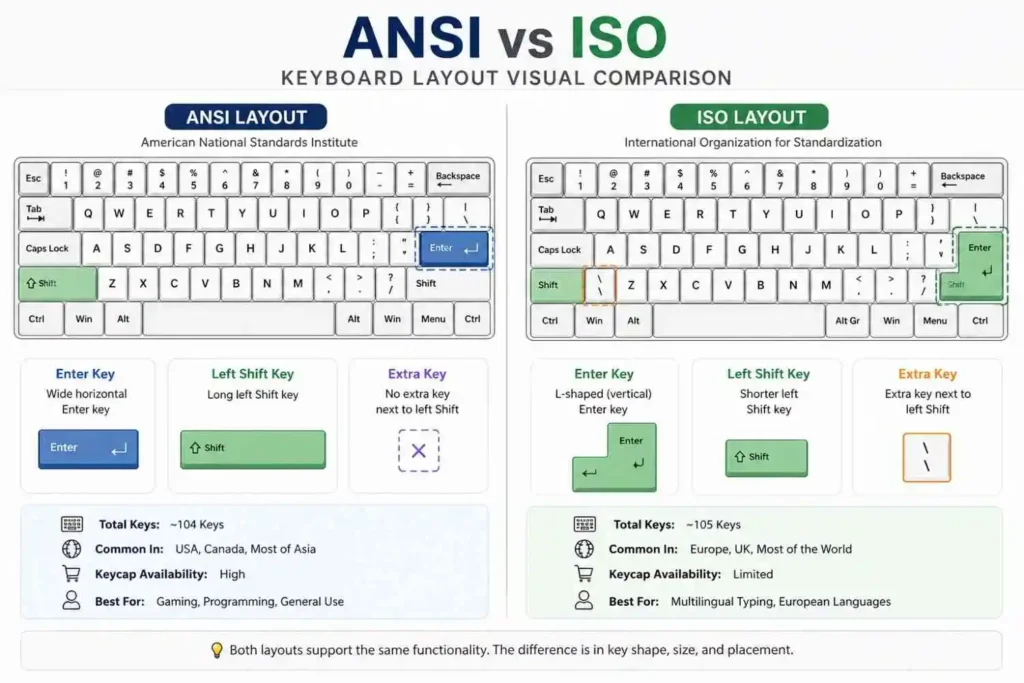
If you’re someone who understands things faster by looking rather than reading, this comparison makes everything instantly clear. The Enter key shape and left Shift size are the first things your eyes will notice. When I first compared both layouts visually, it finally clicked why my typing felt off on ISO—it wasn’t the keyboard quality, just the layout difference.
ANSI vs ISO Across Different Keyboard Sizes
Full-Size Keyboards
In full-size keyboards, the difference between ANSI and ISO is very clear because all keys are present. This is where most users first notice the Enter key shape and the extra ISO key. If you’ve only used standard office keyboards, chances are you’ve already developed a preference without realizing it.
TKL (Tenkeyless) Keyboards
In TKL keyboards, both layouts remove the number pad, but the ANSI vs ISO differences remain exactly the same. From my experience, this is where gamers start caring more, because the compact size combined with ANSI layout gives better mouse space and fewer accidental hits.
Not sure how TKL layouts work? You can explore the full breakdown in our TKL keyboard layout guide.
75%, 65%, and 60% Keyboards layout
As keyboards get smaller, the ANSI vs ISO debate becomes less obvious but still important. Many compact keyboards are only available in ANSI, especially in custom builds. I’ve personally struggled to find good ISO keycap sets for 65% boards—it’s possible, but definitely more limited.
Keyboard Sizes Explained: What Size Should You Choose?
ANSI vs ISO for Different Users
Gamers
Most gamers prefer ANSI, and honestly, it makes sense. The larger Shift key and cleaner layout reduce mistakes during fast gameplay. When I switched to ANSI for FPS games, the difference felt subtle but noticeable—especially during quick movements and key combos.
Programmers and Developers
For programming, ANSI tends to be more practical because many coding symbols are easier to access. That said, ISO can still work well depending on your region and language needs. It really comes down to what you’re used to.
Finding the Best Keyboard Layout for Programming
Office and General Users
For everyday typing, both layouts work fine. But if you type in multiple languages, ISO has an advantage because of the extra key and regional flexibility. For simple English typing, ANSI usually feels more natural and less crowded.
ANSI vs ISO for Keycaps and Compatibility
Keycap Availability
This is where ANSI clearly wins. Most keycap sets in the market are designed for ANSI layouts. When I started exploring custom keyboards, I quickly realized how easy it was to find ANSI sets—and how limited ISO options were.
PCB and Case Compatibility
ANSI layouts are more widely supported in keyboard PCBs and cases. If you’re planning to build a custom keyboard, ANSI gives you more flexibility and fewer compatibility issues.
Custom Keyboard Builds
In the custom keyboard community, ANSI is almost the default. ISO builds exist, but they require more effort to find compatible parts. From what I’ve seen, beginners usually stick with ANSI to avoid unnecessary complications.
If you’re curious about how does a keyboard work the answer might surprise you
Why ANSI is More Popular Worldwide
ANSI became more popular mainly because of its adoption in the United States and its strong integration with software and hardware standards. Over time, manufacturers focused more on ANSI, which made it easier to produce and distribute globally. This created a cycle where ANSI became the default choice for most users.
Which is Better: ANSI or ISO?
There isn’t a single “best” layout—it depends on your needs. If you want simplicity, better compatibility, and a smoother experience for gaming or programming, ANSI is usually the better choice. But if you need support for multiple languages or are used to European layouts, ISO can be more practical.
Should You Choose ANSI or ISO?
If you’re still unsure, here’s a simple way to decide based on real use:
- Choose ANSI if you want better compatibility, gaming comfort, and easier keycap options
- Choose ISO if you need language flexibility and are already used to its layout
From personal experience, switching is possible—but it takes time. So it’s better to pick one and stick with it.
FAQs
What is the main difference between ANSI and ISO keyboards?
The main difference is in the Enter key shape, Shift key size, and the presence of an extra key in ISO layouts.
Which keyboard layout is better for gaming?
ANSI is generally better for gaming due to its simpler layout and larger keys.
Why is ANSI more common?
ANSI is more common because it is widely used in the US and supported by most manufacturers and software.
Can I switch from ISO to ANSI easily?
Yes, but it may take time to adjust your muscle memory, especially for the Enter and Shift keys.
Do ANSI and ISO affect typing speed?
Not directly, but switching between them can temporarily slow you down until you adjust.