
Introduction
Most people ignore their keyboard layout—until something feels wrong. Maybe you used a device from another region or a refurbished laptop, and now keys don’t match your native layout. The US keyboard layout, built on the familiar QWERTY arrangement, is the most widely used standard. But small differences with the UK and other European keyboards can completely change how you type. Keep reading to see exactly what sets them apart and why it matters.
What is a US Keyboard Layout
The US keyboard layout is based on the ANSI layout and is widely used as the default in most systems. It follows the familiar QWERTY layout, making it easy to recognize and use for everyday typing.
“Curious how your keyboard sounds? Test it live with our keyboard sound tester and analyze switch noise.”
Key Features of US Keyboard Layout
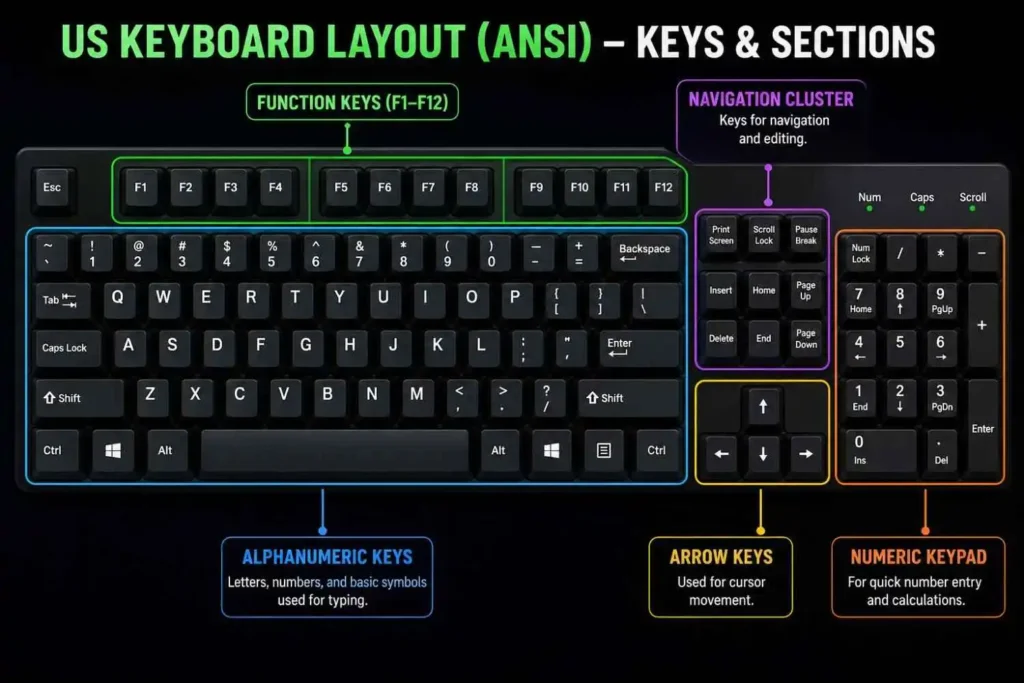
A typical US keyboard has around 104 keys with clear sections like alphanumeric keys, function row, navigation keys, arrow keys, and a numeric keypad. It includes a horizontal Enter key and a long left Shift key, making it simple, consistent, and ideal for typing, gaming, and coding.
“Not sure how your keys feel? Use our keyboard switch tester to check responsiveness and feedback.”
Structure of US Keyboard Layout (Keys & Sections)
The US keyboard layout is divided into clear sections for easy use. In the center is the typing area with letters, numbers, and symbols in the familiar QWERTY layout. Above it is the function row (F1–F12), used for quick shortcuts like volume and brightness.
On the right side, you’ll find the navigation keys such as Insert, Delete, Home, End, Page Up, and Page Down. Below them are the arrow keys for movement. Full-size keyboards also include a numeric keypad for fast number input. The layout features a horizontal Enter key, a long left Shift key, and standard key positions, making it simple and efficient for everyday use.
ANSI Standard Explained
What is ANSI?
ANSI is a nonprofit organization in the United States that supports the development and use of standards across industries. It accredits organizations through an open, fair, and consensus-driven process. These standards help businesses and government agencies ensure safety, interoperability, quality, and consistency.
ANSI Full Form and Meaning
ANSI stands for the American National Standards Institute, a private nonprofit founded 1918 that connects the United States with global standardization bodies like the International Organization for Standardization (ISO) and the International Electro technical Commission (IEC). Its consensus process ensures reliable ANSI standards, used in areas like EDI transaction sets (ANSI X12), electrical safety codes, and protection rules such as eye protection standard and face protection standard.
Symbol Placement in US Keyboard Layout
1. Layout
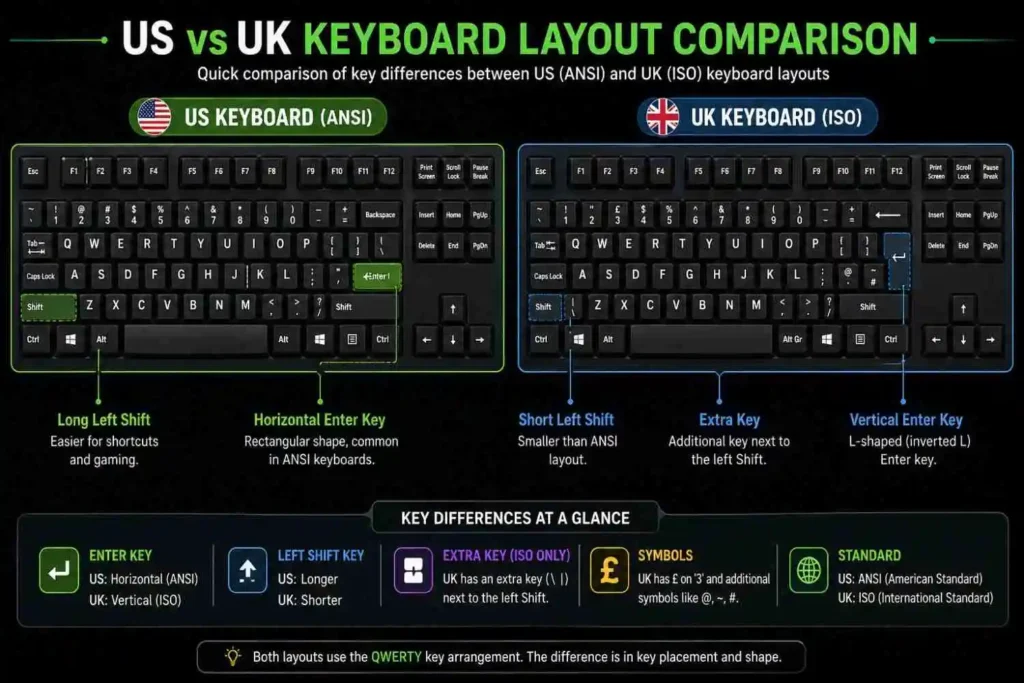
The US keyboard uses ANSI layout, while the UK keyboard follows ISO layout keyboard, and this difference mainly affects key placement, symbols difference, and overall keyboard differences. In real use, both US layout and UK layout share most keyboard keys, but their character input, typing symbols, and symbol input vary slightly due to layout standards.
2. Enter Key
On a US keyboard, the Enter key is a horizontal Enter key, while on a UK keyboard it has an inverted L shape or upside down L shape across two rows, sometimes described as a horizon Enter key. This small design difference impacts key position and spacing around nearby keyboard keys.
3. The Backslash key
The Backslash key on the US keyboard is placed above Enter key, but on the UK keyboard it is often found left of Z key, showing a clear key placement shift. This affects typing symbols, character input, and how users access certain symbols.
4. The left Shift key
The left Shift key on the US layout is a longer Shift key, while the UK layout has a shorter Shift key because of extra keys between keys. This layout change slightly impacts typing comfort and keyboard differences during fast input.
5. Right Alt key
The Right Alt key on a US keyboard is usually identical, working the same as left Alt key, while the UK keyboard uses Alt Gr key for typing additional characters and additional symbols. This makes a noticeable change in typing method and symbol input.
6. Number Sign (#)
The number sign or # symbol on a US keyboard is typed using Shift + 3, while on the UK keyboard the same key may produce a different symbol depending on region. This shows a clear symbols difference in typing symbols.
7. Pound (£) Symbols
The Pound sign or £ symbol is standard in the United Kingdom and Ireland, and on the UK keyboard it is on the number 3 key using Shift+3, while on a US keyboard this position gives the $ symbol. This is one of the most noticeable keyboard differences.
8. @ Symbols
The symbol appears in different places, where the US keyboard uses Shift + 2, but the UK keyboard often uses Shift + ‘ for the same symbol input. This affects quick typing symbols and everyday character input.
“Need special characters? Learn how to type the diameter symbol (⌀) using your keyboard layout.”
9. “Characters
The “sign or “character on a US layout is typed using Shift + “, while in the UK layout this key can differ slightly in key position. This impacts typing method and how users enter quotation symbols.
10. ¬ symbol / ~ symbol
The ¬ symbol and ~ symbol are placed differently, where on a US keyboard the “~” key is found left of 1 key, while on a UK keyboard it may appear next to 1 key or in another position. This change in key placement affects symbol input and typing symbols.
US vs. UK vs. ISO (Quick Comparison)
The US keyboard (ANSI layout) uses a horizontal Enter key and a longer left Shift key, making it simple and widely used for general typing. The UK keyboard (ISO layout) has an inverted L shape Enter key, a shorter Shift key, and different symbol placement like £ symbol, @ symbol, and “~” key.
“Want to switch between layouts easily? Try our keyboard layout converter to instantly adapt your typing setup.”
In terms of keyboard differences, ANSI layout (US) is cleaner and more common, while ISO layout keyboard (UK) supports more additional characters using the Alt Gr key. Overall, both US layout and UK layout are similar in structure, but their typing symbols, character input, and key position vary based on region and usage.
Keyboard Layout Variants (QWERTY, Dvorak, Colemak)
The US keyboard layout mainly uses the QWERTY layout, which are the most common standard for everyday typing and works well for most users. However, there are other variants like Dvorak and Colemak that focus on improving typing speed and comfort.
Dvorak Layout
The Dvorak layout rearranges keys to reduce finger movement and increase efficiency, making it ideal for users who want better typing speed and less strain. However, it has a learning curve and is not widely used compared to QWERTY.
Colemak Layout
The Colemak layout is a modern alternative that keeps many familiar QWERTY positions while improving key placement for better ergonomics and faster typing. It is easier to learn than Dvorak and is popular among users who want improved typing efficiency without fully switching layouts.
In real use, most people stick with QWERTY, but Dvorak and Colemak are popular among enthusiasts who want better typing efficiency and less strain.
Use Cases of US Keyboard Layout (Gaming & Coding)
Gaming
The US keyboard layout is widely used for gaming because of its familiar QWERTY layout and efficient key placement. In gaming, especially FPS and competitive titles, the standard layout keeps important keys like WASD, number keys, and function keys easy to reach, helping with faster reactions and smoother control.
“For better performance in games, it’s important to understand keyboard debouncing and how it affects key response speed.”
Coding
For coding, the US layout is preferred because it provides easy access to essential symbols like {}, [], (), and;, which are used frequently in programming. Its consistent typing method and logical character input make writing code faster and more comfortable, improving overall coding efficiency.
“If your keyboard starts acting weird during typing or gaming, you can quickly reset your Logitech K850 keyboard to fix common issues.”
FAQs
1. What is the US keyboard layout?
The US keyboard layout follows the ANSI layout, which is based on American standards. It features a horizontal Enter key and a longer left Shift key, making it simple and widely used. This layout is the default for most software, operating systems, and devices worldwide.
2. Is US AZERTY or QWERTY?
The US keyboard layout uses the QWERTY layout, which is the most widely used keyboard arrangement. It is designed for efficient typing and is the standard layout in most countries.
3. Is the UK keyboard QWERTY?
Yes, the UK keyboard also uses the QWERTY layout, similar to the US keyboard. However, it follows the ISO layout, which includes differences in key placement and symbol positions.
4. Why is US keyboard layout most common?
The US keyboard layout is the most common because it follows the ANSI layout, which became the global standard for computers and software. It offers simple key placement, easy symbol input, and strong compatibility, making it ideal for gaming, coding, and everyday use.
5.Is the UK keyboard the same as the US keyboard?
No, the UK keyboard is not the same as the US keyboard. The UK version uses the ISO layout, which includes an inverted L-shaped Enter key, a shorter Shift key, and different symbol placement like £, @, and “.