
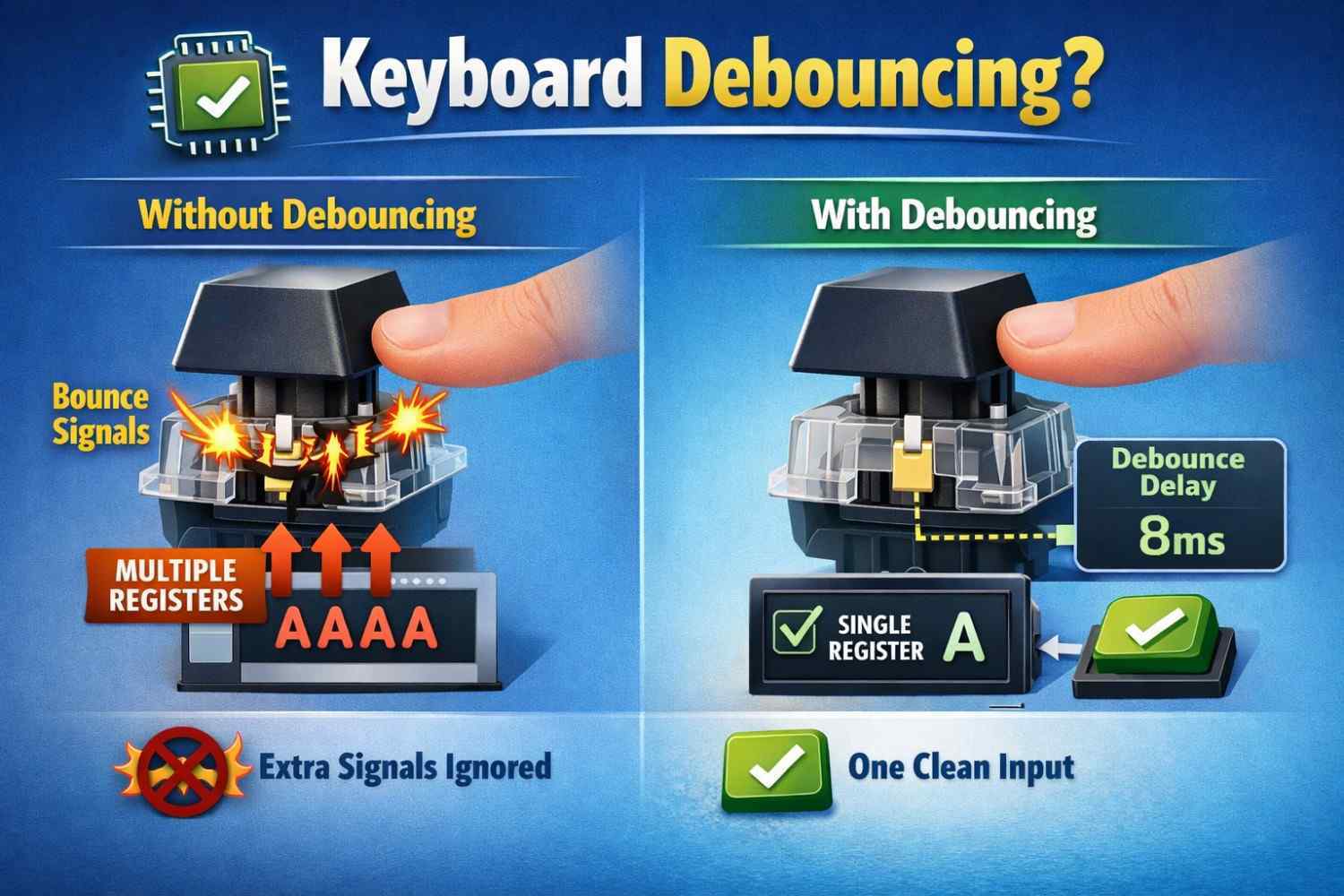
Keyboard debouncing is a process that filters unwanted repeated signals from a key switch, helping prevent double typing and key chatter. When a switch is pressed, its electrical contacts can briefly bounce and produce multiple signals instead of one. Debounce time determines how long the keyboard waits for the signal to stabilize before registering the key press.
Whether you use a mechanical keyboard for typing, programming, or gaming, understanding keyboard debounce time can help you diagnose double typing, key chatter, and unwanted repeated inputs. This guide explains how keyboard debouncing works, what causes switch bounce, and how debounce settings affect keyboard input.
Keyboard Debouncing Explained
Keyboard debouncing is the process of filtering out unwanted electrical signals that can occur when a keyboard switch is pressed or released. A physical switch does not always produce one clean signal; its contacts can briefly make and break contact several times before settling.
Without debouncing, a single key press could be detected as multiple inputs. This can cause problems such as double typing, repeated characters, or key chatter, especially when a mechanical keyboard switch becomes worn or unstable.
If you’re new to keyboards, learn the basics in our What Is a Keyboard? guide.
What Is Keyboard Debouncing?
Keyboard debouncing is a hardware or software method used to make sure a keyboard registers one intentional key press as one input. When a switch changes state, the keyboard controller waits for the signal to stabilize before accepting it as a valid key press.
This filtering process is particularly important for mechanical keyboards, where physical switch contacts can produce rapid signal fluctuations known as switch bounce. The keyboard’s firmware or controller can use a short debounce time to ignore these unwanted signals.
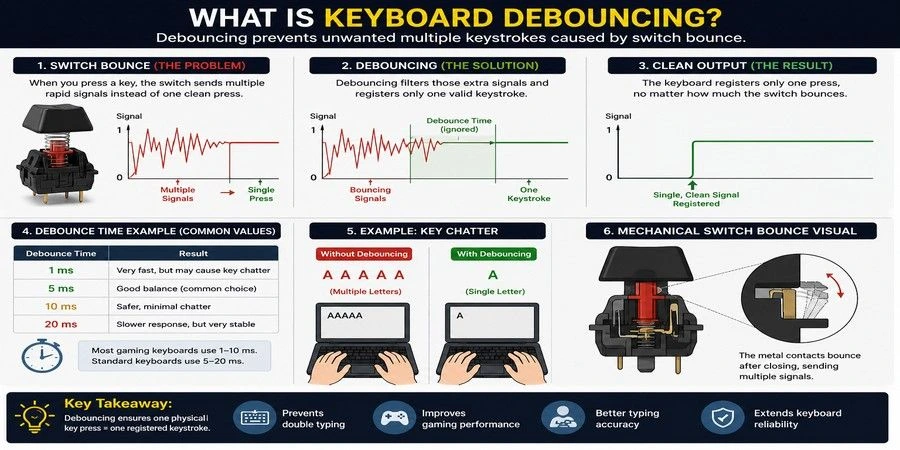
For example, if you press the letter A once but the switch produces several rapid electrical transitions, debouncing prevents the keyboard from interpreting them as AAAA or multiple separate key presses.
What Is Switch Bouncing in Mechanical Keyboards?
Switch bouncing occurs when the electrical contacts inside a mechanical keyboard switch rapidly open and close for a short period when the key is pressed or released. Although the key appears to have been pressed only once, the keyboard’s controller may detect several signal changes.
This is a normal characteristic of many physical switch designs rather than a sign that every keyboard is faulty. Keyboard debounce filters these rapid transitions so that only the intended key press is registered.
The amount of time used to filter the signal is called debounce time. A shorter debounce setting can allow an input to register sooner, while a longer setting provides more time for the switch signal to stabilize.
Explore keyboard switches explained to understand different switch types and how they affect debounce behavior.
Why Debouncing Is Necessary for Mechanical Keyboards
Mechanical switches naturally produce bounce due to their physical design, materials, and wear over time. This can lead to problems like double typing, missed keystrokes, and inconsistent input.
Debounce algorithms stabilize the signal, ensuring accurate key press registration and smooth performance for both typing and gaming.
How Keyboard Debouncing Works
When you press a keyboard key, the switch sends an electrical signal to the keyboard controller. Instead of immediately treating every signal change as a separate key press, the controller can use a debounce process to determine whether the signal represents a genuine, stable input.
The basic process is:
- The key is pressed.
- The switch contacts change state and may bounce briefly.
- The keyboard controller detects the signal changes.
- The debounce mechanism filters rapid unwanted transitions.
- The stable key press is registered by the keyboard.
This process happens extremely quickly and is normally invisible to the user. The goal is to balance reliable key registration with responsive input.
Learn how a keyboard works to understand how key presses are detected and processed.
What Is Debounce Time?
Debounce time is the short period a keyboard uses to allow a switch signal to stabilize before registering the input. It is usually measured in milliseconds (ms).
For example, a mechanical keyboard configured with a 5 ms debounce time may wait briefly after detecting a switch transition before accepting the key press. The exact implementation and available settings vary between keyboard manufacturers, switch types, firmware, and controllers.
A very short debounce time can make input registration feel more responsive, but if the switch has not stabilized, it may increase the chance of unintended repeated inputs. A longer debounce time can provide more filtering but may add a small amount of registration delay.
How Debounce Time Affects Key Press Registration
Debounce time can affect how quickly a keyboard accepts a key press after detecting a switch transition. The relationship is especially relevant when adjusting settings on gaming or mechanical keyboards that allow users to change debounce behavior.
In general:
- Lower debounce time: potentially faster registration, but less filtering of switch bounce.
- Higher debounce time: more filtering, but potentially more delay before registration.
- Appropriate debounce time: balances reliable input with responsive key registration.
The ideal setting depends on the keyboard’s switch characteristics and firmware implementation. A lower number is not automatically better if it causes key chatter or double typing.
How Keyboard Manufacturers Handle Switch Bounce
Keyboard manufacturers reduce switch bounce using a combination of hardware circuits and firmware debounce algorithms. Most modern mechanical keyboards apply a 5–10 ms debounce time to filter unwanted signals, ensuring accurate key registration, preventing key chatter, and delivering reliable typing and gaming performance.
Manufacturer Note: Most mechanical keyboard manufacturers set a default debounce time between 5 ms and 10 ms. This range provides a balance between fast key registration and reliable performance, reducing the risk of key chatter while maintaining responsiveness.
Keyboard Debounce vs. Keyboard Latency
Keyboard debounce filters switch bounce so one key press is registered correctly. Keyboard latency is the total delay between pressing a key and the input reaching the computer. Debounce time is only one factor that can affect overall keyboard response time.
Do Mechanical Keyboard Switches Require Debouncing?
Yes. Mechanical switches can produce brief contact bounce when pressed or released. Keyboard firmware or the controller uses debouncing to filter these unwanted signals and prevent repeated key presses.
Typical Mechanical Keyboard Debounce Time
Mechanical keyboard debounce time is measured in milliseconds (ms). A shorter setting can reduce filtering delay, while a longer setting can provide more protection against key chatter. The ideal setting depends on the switch, keyboard firmware, and controller.
Mechanical vs. Membrane Keyboard Debouncing
Mechanical keyboards use individual physical switches that can produce contact bounce. Membrane keyboards use conductive membrane layers and handle input differently. Both can process key signals, but adjustable debounce settings are more commonly found on mechanical and gaming keyboards.
Keyboard Debounce Software and Settings
Some gaming and mechanical keyboards let users change keyboard debounce settings through firmware or configuration software. Lower settings may improve responsiveness, while higher settings can help prevent unintended repeated inputs.
What Causes Double Typing and Key Chatter?
Double typing and key chatter are common keyboard input issues caused by unstable signals from a key switch. These problems occur when a single key press is registered multiple times due to switch bounce, low debounce settings, or worn-out mechanical components. They directly affect typing accuracy, input consistency, and overall user experience.
What Causes Double Typing on Keyboards
Double typing occurs when a keyboard registers multiple inputs from a single key press. Common causes include worn switches, dust buildup, switch bounce, or incorrect debounce settings. Increasing the debounce time or replacing a faulty switch can often resolve the issue and restore accurate key registration
How Debouncing Prevents Key Chatter
Keyboard debouncing prevents key chatter by filtering out unwanted electrical signals caused by switch bounce. It ensures each key press is registered only once, eliminating repeated keystrokes, improving typing accuracy, and providing reliable input for both everyday use and gaming.
How to Fix Keyboard Double Typing
The goal of fixing double typing is to reduce or eliminate switch bounce, which causes multiple signals from a single key press. Since key chatter can result from different factors like mechanical wear, electrical signal instability, or debounce misconfiguration, multiple solutions are used depending on the keyboard condition and behavior.
Expert Tip: Before changing debounce settings, clean the keyboard and test the affected keys. Many double-typing issues are caused by dust, worn switches, or hardware faults rather than incorrect debounce values.
Verify that every key registers correctly using our Keyboard Checker tool.
Software Fixes (Debounce Settings)
Software debouncing fixes double typing by introducing a controlled debounce delay that filters repeated signals from a single key press. Modern keyboards use firmware-level debounce algorithms or operating system settings to manage key press registration without changing hardware.
A well-optimized debounce setting balances input latency, typing speed, and accuracy. However, setting the debounce time too high can slightly increase response delay, while too low can still allow key chatter.
Cleaning & Maintenance for Mechanical Keyboards
Dust, debris, and oxidation inside a mechanical keyboard switch can interfere with electrical contact, leading to inconsistent inputs and repeated keystrokes. Cleaning the switch using compressed air or proper maintenance tools can restore stable signal transmission.
This method is effective when double typing is caused by dirt or contamination, but it may not resolve issues related to worn-out switch contacts or internal damage.
Replacing a Faulty Switch
Replacing a faulty switch is the most reliable solution when switch bounce, hardware failure, or physical wear causes persistent double typing. This involves opening the keyboard and installing a new switch, often requiring soldering skills and technical knowledge.
Because of the risk of damaging the PCB (printed circuit board) or other components, this method is recommended for experienced users or technicians. For beginners, replacing the entire keyboard may be a safer option.
Test your keyboard switches to identify inconsistent or faulty key behavior.
Debounce Time for Gaming Keyboards
Debounce time plays a critical role in gaming keyboards by balancing input responsiveness and signal stability. In fast-paced gameplay, even small delays in key press registration can affect performance, but overly aggressive settings can introduce key chatter or false inputs. The goal is to achieve low latency without compromising accuracy.
Does Debounce Time Matter for Gaming
Yes, debounce time matters in gaming because it controls how quickly a keyboard registers repeated inputs while filtering switch bounce. Proper key debouncing ensures that each keystroke is detected accurately, which is essential for fast, precise actions in competitive gameplay.
A well-tuned debounce setting improves input consistency, reduces errors, and enhances overall control during high-speed interactions.
Test your keyboard response time with our Keyboard Latency Test tool.
Why Gamers Lower Debounce Time
Gamers often lower debounce time to reduce input lag and improve response time. A shorter debounce delay allows faster key actuation, making rapid actions like spamming keys or executing combos feel more immediate.
However, if the debounce time is set too low, it may allow unintended signals to pass through, causing switch chatter, double inputs, or unstable keystrokes.
Standard Debounce Time for Gaming Keyboards
Most gaming keyboards use a default debounce time of 5–10 ms, offering a balance between fast response and reliable key registration. While lower settings may slightly reduce input delay, stable, chatter-free performance is generally more important than using the lowest possible debounce time.
Practical Example: Many gaming keyboards allow users to adjust debounce time through their companion software or firmware. Competitive players often reduce the setting for faster input, while most users achieve the best balance at the default value.
Measure your keyboard polling rate to see how often your keyboard reports input to your computer.
Debounce Time and Rapid Clicking Techniques
Debounce time directly affects rapid clicking methods by controlling how many inputs are registered within a short time frame. Lower debounce settings allow faster click registration, while higher values filter repeated signals to maintain input stability and prevent false inputs.
Drag Clicking and Debounce Time Effects
Drag clicking generates rapid vibrations on a button surface, producing multiple electrical signals in milliseconds. A lower debounce time allows more of these signals to pass through, increasing clicks per second (CPS).
However, higher debounce settings may block some inputs to prevent signal noise and unintended clicks, reducing overall CPS but improving accuracy.
Butterfly Clicking and Keyboard Debounce Considerations
Butterfly clicking uses alternating finger taps to achieve high-speed input. Lower debounce settings help register each individual press, improving input responsiveness and CPS.
If debounce time is too high, some rapid keystrokes may be ignored, while too low can introduce key chatter or inconsistent input performance.
What Is the Best Debounce Time for a Keyboard?
The best keyboard debounce time is the lowest setting that reliably prevents key chatter and double inputs. There is no single value that works perfectly for every switch or keyboard, so the ideal setting depends on the switch, firmware, and condition of the keyboard.
| Debounce Time | Suitable For | Main Benefit | Potential Drawback |
|---|---|---|---|
| 1–2 ms | Competitive gaming | Very low delay | May cause key chatter |
| 5 ms | Gaming & everyday use | Good balance of speed and stability | May require testing |
| 10 ms | General typing | Reliable key registration | Slightly more delay |
| 15–20 ms | Older or worn switches | Better protection against chatter | Less responsive |
Setting Debounce Too Low
A very low debounce setting may allow unstable switch signals to register as multiple key presses. This can cause key chatter, double typing, or inconsistent input, particularly with switches that have more electrical bounce.
Setting Debounce Too High
A higher debounce setting gives the keyboard more time to filter unwanted signals, but it can also introduce additional input delay. This may be more noticeable during fast typing or competitive gaming.
Finding the Sweet Spot
Start with your keyboard’s default debounce setting and lower it gradually if you want faster input. If repeated keystrokes or key chatter appear, increase the setting again. The best setting is the lowest value that maintains reliable key registration without double inputs.
Important: Don’t present 5–10 ms as a universal standard for all modern mechanical keyboards. Debounce behavior varies by switch, keyboard firmware, and manufacturer. This wording is safer and more technically accurate.
Can You Change Debounce Settings?
Some gaming and custom mechanical keyboards allow users to adjust debounce settings through companion software or custom firmware. This can help users balance input responsiveness with reliable key registration.
However, many standard office and basic mechanical keyboards use fixed debounce settings that cannot be changed by the user. Whether adjustment is available depends on the keyboard’s firmware, software, and manufacturer.
When You Should Adjust Debounce Time
Consider adjusting the setting if you notice key chatter, double typing, or inconsistent key registration. Gamers and keyboard enthusiasts may also fine-tune debounce settings when trying to reduce input delay.
If lowering the setting causes repeated keystrokes, increase it until the keyboard registers each press reliably.
Frequently Asked Questions
What is keyboard debouncing?
Keyboard debouncing is the process of filtering unwanted duplicate key presses caused by switch bounce in mechanical keyboards. When a key is pressed, the internal contacts can create multiple signals in a fraction of a second. Debouncing ensures that only one signal is registered per press, improving typing accuracy and preventing double typing issues.
What causes key chatter or double typing?
Key chatter or double typing occurs when a keyboard switch rapidly makes and breaks contact during a single key press. This behavior, known as switch bounce, can result from worn-out switches, dust buildup, or hardware defects. As a result, the keyboard may register multiple inputs instead of just one.
What is debounce time?
Debounce time is the delay, measured in milliseconds, that a keyboard uses to ignore repeated signals after a key press. This short delay allows the switch to stabilize before registering another input. Proper debounce timing helps prevent duplicate keystrokes while maintaining responsive performance.
Can you change keyboard debounce settings?
Yes, some keyboards allow users to adjust debounce settings through firmware or software. Custom mechanical keyboards using firmware like QMK or VIA provide advanced control over debounce time. Adjusting these settings can help optimize typing accuracy or gaming responsiveness depending on user preference.
Does debounce time matter for gaming?
Yes, debounce time can impact gaming performance, especially in fast-paced scenarios. Lower debounce time can reduce input delay and improve responsiveness. However, setting it too low may lead to unintended double inputs, so finding the right balance is important for both speed and accuracy.