What Is Keyboard Latency? Complete Beginner's Guide
Every time you press a key, your computer needs to register that action. But sometimes there is a small delay. That delay is called keyboard latency. It is one of the most important factors in how a keyboard feels and performs. If you type fast, play games, or just want a smooth experience, understanding keyboard latency is worth your time.
What Is Keyboard Latency?
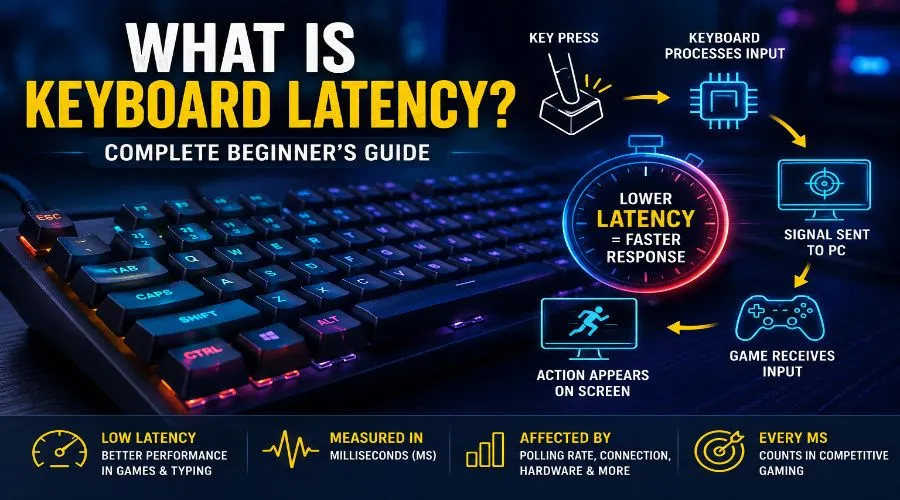
Keyboard latency is the time between when you press a key and when your computer actually responds to it. It is measured in milliseconds (ms). The lower the number, the faster the response.
Think of it like this. You shout a command and someone acts on it. If they act in 1 second, that is low latency. If they take 5 seconds, that is high latency. Keyboards work the same way.
Latency as low as 1–5ms is considered excellent. Anything above 20ms may start to feel slow in competitive settings. For everyday typing, you may not notice it much. But for competitive gaming, every millisecond counts.
Note: This guide is written based on hardware testing experience and technical research into keyboard firmware, switch mechanics, and input systems.
How Keyboard Latency Works
When you press a key, a signal travels through a chain of steps before anything shows up on screen. Each step adds a tiny bit of delay.
The Signal Path
- Step 1: You press the key. The switch inside the keyboard activates.
- Step 2: The keyboard’s keyboard firmware detects the press and processes it.
- Step 3: The signal is sent to the computer over USB or wireless.
- Step 4: The OS receives the signal and sends it to the active application.
- Step 5: The application responds and you see the result on screen.
Each step takes time. Even a few microseconds per step can add up. That total is your keyboard latency.
Keyboard Latency vs Input Lag
People often confuse keyboard latency with input lag. They are related but not the same thing.
Keyboard latency is the delay specific to the keyboard — from key press to signal sent. Input lag is broader. It includes all delays from your input device all the way to what you see on your monitor.
| Term | What It Covers | Who Causes It |
|---|---|---|
| Keyboard Latency | Key press to signal sent | Keyboard hardware/firmware |
| Input Lag | Full chain: key to screen | Keyboard + PC + display |
| Response Time | Signal received to action taken | OS, game, or application |
So keyboard latency is one part of the bigger input lag picture. Fixing only keyboard latency will not eliminate all delays if your monitor or PC is slow.
Keyboard Latency vs Polling Rate
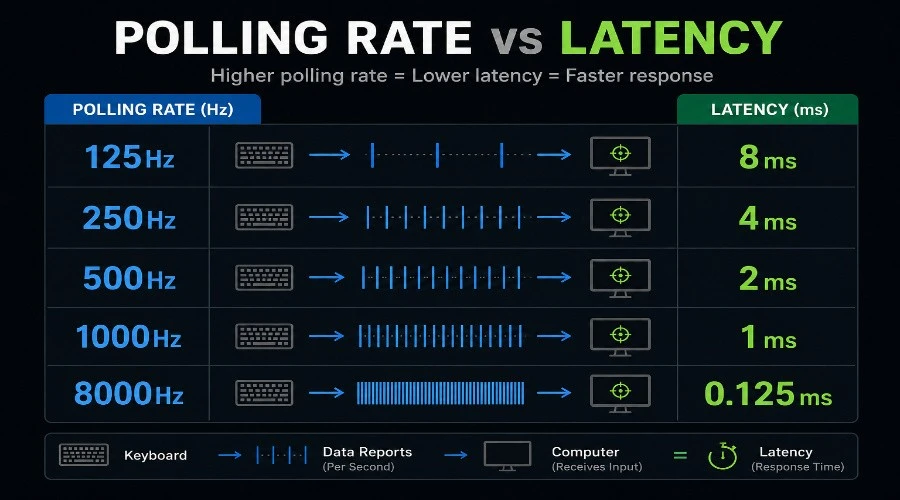
Polling rate is how often your keyboard reports its status to the computer. It is measured in Hz. A 1000Hz polling rate means the keyboard checks in 1000 times per second — once every 1ms.
Higher polling rates mean faster updates and lower keyboard latency. Most gaming keyboards now offer 1000Hz or even 8000Hz polling. Standard office keyboards usually run at 125Hz, which means a potential 8ms delay from polling alone.
So keyboard latency is one part of the bigger input lag picture. Fixing only keyboard latency will not eliminate all delays if your monitor or PC is slow.
Keyboard Latency vs Polling Rate
Polling rate is how often your keyboard reports its status to the computer. It is measured in Hz. A 1000Hz polling rate means the keyboard checks in 1000 times per second — once every 1ms.
Higher polling rates mean faster updates and lower keyboard latency. Most gaming keyboards now offer 1000Hz or even 8000Hz polling. Standard office keyboards usually run at 125Hz, which means a potential 8ms delay from polling alone.
If you want to run a keyboard polling rate test on your own keyboard, Our free browser tool can measure this in seconds.
Common Polling Rates
| Polling Rate | Report Interval | Best For |
|---|---|---|
| 125 Hz | 8ms | Office/casual use |
| 500 Hz | 2ms | General gaming |
| 1000 Hz | 1ms | Competitive gaming |
| 8000 Hz | 0.125ms | Pro/esports gaming |
Keyboard Latency vs Scan Rate
Scan rate is how fast the keyboard scans its own key matrix to detect a press. This is an internal process — it happens before any signal leaves the keyboard.
A higher scan rate means the keyboard detects your key press faster. A low scan rate adds delay even before the signal reaches the PC. Most quality gaming keyboards scan at 1000Hz or faster internally.
The difference: scan rate is internal detection speed. Polling rate is how often it reports to the computer. Both affect your total keyboard latency.
What Causes High Keyboard Latency?
Several things can add unwanted delay to your keyboard. Here are the most common causes:
1. Low Polling Rate
A keyboard set to 125Hz can add up to 8ms of delay just from USB polling. This is one of the easiest problems to fix.
2. Switch Debounce Settings
Debounce time is a small delay built into the keyboard’s firmware. It prevents multiple signals from one key press (called bouncing). Most keyboards debounce for 5–10ms. Some budget keyboards use 20ms or more, which adds noticeable lag.
To learn more about this, see our guide: What Is Keyboard Debouncing?
3. Wireless Connection Type
Wireless keyboard latency depends on the connection type. Bluetooth keyboard connections typically add 10–30ms of delay. 2.4GHz wireless dongles are much faster — often under 1ms, making them competitive with wired keyboards.
4. Firmware and Software
RGB lighting effects, macro processing, and background software can slow down keyboard firmware response times. On low-end keyboards, this delay can reach 5–15ms.
5. Cable Quality (Wired Keyboards)
A damaged or low-quality USB cable can cause unstable signal transmission. This adds random delays that are hard to diagnose.
Why Keyboard Latency Matters for Gaming
In competitive gaming, speed is everything. Games like CS2, Valorant, and Apex Legends run at very high frames per second. A single frame at 240fps lasts about 4ms. If your keyboard adds 10ms of delay, you are already losing more than 2 frames on every key press.
This affects your ability to react, strafe, and execute time-sensitive actions. Pro players obsess over keyboard responsiveness for exactly this reason.
What Gamers Need
- A low latency keyboard with 1ms or less total delay
- Polling rate of 1000Hz or higher
- Wired or 4GHz wireless connection
- Optimized keyboard firmware with minimal debounce
- Fast switches with low actuation force
A mechanical keyboard with fast switches (like optical or linear) is the most popular choice among serious gamers because of their direct actuation and consistent keystroke registration.
Want to know more? Read our deep-dive: Keyboard Switches Explained.
What Is Good Keyboard Latency?
Here is a quick breakdown of latency ranges and what they mean for different users:
| Latency Range | Performance Level | Best For |
|---|---|---|
| < 1ms | Excellent | Esports / Pro gaming |
| 1–5ms | Very Good | Competitive gaming |
| 5–15ms | Good | Casual gaming / fast typing |
| 15–30ms | Acceptable | Office work |
| > 30ms | High Latency | Noticeable delay for most users |
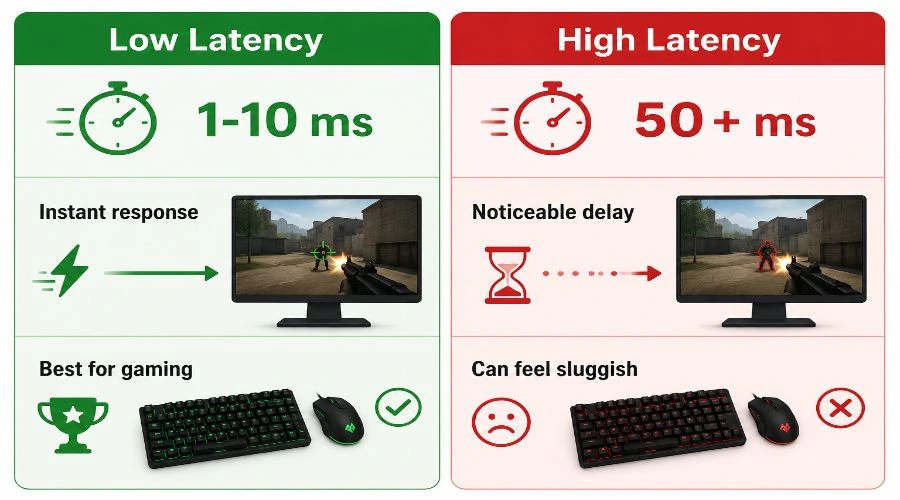
For most people, anything under 10ms feels instant. A high latency keyboard at 30ms+ will feel sluggish, especially when typing quickly or gaming.
How to Test Keyboard Latency
You can check your own keyboard with a few simple methods. Running a latency test takes less than five minutes.
Method 1: Browser-Based Tools
Websites like keyboard-test.online and similar tools can measure your keyboard latency and polling rate in real time. Just open the page and start pressing keys.
Use our recommended tool to run a keyboard latency test right now.
Method 2: High-Speed Camera
Record your screen and keyboard with a high-speed camera at 240fps or higher. Count the frames between key press and screen response. Each frame at 240fps = 4.16ms.
Method 3: Input Analysis Software
Software like HWINFO64 or custom latency analyzers can log your input response time with timestamps. These give more precise data than visual methods.
How to Reduce Keyboard Latency
The good news is that you can often lower your keyboard latency without buying a new keyboard. Here is what to do:
- Increase your polling rate. Check your keyboard software and set polling to 1000Hz if available.
- Update keyboard firmware. Manufacturers often release updates that optimize switch debounce and scanning speed.
- Disable unused software features. Turn off RGB effects, macros, and background apps you do not need.
- Use a USB hub-free connection. Plug directly into a motherboard port for stable signal transmission.
- Switch to wired or 2.4GHz. If you use a Bluetooth keyboard, try switching to 4GHz wireless or wired for lower latency.
- Replace the cable. A braided, short USB cable reduces electrical noise.
Wired vs Wireless Keyboard Latency
This is one of the most common questions in keyboard performance discussions. Let us break it down clearly.
Wired Keyboards
Wired keyboards send signals over USB. With a good cable and 1000Hz USB polling, total keyboard latency can be under 1ms. This is the fastest and most stable option.
2.4GHz Wireless
2.4GHz wireless keyboards use a dedicated USB dongle. The signal is fast and consistent. Most top-tier wireless gaming keyboards today (like Logitech G Pro X, Corsair K100 Air) match or come very close to wired speeds. Typical latency: 1–2ms.
Bluetooth Keyboards
Bluetooth keyboard connections are convenient but slower. They typically add 10–30ms of key press delay on top of normal latency. This is fine for typing and productivity but not recommended for fast-paced gaming.
| Connection Type | Typical Latency | Best Use Case |
|---|---|---|
| Wired USB | < 1ms | Competitive gaming, fast typing |
| 2.4GHz Wireless | 1–2ms | Gaming, everyday use |
| Bluetooth | 10–30ms | Office, casual typing, mobile |
If you are shopping for a gaming keyboard and want wireless, always go for 2.4GHz wireless over Bluetooth. The difference in keyboard responsiveness is very noticeable.
New to keyboards altogether? Start here: What Is a Keyboard? — a beginner-friendly introduction to how keyboards work.
FAQs
Does keyboard latency affect FPS in games?
Not directly. Keyboard latency affects how quickly your actions register, which can affect your reaction time and in-game performance. It does not change your FPS number, but it changes how responsive your game feels.
Is 1ms keyboard latency good?
Yes. 1ms is excellent. At that level, your keyboard is among the fastest available. Even at 5ms, most users will notice no difference from 1ms in everyday use.
Can I test keyboard latency for free?
Yes. Multiple free browser tools can run a latency test right in your browser. You can also use our recommended keyboard latency test tool for quick and accurate results.
Does a mechanical keyboard have lower latency?
A mechanical keyboard often has lower latency than membrane keyboards, especially when combined with optical switches. However, the polling rate, firmware, and connection type matter just as much as the switch type.
What is the fastest type of keyboard switch for low latency?
Optical switches are generally the fastest. They use light instead of physical contact to register a keypress, which nearly eliminates switch debounce delay. This results in very fast keystroke registration.
Final Thoughts
Keyboard latency is a small number with a big impact. Whether you are a competitive gamer chasing every millisecond or just someone who wants a snappy typing experience, lower latency always wins.
Focus on getting a keyboard with a high polling rate, updated keyboard firmware, and a fast connection. These three things alone will dramatically improve your keyboard performance.
Remember: a low latency keyboard does not have to be expensive. Many mid-range options deliver excellent input response times. Just know what to look for — and now you do.