
The best mechanical keyboard switches depend on how you use your keyboard. Linear switches offer a smooth keystroke, tactile switches provide a noticeable bump, clicky switches add audible feedback, and silent switches help reduce typing noise. Magnetic switches offer adjustable actuation on compatible gaming keyboards.
Disclosure: Some links in this article are affiliate links. If you purchase through them, we may earn a commission at no additional cost to you. Our recommendations should be based on product characteristics and suitability, not commission rates.
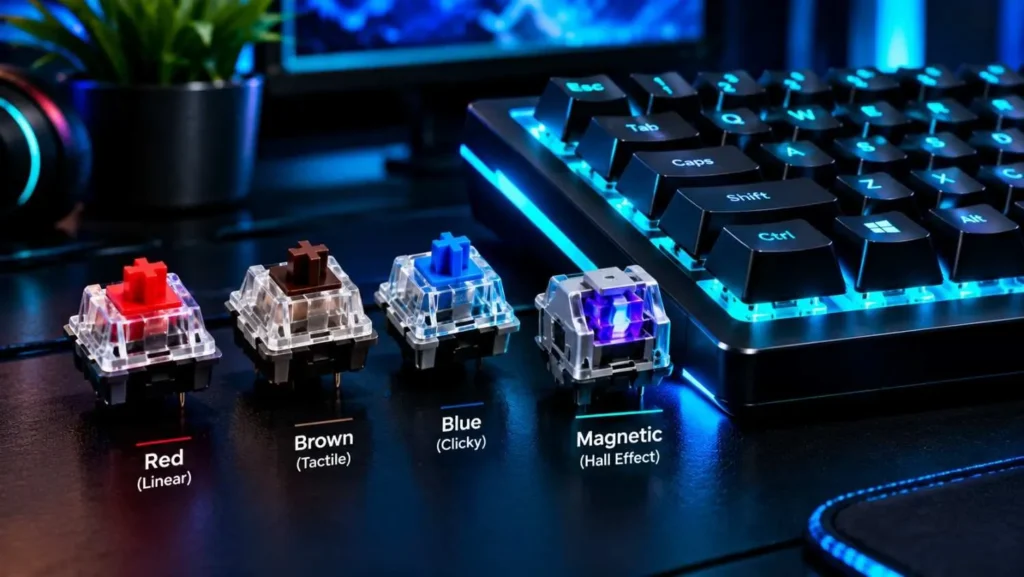
This guide compares popular mechanical keyboard switches by feel, sound, actuation force, travel distance, and value. Whether you need switches for competitive gaming, programming, long typing sessions, or a shared office, the right choice depends on your preferences and keyboard compatibility.
Not sure how different switch types work? Read our guide to keyboard switches explained.
Best Mechanical Keyboard Switches at a Glance
Here are our recommended options for different needs. These are starting points rather than universal rankings because switch feel, sound, and comfort are subjective.
- Best all-round linear: CHERRY MX RED (MX2A)
- Best budget linear: Gateron G Pro 3.0 Yellow
- Best for fast traditional gaming: CHERRY MX SPEED SILVER
- Best tactile option for everyday typing: CHERRY MX BROWN (MX2A)
- Best pronounced tactile feedback: Gazzew Boba U4T
- Best clicky option: Kailh BOX WHITE
- Best for quiet linear typing: CHERRY MX SILENT RED
- Best for quiet tactile typing: CHERRY MX2A HONEY
- Best for adjustable gaming actuation: Compatible Hall effect switches, such as Wooting Lekker
| Switch | Type | Main characteristic | Suitable for |
|---|---|---|---|
| CHERRY MX RED (MX2A) | Linear | Smooth, moderate-light force | Gaming and everyday use |
| Gateron G Pro 3.0 Yellow | Linear | Factory-lubed, budget-friendly | Gaming and typing |
| CHERRY MX SPEED SILVER | Linear | Short pre-travel | Fast-paced gaming |
| Gateron Oil King | Linear | Heavier, smooth feel | Users who prefer more resistance |
| CHERRY MX BROWN (MX2A) | Tactile | Subtle tactile bump | General typing |
| Gazzew Boba U4T | Tactile | Pronounced bump | Tactile enthusiasts |
| Zealios V2 | Tactile | Strong, refined feedback | Custom keyboard builds |
| CHERRY MX BLUE (MX2A) | Clicky | Distinct click and bump | Users who enjoy audible feedback |
| Kailh BOX WHITE V2 | Clicky | Crisp click | Typing enthusiasts |
| CHERRY MX SILENT RED | Silent linear | Damped key travel | Shared workspaces |
| CHERRY MX2A HONEY | Silent tactile | Tactile feedback with dampening | Quiet typing |
| Wooting Lekker | Magnetic | Adjustable actuation on supported boards | Competitive gaming |
Noise descriptions are approximate. Your keyboard case, plate, keycaps, desk surface, and typing technique also influence the final sound.
Best Linear Switches for Gaming and Everyday Use
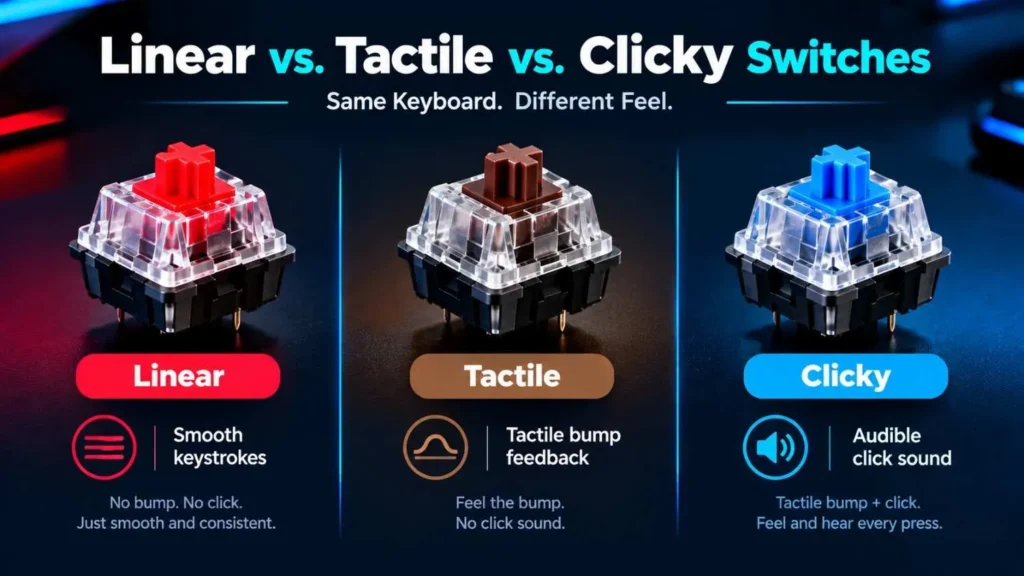
Linear switches move smoothly from top to bottom without the pronounced tactile bump found in tactile switches. They are popular for gaming and can also work well for typing if you prefer an uninterrupted keystroke.
CHERRY MX RED (MX2A)
CHERRY MX RED is a widely recognized linear switch for gaming and everyday use. The MX2A version has a nominal operating force of 45 cN, approximately 2.0 mm pre-travel, and 4.0 mm total travel.
Its relatively light operating force makes repeated key presses comfortable for many users. However, the lack of a tactile bump means you need to rely more on finger control to avoid accidental presses.
Best for: General gaming, everyday typing, and users who prefer a smooth keypress.
Gateron G Pro 3.0 Yellow
The Gateron G Pro 3.0 Yellow is a budget-friendly linear switch with factory-applied lubrication.
Its published specifications list a nominal operating force of 50 ± 15 gf, pre-travel of 2.0 ± 0.6 mm, and up to 4.0 mm total travel. The force tolerance matters: individual switches may not feel identical.
It is worth considering if you want a smooth linear switch without paying enthusiast-level prices. Check the precise model and specifications before comparing it with other Gateron Yellow variants.
Best for: Budget-conscious gamers, everyday typing, and first-time mechanical keyboard owners.
CHERRY MX SPEED SILVER
CHERRY MX SPEED SILVER is designed around shorter pre-travel than the standard MX RED. Its nominal actuation force is 45 cN, with approximately 1.2 mm pre-travel and 3.4 mm total travel.
The shorter distance can make inputs register earlier during a key press. However, it does not automatically make a player faster or reduce every source of keyboard latency.
The sensitive registration point can also make unintended inputs more likely if you rest your fingers on keys.
Best for: Competitive gaming and users who prefer short-travel traditional mechanical switches.
Gateron Oil King
Gateron Oil King is a premium linear switch known for its smooth feel and substantial resistance compared with lighter linears.
Its heavier feel may appeal to users who prefer more resistance while typing. However, smoothness, sound, and perceived weight are subjective, and the keyboard itself affects the final experience.
For a lower-cost alternative, consider the EPOMAKER Creamy Jade V2 Switch Set, a factory-lubed, five-pin linear switch. The EPOMAKER Cream Marble Switch Set is another option for users who prefer a bouncy linear feel.
Best for: Users who prefer a heavier linear switch or want to experiment with a premium-feeling custom build.
Best Tactile Switches for Typing
Tactile switches provide a noticeable bump during the key press without necessarily producing the distinct click of a clicky switch. Some typists enjoy this feedback because it helps them feel the switch’s actuation.
A tactile switch does not automatically improve typing accuracy or prevent fatigue. Comfort depends on the bump strength, operating force, typing technique, and personal preference.
CHERRY MX BROWN (MX2A) vs. Gateron G Pro 3.0 Brown
CHERRY MX BROWN (MX2A) is a general-purpose tactile switch with a nominal operating force of 55 cN and 4.0 mm total travel. It offers a relatively subtle bump rather than the pronounced feedback found in stronger tactile switches.
Gateron G Pro 3.0 Brown is an alternative worth comparing if you prefer a different tactile feel and factory-applied lubrication. The exact feel depends on the model version and individual switch.
Both can work for programming, everyday typing, and general productivity. Try them before choosing if possible.
Best for: Beginners, programmers, office workers, and users who want tactile feedback without a loud click.
Gazzew Boba U4T
Boba U4T is an enthusiast-oriented tactile switch known for its pronounced bump and deeper sound profile. Some versions are available with different spring weights, so check the exact specification before purchasing.
It can suit long-form writing if you enjoy a stronger tactile event, but the pronounced feedback will not appeal to everyone. Also, do not confuse Boba U4T with Boba U4 Silent, which is designed to reduce noise.
Best for: Tactile enthusiasts who want a noticeable bump and a distinctive sound.
Zealios V2
Zealios V2 is a premium tactile switch available in different force options. It is known for a pronounced tactile feel and is often considered for custom mechanical keyboard builds.
Its price can be higher than mainstream alternatives, and the stronger tactile event may not suit people who prefer a lighter or subtler press.
Best for: Enthusiasts who prioritize tactile feedback and want to customize their keyboard.
Glorious Panda
Glorious Panda is a tactile switch designed around a pronounced bump. It is one option for people who want a more noticeable tactile experience than a traditional Brown switch.
If you are exploring more affordable alternatives, the EPOMAKER Stomp Tactile Switch Set offers a medium-heavy feel, factory pre-lubing, and published initial force of 60 ± 5 gf.
Compare the initial force and bottom-out force separately, as they describe different parts of the key press.
Best for: Users who want pronounced tactile feedback for typing and everyday gaming.
Best Clicky Switches for Audible Feedback
Clicky switches combine tactile feedback with a distinct audible click. They can make typing feel more deliberate, but the noise can disturb people nearby.
CHERRY MX BLUE (MX2A)
CHERRY MX BLUE is a classic clicky switch with a tactile bump and a distinct sound. Its nominal operating force is approximately 60 cN.
It may appeal to users who enjoy audible feedback while typing. However, it is usually a poor choice for shared offices or quiet rooms where repeated clicks may become distracting.
Best for: Solo workspaces and typists who specifically enjoy clicky switches.
Kailh BOX WHITE V2
Kailh BOX WHITE V2 is a clicky switch known for its crisp feedback. Its box-style stem design is intended to help protect the switch mechanism against dust and improve stem stability.
The exact feel and noise level depend on the switch version and keyboard construction. It is worth considering if you want a lighter-feeling clicky alternative to heavier click mechanisms.
Best for: Users who want clear audible feedback without choosing the heaviest clicky switches.
Kailh BOX JADE and BOX NAVY
Kailh BOX JADE offers a more pronounced click than many lighter clicky options. BOX NAVY is a heavier alternative for users who prefer stronger resistance and feedback.
These switches can be enjoyable for deliberate typing, but their pronounced sound and feel may become tiring for some users during long sessions.
Best for: Clicky-switch enthusiasts who prioritize strong feedback over quiet operation.
Best Silent Keyboard Switches for Offices
Silent switches use design features such as built-in dampening to reduce noise during key presses and releases. They are useful for offices, shared workspaces, voice chat, and late-night typing.
They are quieter, not completely silent. Keycaps, stabilizers, the keyboard case, and typing technique still affect the final sound.
CHERRY MX SILENT RED
CHERRY MX SILENT RED is a silent linear switch with a nominal operating force of 45 cN, approximately 1.9 mm pre-travel, and 3.7 mm total travel.
Its dampening helps reduce the noise associated with the key’s downstroke and return. Some users may notice a softer or more cushioned bottom-out feel than with a standard linear switch.
Best for: Users who want a smooth linear switch in a shared workspace.
CHERRY MX2A HONEY
CHERRY MX2A HONEY is a silent tactile switch that combines a tactile bump with noise-reducing design features.
Its published specifications include 45 cN operating force, 1.9 mm pre-travel, 3.7 mm total travel, and a rated lifespan of over 50 million keystrokes.
This combination makes it worth considering if you want tactile feedback without the pronounced sound of a clicky switch.
Best for: Quiet offices and users who prefer tactile feedback with reduced noise.
Boba U4 Silent
Boba U4 Silent is designed to provide tactile feedback while reducing sound. It is a different choice from Boba U4T, which is known for its pronounced tactile feel and more audible sound profile.
The silent version may appeal to people who enjoy a tactile bump but need to type around other people. Check the exact version and spring weight before purchasing.
For budget-oriented alternatives, explore the EPOMAKER Sea Salt Silent V3 for a silent linear option or the EPOMAKER Lilac Silent Tactile Switch Set for dampened tactile feedback.
Best for: Quiet typing with a tactile feel.
Best Magnetic Switches for Competitive Gaming
Magnetic switches, often called Hall effect switches, use magnetic sensing to detect key position rather than relying on conventional metal-contact actuation. Supported keyboards can offer adjustable actuation points and features such as Rapid Trigger.
These switches are not interchangeable with ordinary mechanical switches simply because their stems look similar. Compatibility depends on the keyboard’s PCB, sensors, firmware, and supported switch models.
Wooting Lekker
Wooting Lekker switches are used in compatible Wooting Hall effect keyboards. Supported models offer adjustable actuation and Rapid Trigger features that can change how quickly keys activate and reset.
These capabilities can be useful in competitive games that require repeated movement inputs. They do not guarantee better performance, and the benefit depends on the game, settings, and player.
Best for: Competitive gamers who want adjustable actuation and Rapid Trigger.
Gateron Magnetic Jade
Gateron Magnetic Jade and Magnetic Jade Pro are magnetic switch options designed for compatible Hall effect keyboards. Other magnetic models, such as the Gateron KS-20 Magnetic Orange, may offer different characteristics.
Before buying, verify the keyboard manufacturer’s compatibility list. A magnetic switch intended for one Hall effect platform may not work in another.
For another option, consider the EPOMAKER Creamy Jade Magnetic Switch Set, but confirm compatibility with your exact keyboard before ordering.
Best for: Hall effect keyboard owners who want to explore alternative magnetic switches.
SteelSeries OmniPoint and Other Analog Technologies
SteelSeries OmniPoint is a magnetic switch technology used in compatible gaming keyboards. Wooting Lekker and Gateron’s magnetic range are other examples of technologies aimed at adjustable actuation and gaming customization.
Some keyboards use different technologies, including optical or other analog sensing systems. Similar features do not mean their switches are physically interchangeable.
Best for: Gamers comparing complete keyboards with adjustable actuation, rather than buying switches without checking platform compatibility.
Adjustable Actuation and Rapid Trigger
Adjustable actuation lets users choose how far a key must travel before registering a press on supported hardware. A shallow setting may register inputs earlier, while a deeper setting can help reduce unintended presses.
Rapid Trigger changes the reset behavior based on key movement, allowing repeated inputs without relying on the same fixed reset point used by conventional switches.
You can explore key-registration timing with our Keyboard Switch Actuation Tester. It measures browser keyboard events and timing; it does not physically measure switch depth or actuation force.
CHERRY MX vs. Gateron Switches
CHERRY MX and Gateron both offer a wide selection of mechanical switches. Neither brand is automatically better for every user: the specific model, version, price, and preferred feel matter more than the name alone.
Feel and Smoothness
Gateron models such as the G Pro series are often marketed with factory lubrication to provide a smooth feel out of the box. CHERRY’s MX2A range also includes design refinements intended to improve switch consistency and smoothness.
Scratchiness, spring ping, stem wobble, and sound can vary between models. A general brand comparison cannot replace testing the exact switch you plan to use.
Price and Value
Gateron offers many budget-friendly options, while CHERRY has mainstream and premium products. Compare the price per switch, quantity in the pack, shipping costs, and compatibility rather than judging value by brand alone.
Factory-lubed switches can also save time if you do not want to modify them yourself.
Durability and Lifespan
Lifespan ratings vary by model and product generation. CHERRY rates standard MX2A switches at up to 100 million keystrokes, while MX2A Silent Red and Honey are rated at over 50 million.
Gateron also rates its G Pro 3.0 series at up to 100 million cycles. These are manufacturer ratings, not guarantees of identical real-world lifespan. Actual results depend on use, manufacturing consistency, and the conditions in which the switches operate.
Switch Colors and Compatibility
Switch colors are not standardized across manufacturers. A Red switch from one brand may differ from a Red switch made by another brand, and Gateron Yellow does not have a direct equivalent based on color alone.
Many conventional mechanical switches use an MX-style cross stem, but that does not guarantee every switch will fit every keyboard. Check whether your keyboard supports three-pin or five-pin switches and whether it has hot-swap sockets.
Magnetic switches require a compatible Hall effect platform and should not be treated as ordinary MX-style replacements.
How to Choose the Best Keyboard Switches
Switches for Gaming
For traditional mechanical gaming keyboards, consider a linear switch such as CHERRY MX RED or SPEED SILVER. If you want adjustable actuation and Rapid Trigger, compare compatible Hall effect keyboards and their supported magnetic switches.
Shorter pre-travel is not a guarantee of faster overall system response, and overly sensitive settings may lead to accidental key presses.
Switches for Typing and Programming
Choose based on comfort and the type of feedback you prefer. CHERRY MX BROWN is a reasonable starting point for subtle tactile feedback, while Boba U4T and Zealios V2 suit users who prefer a more pronounced bump.
Linear switches are also suitable for typing if you prefer a smooth keypress without tactile feedback.
Switches for Shared Offices
Consider silent linear or silent tactile switches if keyboard noise is a concern. CHERRY MX SILENT RED, CHERRY MX2A HONEY, and Boba U4 Silent are options worth comparing.
A silent switch alone cannot eliminate all keyboard noise, so consider stabilizers, keycaps, and the keyboard’s overall construction as well.
Switches for Beginners and Budget Builds
Start with a mainstream switch that matches your preferred feel. Gateron G Pro 3.0 Yellow is one linear option, while CHERRY MX BROWN is a starting point for subtle tactile feedback.
A switch tester lets you compare several switches before buying a full set. The EPOMAKER switch collection includes options across linear, tactile, silent, and magnetic categories.
Before purchasing replacement switches, confirm the switch count, pin configuration, mounting style, and compatibility with your keyboard.
Frequently Asked Questions
Are expensive keyboard switches worth it?
Sometimes. Premium switches may offer a particular tactile feel, smoother travel, specialized construction, or other characteristics that enthusiasts value. However, many affordable switches perform well, and a higher price does not guarantee a better typing experience for you.
Are linear or tactile switches better for typing?
Neither is best for everyone. Linear switches offer uninterrupted movement, while tactile switches provide a noticeable bump. Comfort, typing technique, and personal preference matter more than choosing a category simply because it is popular.
Can you replace switches on any mechanical keyboard?
No. Hot-swappable keyboards let you remove and replace compatible switches without soldering. Keyboards with soldered switches require desoldering and soldering equipment. Always verify switch compatibility before buying replacements.
Do magnetic switches fit standard mechanical keyboards?
Generally, no. Magnetic switches need compatible magnetic sensors, a suitable PCB, and supported firmware. Physical resemblance to a traditional switch does not guarantee electrical or functional compatibility.
How do actuation force and travel distance affect typing?
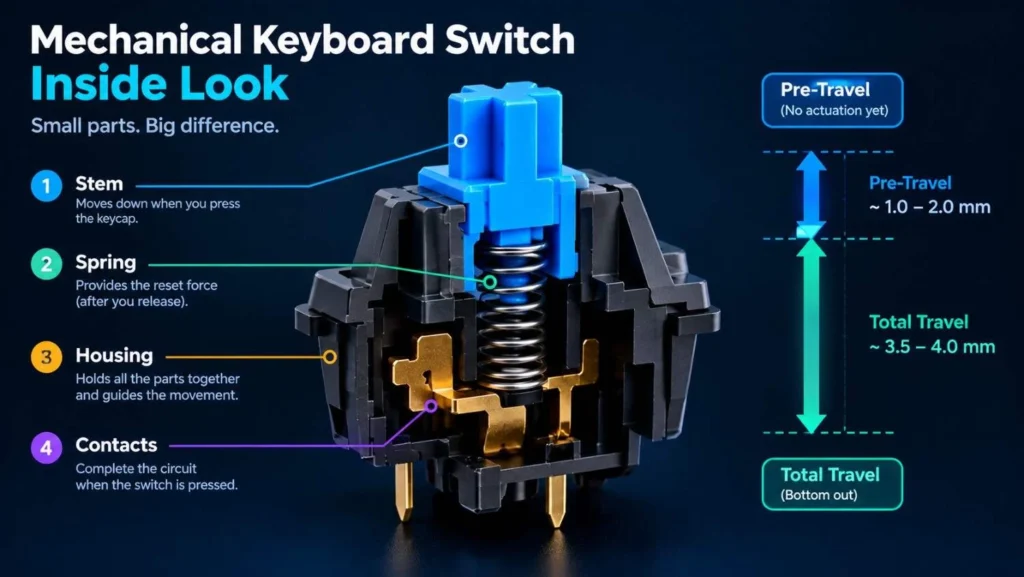
Actuation force describes how much force is needed to register a key press, while pre-travel describes how far the key moves before registration. Total travel is the full distance from the resting position to the bottom of the press.
Lighter force and shorter pre-travel may feel responsive, but they can also increase accidental presses for some users. Heavier switches may provide more resistance but can feel tiring during long sessions.
Are silent mechanical switches completely silent?
No. Silent switches use dampening to reduce noise, but keycaps, stabilizers, the keyboard case, and typing technique can still produce sound. They are quieter options rather than a guarantee of silent operation.
Do all switch brands use the same color coding?
No. Switch colors are not universal standards. Compare the switch type, operating force, pre-travel, total travel, and manufacturer specifications instead of relying on color alone.
Final Verdict
The best mechanical keyboard switch is the one that matches your typing style, noise requirements, budget, and keyboard compatibility.
Choose a linear switch for smooth movement, a tactile switch for a noticeable bump, a clicky switch for audible feedback, or a silent switch when reducing noise is important. For competitive gaming, compare compatible Hall effect keyboards if adjustable actuation and Rapid Trigger are priorities.
Whenever possible, try a switch tester before buying a full set. Testing the actual feel is often more useful than choosing a switch based on its reputation alone.