
Choosing the right keyboard size can make a big difference in comfort, desk space, productivity, and gaming. Keyboards come in several sizes, from full-size 100% models with a dedicated number pad to compact 60% layouts designed to save space.
In this guide, you’ll learn the standard keyboard sizes and dimensions in inches and centimeters, compare popular layouts such as 100%, 96%, TKL, 75%, 65%, and 60%, and find out which keyboard size is best for your needs.
What Is the Standard Keyboard Size?
A standard full-size keyboard is typically about 17–18 inches (43–46 cm) wide and 5–7 inches (13–18 cm) deep. The exact dimensions can vary depending on the manufacturer, keyboard design, and features such as media controls, bezels, or a wrist rest.
A traditional full-size keyboard usually has 104 keys in the ANSI layout or 105 keys in the ISO layout. It includes the main typing area, function keys, arrow keys, navigation keys, and a dedicated numeric keypad.
| Measurement | Typical Size |
|---|---|
| Width / Length | 17–18 in (43–46 cm) |
| Depth | 5–7 in (13–18 cm) |
| Height | About 1–1.6 in (2.5–4 cm) |
| Number of keys | 104–105 |
These measurements are typical for a 100% full-size keyboard. Smaller layouts, such as TKL, 75%, 65%, and 60%, are narrower because they remove or combine certain groups of keys.
If desk space is your main concern, keyboard width is usually the most important measurement to check. However, always check the manufacturer’s specifications for the exact dimensions of a particular keyboard, as sizes can vary between models.
What Are Keyboard Sizes and Dimensions?
Keyboard size refers to the physical dimensions and layout of a keyboard, including its width, depth, height, and number of keys. Common layouts include 100%, 96%, 80% (TKL), 75%, 65%, and 60%, with smaller layouts generally taking up less desk space.
How Layout Affects Size
The keyboard layout determines which keys are included. A 100% full-size keyboard has a dedicated number pad, while TKL removes the number pad and 75%, 65%, and 60% layouts become progressively more compact.
Why Width and Depth Matter
Width is important for desk space and mouse movement, while depth determines how much front-to-back space the keyboard uses. Height can also vary depending on the case, keycaps, switches, and typing angle.
Because dimensions vary between manufacturers, always check the actual width, depth, and height when choosing a keyboard for a specific workspace.
Keyboard Size Chart: Dimensions in Inches and CM
Keyboard dimensions vary by layout. A full-size keyboard takes up the most desk space because it includes a dedicated numeric keypad, while compact layouts remove or combine keys to create a smaller footprint.
| Keyboard Size | Typical Keys | Approx. Width | Approx. Depth | Best For |
|---|---|---|---|---|
| 100% Full-Size | 104–105 | 17–18 in (43–46 cm) | 5–7 in (13–18 cm) | Office work, productivity, gaming |
| 96% | 96–100 | 15–16 in (38–41 cm) | 5–7 in (13–18 cm) | Full functionality with less desk space |
| 80% TKL | 87–88 | 14–15 in (36–38 cm) | 5–6 in (13–15 cm) | Gaming and general use |
| 75% | 80–84 | 12–14 in (30–36 cm) | 4.5–6 in (11–15 cm) | Compact productivity and gaming |
| 65% | 66–68 | 11–12.5 in (28–32 cm) | 4–5.5 in (10–14 cm) | Compact setups and gaming |
| 60% | 61–62 | 10–11.5 in (25–29 cm) | 3.5–5 in (9–13 cm) | Minimal desk setups and gaming |
These are approximate size ranges rather than fixed standards. Actual keyboard dimensions vary between manufacturers and models.
The 100% full-size keyboard is generally the widest common keyboard layout, while a 60% keyboard can reduce the keyboard’s footprint substantially by removing the dedicated number pad, function row, navigation keys, and arrow-key cluster.
If you are choosing a keyboard based on desk space, compare the actual width and depth of the model, rather than relying only on its percentage size.
keyboard polling rate instantly:
Keyboard Polling Rate Test – Check Keyboard HzStandard Keyboard Sizes Explained
100% Keyboard (104-Key) – Full-Size Keyboard
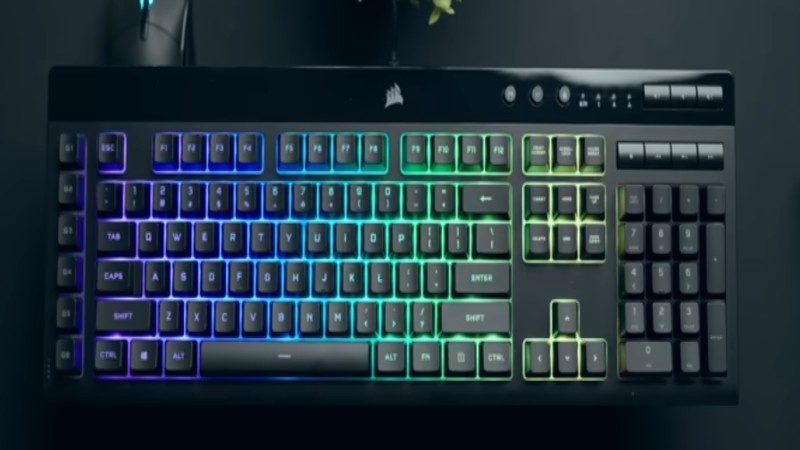
The 100% keyboard is the traditional full-size layout most people recognize. It includes all standard keys, including a dedicated number pad, making it one of the largest common keyboard layouts.
Typical dimensions: About 17–18 inches (43–46 cm) wide and 5–7 inches (13–18 cm) deep, although measurements vary by model.
Key Features:
- 104 keys in the standard ANSI layout
- Full F1–F12 function row
- Dedicated arrow and navigation keys
- Full numeric keypad on the right
- Largest footprint among common standard layouts
Best For:
- Office and productivity: Great for spreadsheets, accounting, and data entry.
- Traditional users: Ideal if you prefer having every key readily available.
- Gaming: Useful for games or setups that require a number pad, function keys, or macros.
96% Keyboard (100-Key) – Compact Full-Size Keyboard.
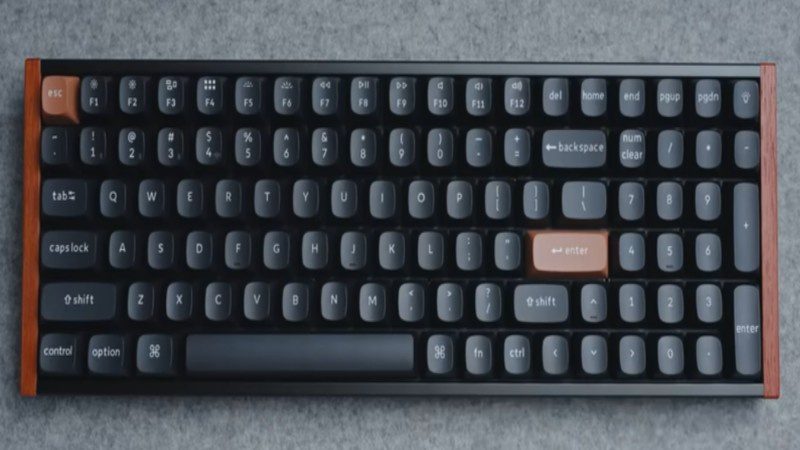
The 96% keyboard is a compact full-size layout that keeps most of the keys found on a traditional keyboard, including the number pad, function row, and arrow keys, while arranging them more tightly to save desk space.
Typical dimensions: About 15–16 inches (38–41 cm) wide and 5–7 inches (13–18 cm) deep, although exact measurements vary by model.
Key Features:
- Usually around 96–100 keys
- Dedicated numeric keypad
- Full function row
- Arrow and navigation keys
- Tighter layout with less unused space
Best For:
- Limited desk space: Provides most full-size functionality with a smaller footprint.
- Office and productivity: Keeps the number pad and essential keys for everyday work.
- Customization enthusiasts: A popular choice for users who want full functionality in a more compact design.
80% Keyboard (87-Key) – Tenkeyless (TKL) Keyboard
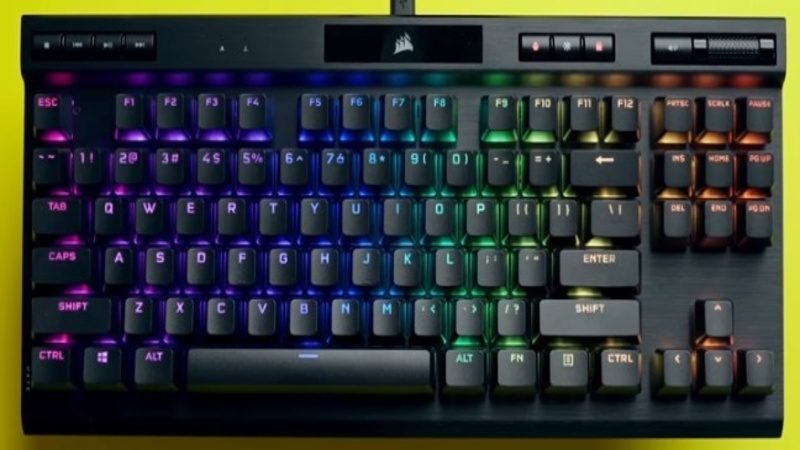
The 80% layout, commonly called Tenkeyless (TKL), removes the dedicated number pad from a full-size keyboard while keeping the main typing, function, arrow, and navigation keys. With about 87 keys, it offers a good balance between functionality and desk space.
Typical dimensions: About 14–15 inches (36–38 cm) wide and 5–6 inches (13–15 cm) deep, although exact measurements vary by model.
Key Features:
- Usually 87–88 keys
- Removes the dedicated numeric keypad
- Keeps the F1–F12 function row
- Includes arrow and navigation keys
- Provides more mouse space than a full-size keyboard
Best For:
- Gamers: Extra desk space allows more room for mouse movement.
- Office workers: Retains most essential keys for everyday work.
- Balanced users: A good choice if you want functionality without the larger footprint of a full-size keyboard.
Confused? The TKL keyboard layout guide will help you decide fast.
75% Keyboard (80–84-Key) – Compact Layout
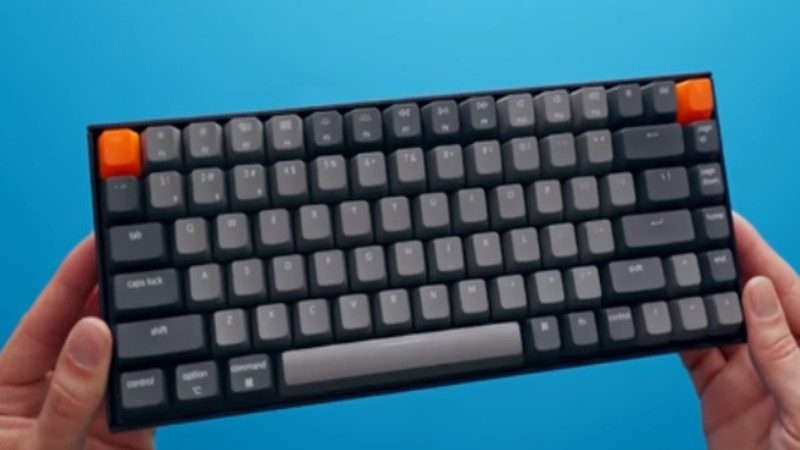
The 75% keyboard is a compact layout that keeps the function row, arrow keys, and most essential navigation keys while arranging them closer together. With around 80–84 keys, it provides many of the functions of a TKL keyboard in a smaller footprint.
Typical dimensions: About 12–14 inches (30–36 cm) wide and 4.5–6 inches (11–15 cm) deep, although exact dimensions vary by model.
Key Features:
- Usually around 80–84 keys
- Dedicated function row
- Includes arrow keys
- Compact navigation cluster
- Tightly arranged keys with minimal spacing
Best For:
- Compact setups: Saves desk space without removing the function row.
- Gamers: Provides more room for mouse movement.
- Daily users: A practical balance between functionality and compact size.
- Keyboard enthusiasts: Popular for customization, keycaps, and modern designs.
65% Keyboard (68-Key) – Compact Keyboard
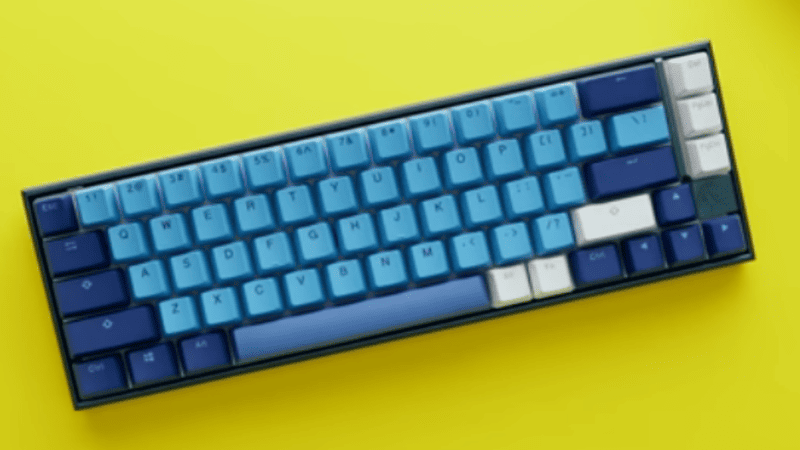
The 65% keyboard is a compact layout that sits between a 60% and TKL keyboard. It removes the function row and number pad but keeps arrow keys and several commonly used navigation keys, providing a practical balance between functionality and desk space.
Typical dimensions: About 11–12.5 inches (28–32 cm) wide and 4–5.5 inches (10–14 cm) deep, although exact dimensions vary by model.
Key Features:
- Usually around 66–68 keys
- Keeps dedicated arrow keys
- Includes commonly used navigation keys such as Delete
- Removes the dedicated function row and number pad
- Compact footprint with more room for mouse movement
Best For:
- Gamers: Provides extra mouse space while keeping essential keys.
- Minimalist setups: Offers a clean, compact desk footprint.
- Keyboard enthusiasts: Popular for customization and mechanical keyboard builds.
- Office users: Works well for everyday tasks when a dedicated number pad isn’t needed.
60% Keyboard (61-Key) – Mini Keyboard
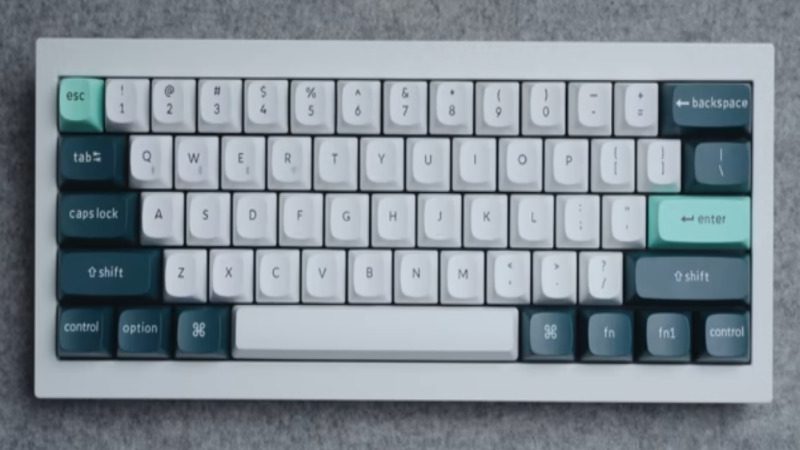
The 60% keyboard is a compact 61-key layout that keeps the main typing area and essential modifier keys while removing several dedicated key groups. It is one of the smallest mainstream keyboard layouts and takes up very little desk space.
Typical dimensions: About 10–11.5 inches (25–29 cm) wide and 3.5–5 inches (9–13 cm) deep, although exact dimensions vary by model.
Key Features:
- Usually 61–62 keys
- Keeps the main alphanumeric section
- Removes the dedicated function row, arrow keys, navigation cluster, and number pad
- Uses Fn shortcuts or secondary layers for missing functions
- Small and easy to transport
Best For:
- Minimalist setups: Excellent for clean, space-saving desks.
- Competitive gamers: Provides maximum room for mouse movement.
- Keyboard enthusiasts: Popular for custom mechanical keyboard builds.
- Touch typists: Works well for users comfortable with keyboard shortcuts.
Other Keyboard Sizes and Layout Variations
In addition to standard keyboard sizes, there are niche options like 40% keyboards and split keyboards. These layouts are less common, harder to find, and designed for specific user preferences.
While popular among enthusiasts, they can be less practical for everyday use, especially for gaming or office work. For most users, standard keyboard sizes remain the better choice for comfort and productivity.
40% Keyboard – Ultra-Compact Layout
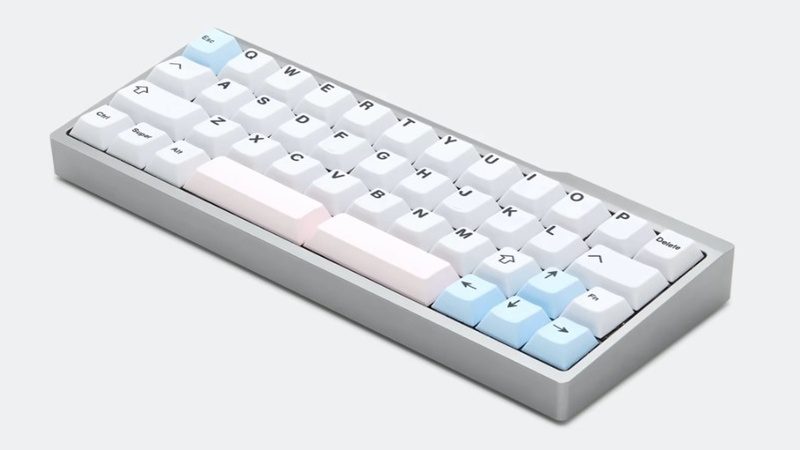
The 40% keyboard is an ultra-compact layout designed to minimize desk space. It removes more dedicated keys than a 60% keyboard and often relies heavily on layers and key combinations to access numbers, symbols, navigation, and other functions.
Typical dimensions: Often around 8–10 inches (20–25 cm) wide, although dimensions and key counts vary considerably between models.
Key Features:
- Extremely compact footprint
- May omit the dedicated number row and other key groups
- Relies heavily on layers and modifier combinations
- Lightweight and highly portable
- Requires more adjustment than larger layouts
Best For:
- Minimalists and travelers: Excellent for portability and small desk setups.
- Keyboard enthusiasts: Ideal for users who enjoy custom layouts and layer-based functionality.
- Small workspaces: Useful when minimizing keyboard footprint is a priority.
Split Keyboard – Ergonomic and Adjustable Keyboard
A split keyboard separates the keys into two sections, allowing each half to be positioned independently. This can provide a more natural hand, wrist, and arm position and gives users greater flexibility when setting up their workspace.
Typical dimensions: Split keyboards vary widely in size and design. Their total width depends on the distance between the two halves, while some models can be positioned closer together or farther apart.
Key Features:
- Two separate keyboard sections
- Adjustable spacing and positioning
- More flexible wrist and hand positioning
- Available in many different layouts and sizes
- Often customizable with mechanical switches and keycaps
Best For:
- Long typing sessions: Useful for programmers, writers, and office workers.
- Ergonomic setups: Suitable for users who prefer a more adjustable typing position.
- Custom workspaces: Ideal when you want control over the spacing and angle of each keyboard half.
Ortholinear Keyboard – Grid-Based Compact Keyboard
An ortholinear keyboard uses a grid-based layout where the keys are arranged in straight rows and columns instead of the staggered arrangement found on most traditional keyboards. This design can provide a consistent typing position, although it may require some adjustment.
Typical dimensions: There is no fixed size for ortholinear keyboards. They are available in different layouts and key counts, so their width and depth vary by model.
Key Features:
- Straight rows and columns
- Consistent key positioning
- Often available in compact layouts
- Can reduce unnecessary finger movement
- Requires an adjustment period for new users
Best For:
Compact setups: Many ortholinear designs have a relatively small footprint.
Keyboard enthusiasts: Popular for unique layouts and customization.
Writers and programmers: Suitable for users who enjoy consistent key positioning.
Ergonomic Keyboard – Comfort-Focused Keyboard Design
An ergonomic keyboard is designed to support a more natural position for your hands, wrists, and arms. Unlike traditional flat keyboards, ergonomic models may use split, curved, tented, or angled designs to provide a more comfortable typing experience.
Typical dimensions: Ergonomic keyboards have no standard size. Their width and depth vary considerably depending on the design, number of keys, and whether the keyboard is split or adjustable.
Key Features:
- Curved, split, angled, or tented designs
- Adjustable positioning on some models
- Focus on comfortable hand and wrist positioning
- Available in different sizes and layouts
Best For:
- Comfort-focused users: Suitable for people who prefer a more natural typing position.
- Office workers: Useful for long periods of typing and computer use.
- Custom setups: Good for users who want an adjustable or specialized keyboard design.
Alice Layout Keyboard – Ergonomic Split-Style Keyboard
An Alice keyboard uses a split and angled key layout that differs from the traditional straight QWERTY arrangement. The keys are positioned to better follow the natural angle of your hands while keeping a familiar typing layout. If you want to learn more about how this layout works, see our complete Alice keyboard guide.
Typical dimensions: Alice keyboards do not have a fixed size. Their width and depth vary depending on the model, key count, case design, and additional features.
Key Features:
- Split and angled key arrangement
- Curved or ergonomic key positioning
- Familiar QWERTY-based layout
- Designed for a more natural hand position
- Available in different sizes and configurations
Best For:
- Comfort-focused typists: Suitable for users who prefer an angled typing position.
- Keyboard enthusiasts: Popular for unique layouts and custom mechanical keyboards.
- Traditional keyboard users: A good option for those who want an ergonomic-style layout without completely changing the familiar QWERTY arrangement.
online typing speed test analytics tool:
Keyboard Counter – Check Your Key SpeedWhich Keyboard Size Should You Choose?
Choosing the right keyboard size depends on your typing needs, desk space, and the keys you use most often. There is no single best size for everyone.
Quick Decision Guide
- 100% / 96% → Best for full functionality, spreadsheets, accounting, and frequent number-pad use.
- TKL (80%) / 75% → Best balance between functionality, desk space, and usability.
- 65% / 60% → Best for compact desks, minimalist setups, and gaming.
- 40% → Best for experienced users who are comfortable with layers and keyboard shortcuts.
- Split / Ergonomic → Best for users who prioritize adjustable positioning and typing comfort.
Simple Rule
Need more dedicated keys → Choose a larger keyboard.
Want more desk space → Choose a smaller keyboard.
Best Keyboard Size by Use Case
| Use Case | Recommended Sizes | Why |
|---|---|---|
| Gaming | 60%, 65%, TKL | More room for mouse movement |
| Office Work | 100%, 96%, TKL | Better access to navigation and number keys |
| Travel | 60%, 65% | Compact and easier to carry |
| Programming | 65%, 75%, TKL | Good access to frequently used keys |
| Ergonomic Setup | Split, Alice, Ergonomic | More flexibility in hand and wrist positioning |
The best choice ultimately depends on which keys you use regularly. If you frequently work with numbers, a 100% or 96% keyboard may be worth the extra desk space. If you rarely use a number pad and want more room for your mouse, a 65%, 75%, or TKL keyboard may be a better fit.
The best keyboard layout for programming can make your coding faster and smoother.
Keyboard Size Comparison Table (Quick Guide)
Here’s a quick comparison of common keyboard sizes and layouts to help you choose the right option for your desk, work, or gaming setup.
| Keyboard Size / Layout | Keys | Typical Footprint | Main Feature | Best For |
|---|---|---|---|---|
| 100% Full-Size | 104–105 | Large | Full layout with number pad | Office work, data entry |
| 96% | 96–100 | Medium-Large | Compact full-size layout | Productivity, smaller desks |
| 80% TKL | 87–88 | Medium | No number pad, full function row | Gaming, office work |
| 75% | 80–84 | Medium-Compact | Condensed layout with function row | Gaming, daily use |
| 65% | 66–68 | Compact | Keeps arrow keys, removes function row | Gaming, compact setups |
| 60% | 61–62 | Very Compact | Minimal layout | Gaming, minimalists |
| 40% | Varies | Ultra-Compact | Heavy use of layers and shortcuts | Enthusiasts, small desks |
| Split | Varies | Varies | Two separate keyboard halves | Ergonomic setups |
| Ergonomic | Varies | Varies | Comfort-focused design | Long typing sessions |
| Ortholinear | Varies | Varies | Straight grid-style key arrangement | Enthusiasts, programmers |
| Alice | Varies | Varies | Angled, ergonomic-style layout | Comfort-focused users |
Keyboard dimensions and key counts can vary between manufacturers and models. Percentage sizes describe the layout rather than exact physical dimensions.
For exact measurements in inches and centimeters, refer to the individual keyboard-size sections above.
Pros and Cons of Different Keyboard Sizes
Each keyboard size has its own advantages and trade-offs. The best choice depends on how much desk space you have and which keys you use regularly.
| Keyboard Size | Pros | Cons |
|---|---|---|
| 100% & 96% | Full functionality, dedicated number pad, familiar layout | Larger footprint, less mouse space |
| TKL & 75% | Good balance of functionality and desk space | No dedicated number pad |
| 65% & 60% | Compact, portable, more room for mouse movement | Fewer dedicated keys, more shortcuts required |
| 40% & Niche Layouts | Extremely compact, customizable, space-efficient | Steeper learning curve, heavy reliance on layers |
If you frequently use a number pad, a 100% or 96% keyboard is usually the more practical choice. If desk space and mouse movement are more important, a 65%, 75%, or TKL keyboard can offer a better balance.
Frequently Asked Questions About Keyboard Sizes
What is the standard keyboard size in inches?
A standard full-size keyboard is typically around 17–18 inches (43–46 cm) wide and 5–7 inches (13–18 cm) deep. Exact dimensions vary by manufacturer and keyboard design.
What is the standard keyboard size in cm?
A typical full-size keyboard is approximately 43–46 cm wide and 13–18 cm deep. Some models may be slightly larger or smaller depending on their design and additional features.
How long is a standard keyboard?
A standard full-size 100% keyboard is generally 17–18 inches (43–46 cm) long. Keyboards with a compact layout, such as TKL, 75%, 65%, or 60%, are shorter.
How wide is a standard keyboard?
A typical full-size keyboard is approximately 17–18 inches (43–46 cm) wide. The exact width depends on the keyboard’s layout, case design, and manufacturer.
What are the dimensions of a standard computer keyboard?
A standard full-size computer keyboard is usually around 17–18 inches (43–46 cm) wide and 5–7 inches (13–18 cm) deep. Its height can vary depending on the case, switches, keycaps, and design.
What is the average size of a keyboard?
The average size depends on the keyboard layout. A full-size keyboard is commonly around 17–18 inches wide, while compact layouts such as 60% keyboards can be approximately 10–11.5 inches wide.
What keyboard size is best for gaming?
A 60%, 65%, 75%, or TKL keyboard is often preferred for gaming because the smaller footprint provides more room for mouse movement. However, the best size depends on whether you need a dedicated number pad or other keys.
What is the most common keyboard size?
The 100% full-size keyboard is one of the most common traditional keyboard layouts, especially for office and general-purpose computing. TKL and compact layouts are also widely used, particularly for gaming and smaller desk setups.