
TKL Keyboard Layout: Complete Guide (Tenkeyless Explained)
A TKL keyboard layout gives you the perfect mix of space-saving design and full functionality, removing the numpad while keeping everything you actually use—so you get a cleaner desk, better mouse movement, and a setup that just feels right.
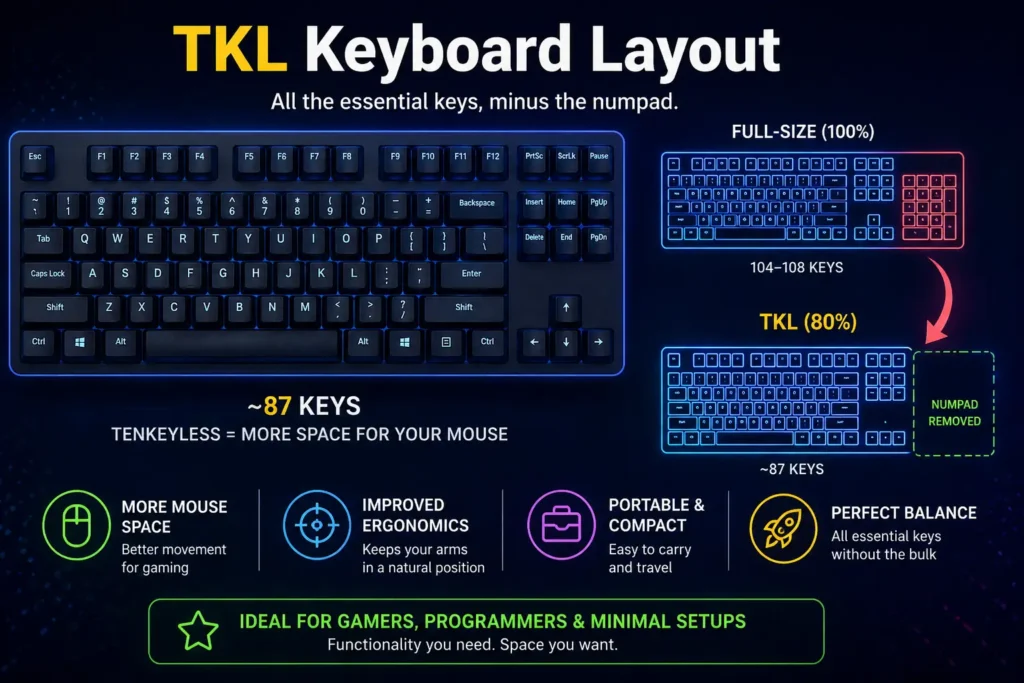
What Is a TKL Keyboard?
A TKL keyboard (Tenkeyless keyboard) is a standard keyboard layout that removes the numeric keypad or ten key number pad from a full size keyboard. The term tenkeyless does not literally mean exactly fewer keys, but refers to the removal of the number pad section. A typical TKL keyboard has 87 keys or 88 keys, which is roughly 80% keyboards compared to the 104 keys or 108 keys on full sized keyboards, depending on the country and ANSI or ISO standards.
- If you’re new, start with understanding what a keyboard is and how different designs work.
- For a broader view, check out Keyboard Sizes Explained to see where TKL fits.
TKL Keyboard Layout Explained
Key Sections in a TKL Layout
From what I’ve seen using a TKL keyboard layout, the main key features of this layout still include the function row from F1–F12, which is still available, along with arrow keys and the navigation cluster that remain fully intact. This compact keyboard layout is especially appreciated by gamers because it brings the mouse closer to the typing area, helping in reducing unnecessary wrist strain and allowing more freedom of movement.
Missing Keys Compared to Full-Size Keyboards
It’s ideal for people who don’t regularly use a numpad, because removing the extra 17 keys makes the keyboard about 80% the size of a full size board. The no numpad design means the only missing part is the pad, which some users may replace with a standalone numpad if needed, making it a cleaner and more space-saving option.
Key Features of a TKL Keyboard
Compact Size and Space Saving
A TKL keyboard removes the numpad, making it smaller and freeing up desk space, which helps create a cleaner and more efficient workspace.
Standard Key Placement
Despite its smaller size, a TKL layout keeps all essential keys like the function row, arrow keys, and navigation cluster in their usual positions for easy use.
Portability and Desk Setup Benefits
Its compact design makes it easier to carry and ideal for flexible setups, while also allowing more room for mouse movement, improving comfort during long use.
Full-Size vs TKL Keyboard (Differences, Pros & Cons)
Choosing between keyboard sizes can be confusing. Here’s a quick comparison to help you understand how TKL stacks up against other layouts.
| Feature | Full-Size (100%) | TKL | 75% | 65% | 60% |
|---|---|---|---|---|---|
| Keys Count | 104–108 keys | ~87 keys | ~80–84 keys | ~66–68 keys | ~61 keys |
| Size | Largest | Medium | Compact | More compact | Ultra-compact |
| Numeric Keypad | Yes | No | No | No | No |
| Function Row (F1–F12) | Yes | Yes | Partial / Compact | No (via Fn) | No |
| Arrow Keys | Yes | Yes | Yes (tight layout) | Yes | No |
| Navigation Cluster | Full | Full | Limited / merged | Basic | No |
| Layout Style | Traditional | Standard | Non-traditional | Modified | Minimal |
| Extra Keys | All dedicated keys | Most essential keys | Extra via compact spacing | Fn-based functions | Fn-based only |
Quick Summary:
- Full-size is best for heavy number work.
- TKL is ideal for balance and gaming
- 75% is for compact layouts with function row and arrows
- 65% is for compact setups with essential keys and flexibility
60% is for minimalists and maximum portability
- There are also many types of keyboard depending on use and design.
Who Should Use a TKL Keyboard (Best Use Cases)
Gamers (FPS & MOBA Gaming)
For gamers, especially those into FPS and MOBA titles, a TKL keyboard is often seen as the best choice because it provides extra mouse space and better comfort, helping with faster and more controlled movements during game play.
Programmers, Developers & Enthusiasts (Programming)
Programmers, developers, and keyboard enthusiasts prefer TKL layouts because they balance compact design with essential keys, and many custom mechanical keyboards are built in this format due to its popularity and flexibility.
Office Users, Students & Travelers (Everyday Productivity)
Office users who mostly type and don’t rely on constant numeric input will find TKL practical, while students and travelers benefit from its compact size, making it easy to carry in a bag and ideal for flexible work setups.
- For coding, choosing the best keyboard layout for programming can improve workflow.
When to Choose TKL vs Full-Size
Choose a TKL keyboard if you rarely use the number pad, want a more compact desk setup, or prioritize mouse space for gaming, but go for a full-size keyboard if you frequently use the numeric keypad or work heavily with spreadsheets and data entry.
Switch Type (Mechanical, Membrane, Optical)
From my use, mechanical keyboards feel more ideal for gaming and typing, offering unique tactile, smooth, thocky, or clicky feedback with better durability and customization, and common switch types include linear for a quiet press like Akko V5 creamy yellow pro, tactile with a gentle bump and no click such as blue, or clicky with an audible sound like cyan, while membrane options are quieter and more affordable but often lack responsiveness and longevity.
Understanding keyboard switches explained can help you pick the right feel.
Build Quality and Materials
I usually check build quality and design first, where the case material can be plastic for a lightweight feel, aluminum for a premium and durable finish, or acrylic that is transparent and visually striking, and the keycap choice like ABS (smooth, may wear over time), PBT (textured, long-lasting), or PC (glossy) also matters, while layout and ergonomics such as low-profile, standard height, angled, and ergonomic designs improve optimal comfort and efficiency.
Wired vs Wireless
For connectivity, I’ve found wired setups give lower latency and are better for competitive gaming with no charging needed, while wireless options like 2.4GHz or BT offer a cleaner setup, more flexibility, and easier multitasking across devices, and tri-mode boards that support bluetooth give maximum versatility.H3: Extra Features (RGB, Hot-Swappable, etc.)
Extra Features (RGB, Hot-Swappable, etc.)
hot-swappable sockets with yes allows easily change switches without soldering for customization enthusiasts, while no means permanently mounted for users who won’t modify keyboard, and programmability like QMK or VIA gives open-source firmware, flexible key remapping, macro programming, while brand-specific software is more user-friendly but may lack advanced customization, and lighting like RGB backlighting is fully customizable with colors and effects, or single color backlight (white, red) or none for a minimalist, power-saving, affordable setup, plus additional features like dedicated media controls, knobs, buttons, volume, playback, software macros, and platform support for macOS, windows, linux compatibility.
How Many Keys Are on a TKL Keyboard?
A standard TKL (Tenkeyless) keyboard typically has 87 keys in the US ANSI layout. It includes the main alphanumeric keys, function row, arrow keys, and navigation keys, but removes the dedicated numeric keypad (numpad) found on a full-size keyboard.
The exact TKL key count can vary depending on the keyboard layout. An ANSI TKL keyboard generally has 87 keys, while an ISO TKL keyboard commonly has 88 keys because of differences in the Enter key and surrounding keys.
| TKL Keyboard Layout | Typical Number of Keys |
|---|---|
| ANSI TKL | 87 keys |
| ISO TKL | 88 keys |
The missing number pad is what makes a TKL keyboard shorter than a traditional full-size keyboard while keeping most of the keys needed for everyday typing, gaming, and productivity.
Frequently Asked Questions (FAQs)
What layout is TKL?
From my use, a TKL (Tenkeyless) layout is an 80% keyboard with a compact design that removes the numeric keypad (numpad) from the right side, while retaining the function row, arrow keys, and navigation cluster, and these keyboards typically feature 87–88 keys in ANSI or ISO, making them popular for gaming and small desks because they offer a familiar feel with less ergonomic strain and no wasted space compared to a full board.
Is TKL a 75% keyboard?
A TKL keyboard (tenkeyless) means it works without a numeric keypad, and it typically has 87 keys instead of 104 on a standard full-size layout, being approximately 80% in size, so full-sized keyboards in this format are often called 80% rather than 75%.
What does TKL stand for?
TKL stands for TenKeyLess, referring to a computer keyboard layout that lacks a numeric keypad (numpad) on the right side, often called 80% keyboards, designed to save desk space, improve ergonomics, and increase portability while retaining the main typing area and function keys.
Are 80% and TKL the same?
Yes, Tenkeyless (TKL) and 80% keyboard are simply the same idea—a full-size keyboard without a number pad, which retains the function row and navigation cluster with everything else, offering a familiar experience in a more manageable size.
Is TKL better for gaming?
In my experience, TKL (TenKeyLess) keyboards feel better for gaming than full-size ones because removing the number pad can provide more desk space for wide mouse movements, and also improve ergonomics by reducing the distance between the mouse and shoulder, which helps alleviate wrist strain during long sessions.
How many keys are on a TKL keyboard?
A standard TKL (Tenkeyless) keyboard has 87 keys in the US ANSI layout. It keeps the main typing area, function row, arrow keys, and navigation keys but removes the dedicated numeric keypad found on full-size keyboards.