
What Is a Top Mount Keyboard? Complete Guide to Keyboard Mounting Styles
If you’ve been exploring the world of mechanical keyboards or asking what is a keyboard, one term you’ll keep bumping into is top mount. It’s one of the most popular types of keyboard mounting styles in the enthusiast community — and for good reason.
A top mount keyboard gives you a firm, consistent typing feel with a clean sound profile. It’s the go-to choice for custom keyboard builders who want quality without jumping all the way to a gasket mount build.
In this guide, you’ll learn exactly what a top mount keyboard is, how it works, how it compares to other styles, and whether it’s the right pick for you.
What Is a Top Mount Keyboard?
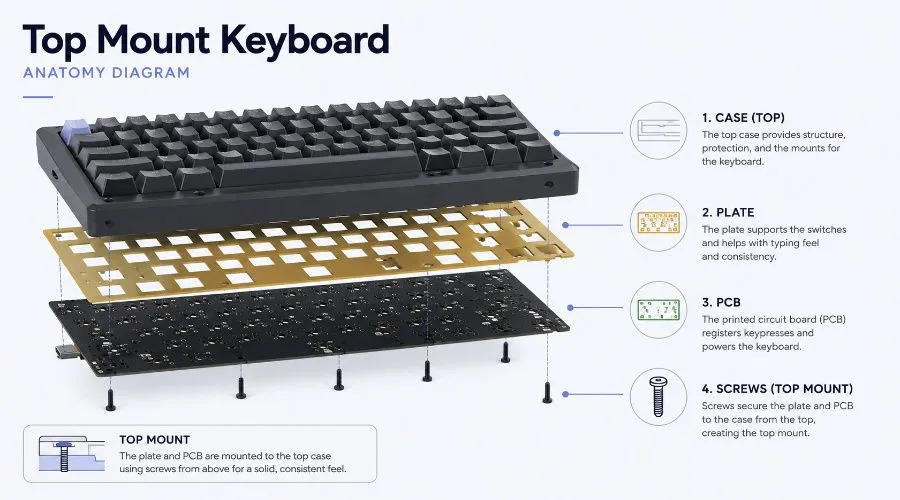
A top mount keyboard is a mechanical keyboard where the plate is screwed directly into the top housing (the upper half of the case). This keeps the plate elevated from the bottom shell, giving the keyboard a specific sound and feel.
The name is simple: the plate is mounted from the top. When you press a key, the force travels through the keycap → switch → plate → top case. This tight connection is what defines the top mount feel.
Key Features of Top Mount Keyboards
- Plate screws into the top frame — not the bottom housing or tray
- Firm and consistent typing feel across all keys
- Cleaner, brighter sound profile compared to tray mount
- Compatible with multiple plate materials for further customization
- Popular in mid-range and high-end custom keyboards
How Does a Top Mount Keyboard Work?
Inside a top mount keyboard, the internal structure follows a clear order: case → plate → PCB. The plate is attached to the top half of the case using screws, which suspends it slightly above the bottom shell.
When you type, the impact is transferred from the switch through the plate and directly into the top case. Because the plate is rigidly coupled to the top frame, every keystroke feels uniform — whether you press a corner key or a center key.
Internal Structure at a Glance
- Case — the outer shell; top and bottom halves
- Plate — metal or polycarbonate sheet holding the switches in place
- PCB — printed circuit board that registers key presses
- Screws — attach the plate to the top case, not the bottom
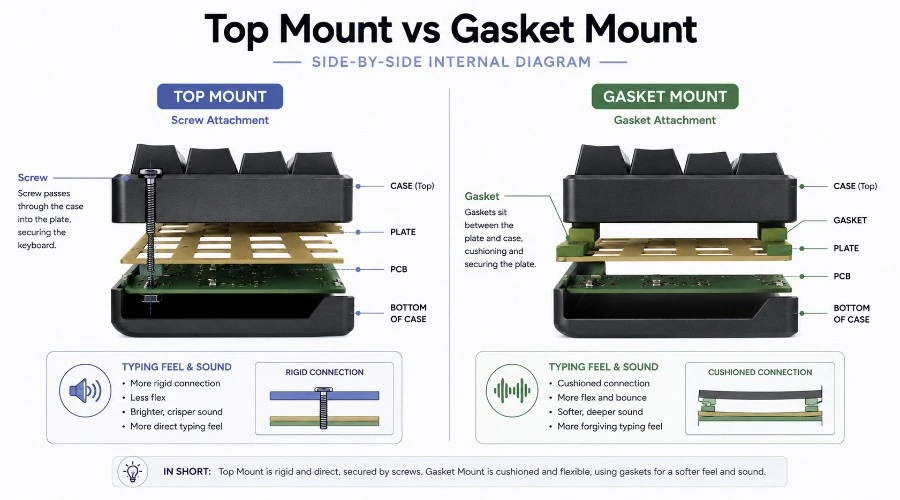
This is different from a tray mount, where screws go straight through the PCB into the bottom case. Understanding how a keyboard works internally helps you see why mounting style matters so much for sound and feel.
Top Mount Keyboard Typing Feel Explained
The typing feel of a top mount keyboard is best described as firm, stable, and consistent. Because the plate is locked to the top case, there is very little flex — every key bottoms out with the same force and the same feedback.
This makes top mount keyboards extremely popular with fast typists and programmers who need reliable keystroke registration. You won’t feel a soft bounce or spring-like give — you get a solid, planted feel on every press.
Is Top Mount Good for Gaming?
Yes — top mount keyboards are excellent for gaming. The firm, low-flex structure means actuation is predictable and fast. There’s no mushy give between keypresses, which matters in reaction-time-sensitive games.
- Consistent actuation across all keys
- No flex creep during rapid keypresses
- Works well with both linear and tactile switches
Is Top Mount Good for Typing?
Absolutely. Long typing sessions on a top mount feel natural for users who prefer direct feedback. Writers, coders, and data entry professionals often prefer it over gasket mount because it doesn’t feel “springy” or unpredictable.
- Firm bottom-out reduces finger fatigue for fast typists
- Consistent sound helps develop a comfortable typing rhythm
- Pairs well with tactile or clicky switches for maximum feedback
Top Mount Keyboard Sound Profile
Top mount keyboards produce a bright, resonant, and slightly clacky sound. Because the plate is rigidly attached to the case, vibration transfers directly into the housing — creating a more pronounced, lively acoustic response than softer mount styles.
The exact sound depends on your plate material, case material, and switch choice. An aluminum plate on an aluminum case gives a sharp, metallic clack. A polycarbonate case adds warmth and softens the tone.
Why Top Mount Sounds Different
- Plate rigidity transfers vibrations directly into the case
- Aluminum on aluminum = sharp, crisp clack
- Polycarbonate case = warmer, deeper tone
- Switch type matters — linears sound smooth, clickies sound sharp
- Foam mods can significantly dampen and improve the sound (more below)
How Plate Material Affects Your Top Mount Keyboard
One of the biggest advantages of top mount is compatibility with a wide range of plate materials. Each material changes the sound and feel in a meaningful way. This is a section most beginner guides skip — but it’s one of the most important factors in your build.
Aluminum Plate
Sound: Bright, crisp, clacky. Feel: Stiff, with zero flex. Best for those who want a firm, traditional mechanical keyboard experience. Most common in mid-range top mount boards.
Brass Plate
Sound: Deep, solid thud. Feel: Very heavy and rigid. Adds noticeable weight to the board. Popular in high-end custom builds for a premium, weighty typing feel.
Polycarbonate (PC) Plate
Sound: Warmer, rounder tone. Feel: Very slight flex compared to metal plates. A great middle ground between the rigidity of aluminum and the softness of gasket mount.
FR4 Plate
Sound: Slightly muted, poppy. Feel: Light flex even in a top mount build. Popular for bringing a bit of give to an otherwise stiff structure. Great for tactile switch users.
POM Plate
Sound: Soft, muted, “thocky.”Feel: The most flexible plate material available for top mount. Dramatically changes the feel — almost approaches gasket mount territory in softness.
Top Mount Acoustic Mods (Make It Sound Even Better)
One of the best things about top mount keyboards is how well they respond to acoustic modifications. Because the plate is rigid and fixed, foam and tape mods have a very clear, pronounced effect on the overall sound.
PE Foam Mod
Place a thin sheet of polyethylene foam between the PCB and plate. This adds a deep, poppy sound signature that many enthusiasts love. It’s cheap, reversible, and one of the most impactful mods for any top mount board.
Case Foam / Shelf Liner Mod
Add foam padding inside the bottom case to reduce hollow echoing. Even a simple craft store foam sheet can eliminate that empty, resonant sound common on unmodded top mount boards.
Tape Mod
Apply painter’s tape to the back of the PCB (the solder side). This adds a softer, more muted tone and reduces high-pitched pinging. Takes under 5 minutes and costs almost nothing.
O-Ring Mod
Place rubber o-rings under the screw heads where the plate meets the top case. This softens the connection point and introduces a small amount of give into an otherwise stiff structure.
Pros and Cons of Top Mount Keyboards
Pros
- Consistent typing feel — every key responds the same way, edge to center
- Clean, resonant sound profile out of the box
- Highly moddable — foam, tape, and o-ring mods work very well
- Wide plate material compatibility — aluminum, brass, FR4, POM, PC
- Durable structure — the rigid attachment means less flex = less wear over time
- Popular in enthusiast market — many high-quality kits use this style
Cons
- Less flex than gasket mount — not ideal if you prefer a soft, bouncy feel
- Can feel stiff for users coming from membrane or gasket boards
- Edge keys slightly harder than center (though less than tray mount)
- Build quality dependent — a poorly built top mount will feel worse than a good gasket
Top Mount vs Gasket Mount Keyboard
This is the most searched comparison in the keyboard world right now. Both top mount and gasket mount are premium mounting styles — but they deliver completely different experiences.
A gasket mount suspends the plate between two layers of soft gaskets, allowing it to flex and bounce slightly during typing. A top mount screws the plate firmly to the top case, giving a rigid, direct response.
| Feature | Top Mount | Gasket Mount |
|---|---|---|
| Typing Feel | Firm, direct, stable | Soft, bouncy, flexible |
| Sound Profile | Bright, resonant, clacky | Deep, muted, thocky |
| Flex | Minimal to none | Noticeable plate flex |
| Gaming | Excellent — predictable actuation | Good — slightly mushy for fast gaming |
| Moddability | Excellent — foam/tape work very well | Good — gaskets limit some mods |
| Price Range | $50–$300+ | $80–$500+ |
| Best For | Gamers, programmers, firm-feel lovers | Typists who want soft, cushioned feel |
| Beginner Friendly | Yes — more options at lower prices | Yes — but good ones cost more |
Which Is Better for Beginners?
Top mount wins for beginners on a budget. You can get a well-built top mount keyboard for under $80 that outperforms most gasket boards in the same price range. Gasket boards at lower prices often use poor-quality gaskets that don’t deliver the soft feel they promise.
Top Mount vs Tray Mount Keyboard
The tray mount is the most common mounting style in budget and entry-level boards. You’ll find it in most mass-market gaming keyboards. Understanding types of keyboard mountings starts here.
| Feature | Top Mount | Tray Mount |
|---|---|---|
| Plate Attachment | Screwed to top case | Screwed to bottom tray via PCB |
| Typing Consistency | Very consistent across all keys | Inconsistent — edge keys feel different |
| Sound | Cleaner, more resonant | Can sound hollow or rattly |
| Price | Mid to high range | Budget / entry level |
| Build Quality | Better overall structure | Simple, cost-effective |
If you’re currently using a budget tray mount board and looking to upgrade, top mount is the natural next step. The consistency improvement alone is immediately noticeable.
Top Mount vs Sandwich Mount
A sandwich mount (also called a screw-through mount) uses screws that pass all the way through the bottom housing, plate, and top housing — sandwiching the plate in the middle.
| Feature | Top Mount | Sandwich Mount |
|---|---|---|
| Plate Position | Attached to top case | Sandwiched between top and bottom case |
| Stiffness | Firm | Very stiff — stiffer than top mount |
| Sound | Resonant, bright | Can sound pingy or harsh |
| Premium Feel | Yes | Common in acrylic builds — less premium |
| Low Profile Option | No | Yes — top case can be removed |
Sandwich mount is popular in acrylic stacked keyboards and DIY builds. It’s stiffer than top mount and often sounds more pingy. For most users, top mount offers a better balance of feel and sound.
Top Mount vs Bottom Mount vs Plateless Mount
While these are less commonly discussed, understanding the full picture of parts of a keyboard mounting helps you make smarter buying decisions.
- Bottom Mount — plate is screwed to the bottom case instead of the top. More consistently stiff than top mount. Less common in the enthusiast market.
- Plateless Mount (PCB Mount) — removes the plate entirely. Switches mount directly to the PCB. Gives a unique, mushy feel. Requires a PCB-mount switch (5-pin) and a custom PCB.
- Integrated Plate — the plate and top case are one piece. Reduces cost, increases stiffness. Common in budget custom keyboards.
Best Top Mount Keyboards
Whether you’re just getting into keyboard size Explained or you’re a seasoned builder, there’s a top mount keyboard for your budget.
Budget Range (Under $100)
- Keychron Q Series — excellent build quality, hot-swap, gasket option but top mount variants available
- Tofu Keyboards — simple, popular top mount chassis used in many custom builds
- Glorious GMMK Pro — budget-accessible with top mount structure
Mid-Range ($100–$250)
- Mode Sonnet — well-regarded mid-range top mount with excellent sound and feel
- KBDfans Tofu 65 — popular community favorite, widely modded
- Zoom 65 — solid mid-range top mount with a clean typing profile
High-End / Custom ($250+)
- Space65 — premium top mount with a cult following in the enthusiast community
- Cannon keys Satisfaction75 — flagship top mount build, beloved for its sound
- Mode Envoy — high-end top mount with incredible customization depth
Who Should Buy a Top Mount Keyboard?
Top mount keyboards aren’t for everyone — but they’re the right choice for a wide range of users. Here’s a quick breakdown based on use case:
Gamers
If you play fast-paced competitive games and want consistent, predictable key actuation, top mount delivers. There’s no flex to throw off your timing. Pair it with a keyboard switch that suits your actuation preference.
Writers and Typists
Long typing sessions benefit from the firm, even feel of top mount. It rewards fast typists who like to hear and feel each keystroke clearly — especially with tactile or clicky switches.
Programmers
Programmers who spend hours on keyboard layout for programming tasks will appreciate the consistent feedback. The stable sound profile is also less fatiguing in quiet office environments after modding.
Keyboard Enthusiasts
Top mount is the classic starting point for the custom keyboard hobby. It’s compatible with every plate material, responds beautifully to mods, and gives you the foundation to explore the hobby without overspending.
Office Users
After a tape mod or case foam mod, a top mount keyboard can be surprisingly quiet and pleasant in a shared workspace. Not ideal unmoded, but great with silent switches and foam.
Is Top Mount Better Than Gasket Mount?
The honest answer: it depends on what you value. Neither is objectively better — they’re built for different preferences.
- Choose Top Mount if: you want firm, direct feedback; you game competitively; you’re on a budget; or you love modding
- Choose Gasket Mount if: you want a soft, bouncy typing feel; you prioritize deep, muted sound; or you type for very long sessions
If you’re coming from a TKL keyboard layout or a standard gaming board, top mount will feel like a significant upgrade. If you’ve already tried top mount and want something softer, gasket is the next step.
Are Top Mount Keyboards Worth It?
Yes — top mount keyboards offer genuine, long-term value. They’re built to last, respond well to customization, and consistently outperform budget tray mount and membrane keyboards in feel and sound quality.
- Long-term durability — rigid plate-to-case connection means less mechanical stress over time
- Resale value — popular custom top mount kits hold their value well in the enthusiast market
- Upgrade path — as you learn more about keyboard switches explained, plate materials, and mods, your top mount grows with your preferences
- Still dominant in the custom market — even as gasket gains popularity, top mount retains a huge share of mid-range custom builds
Common Questions About Top Mount Keyboards (FAQ)
What does top mount mean in a keyboard?
Top mount means the plate is secured to the top half of the case using screws, rather than the bottom case or a PCB tray. This determines how the keyboard feels and sounds when you type.
Are top mount keyboards stiff?
Compared to gasket mount, yes. Top mount keyboards have minimal flex, giving a firm, direct feel. Compared to tray mount, top mount is more consistent but similarly stiff. Plate material affects this — POM and PC plates introduce a little softness.
Do top mount keyboards sound better?
They generally sound better than tray mount boards right out of the box. With acoustic mods like PE foam, tape mod, and case foam, a top mount keyboard can sound excellent — bright, clean, and satisfying.
Is top mount better for gaming?
Yes. The rigid, consistent plate means every key actuates with the same force — no mushy flex. This makes top mount keyboards a strong choice for competitive gaming where reaction speed matters.
What is the difference between top mount and gasket mount?
Top mount screws the plate to the top case (firm, rigid). Gasket mount suspends the plate between soft gaskets (soft, bouncy). See the full comparison table above for a side-by-side breakdown.
Are top mount keyboards expensive?
Not necessarily. You can find good top mount keyboards from $60 upward. Premium custom builds can reach $300–$500+. The middle ground ($100–$200) offers excellent quality for most users.
Does the keyboard layout affect mounting style?
No — mounting style is independent of keyboard layout. Whether you prefer a TKL vs 75% keyboard layout, ANSI vs ISO, or a US keyboard layout, you can find top mount options in all sizes.
Final Verdict: Is a Top Mount Keyboard Right for You?
Top mount keyboards earn their popularity the right way — with consistent performance, great moddability, and a satisfying, firm typing feel. They’re not the “softest” option, and they’re not the cheapest. But they sit in a sweet spot that works for gamers, typists, programmers, and enthusiasts alike.
If you’re exploring keyboard sizes explained, looking at north facing vs south facing switches, or just trying to understand what is a keyboard layout for the first time — top mount is one of the best starting points in the custom keyboard world. It’s approachable, widely available, and deeply satisfying to type on.
Start with a good top mount. Mod it. Love it. Then decide what you want next.